How I Use Grok Bot to Automate PAYBACK Coupons and Save Money
How I use Grok Bot for PAYBACK coupons, unit-price comparisons and gift-card rewards, with practical setup instructions and checks before buying.
In this story
I like saving money. I am considerably less enthusiastic about spending an evening activating coupons to save it….
Rossmann, DM, Lidl, PAYBACK, Edeka, Kaufland…and more, all of them have Apps and coupons, none of them have an “activate all” button. Super annoying.
Germany has enough loyalty programs, point multipliers, retailer apps and paper coupons to turn buying dishwasher tabs into an administrative job. I already have a full-time job, a partner and a newborn at home. Comparing three slightly different ways to buy diapers is not how I want to spend the time left over.
So I gave Grok Bot the repetitive work. My “Shopping Bot · Deals & Coupons” is a named Bot in Grok Bot, not a separate shopping service. It checks the accounts I use, activates permitted offers and compares purchases.
The useful results have been ordinary: fewer forgotten coupons (it activates all of them and tells me what I might need or good offers I might be interested in based on what I told it), a better understanding of unit prices, and a €150 Zalando gift-card order whose confirmation listed 1,500 PAYBACK points + another 20% off. There have also been mistakes, including a recommendation that made a product more expensive in pursuit of points. That one defeated the entire purpose. 🥲
This guide explains the routine, the account boundaries and the checks behind those examples.
What the assistant does, and what stays with me
I use Grok Bot for account browsing, recurring coupon tasks, and when needed, reading an order confirmation in Mozilla Thunderbird on my Windows PC.
I like Thunderbird, because it has a CLI and an MCP so an agent can easily interact with it, I can add iCloud and Gmail without having to give my Agent access to either of the credentials here. Thunderbird rund inside my “Agent OS” a Windows 11 VM running Codex and Grok Bot 24/7 with full computer use capabilities. I suppose you could use Ubuntu or CachyOS for this as well, but the native desktop app support for these tools is not as good. Mac OS is a first-class citizen here, but I am not gonna buy a Mac to run 24/7 when I can have free Windows 11 that works just as well.
Back to topic. Grok uses accounts I already have with PAYBACK, dm, Lidl, Edeka and Kaufland. Those are separate accounts and programs; connecting one does not connect the others.
For the product and downloads, start at the official Grok Bot page. New users can follow its sign-up and access route; the official getting-started guide explains installation and account linking. Check the current plan requirements before subscribing. Include the assistant’s subscription and usage costs when deciding whether the shopping savings justify it. I am on Grok Premium for 35€ a month.
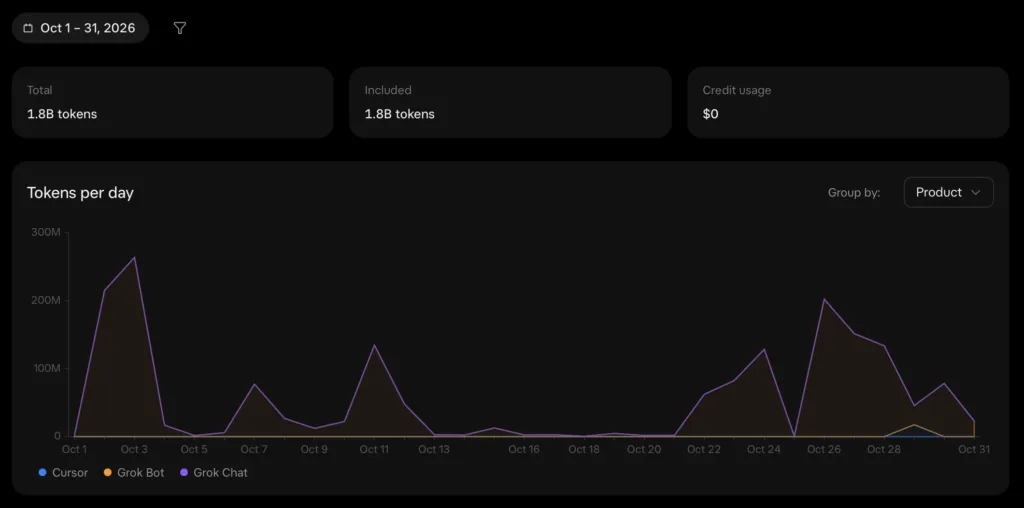
The current Grok Bot pricing is too cheap and probably not sustainable for long, so take advantage of it while you can. Elon can afford it.
The assistant can research an offer, read its terms, compare totals and prepare a purchase. Payment still needs my explicit approval. My instructions also exclude subscriptions, financial products and other commitments, even when the offer advertises a generous reward.
Here are the boundaries I use:
- Activate free coupons and point multipliers only when their terms are clear and the offer falls within the permitted categories.
- Skip offers involving subscriptions, contracts, credit cards, loans, insurance, energy or mobile switches, and paid lotteries. Leave an ambiguous offer untouched and report it.
- Ask before ordering, paying, enrolling in a new program or providing additional personal details.
- Give one recommendation with the total price and the important catch. A pile of links is not a decision.
- Report failed logins, skipped offers and mistakes. A scheduled task that could not open the account did not complete its job.
For logins I approve two-factor login requests on my phone and store some credentials inside of Grok Bots vault. Grok Bot says that passwords entered through its secure sign-in flow are hidden from the Bot; that is also how its setup documentation describes it. I have not independently verified that isolation, and I am not taking the claim on trust. I keep credentials out of chat and shopping reports….and I will rotate them as soon as possible, MFA does add another layer so even if those credentials would get leaked a login without my phone is not possible, this I verified.
The daily PAYBACK coupon routine
The biggest benefit comes from remembering to do something boring.
PAYBACK eCoupons often require activation before an eligible purchase. I used to activate a few when I remembered. I now have an automation that checks for new coupons every day, opens the account and activates the permitted free offers under the rules above. Afterwards, it returns a short report.
If you reproduce this, give the scheduler an explicit time zone. Also make sure the assistant you use supports recurring tasks with the account access needed to complete them. A reminder to open PAYBACK and an assistant that can work through the coupons are different capabilities.
Why the activation step is worth offloading
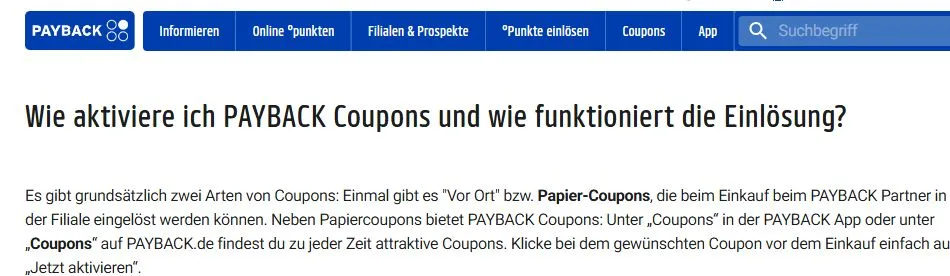
PAYBACK’s activation instructions tell customers to open the coupon area in the app or on the website and activate the desired eCoupon before shopping.
That is the chore I handed to Grok Bot. Without it, I have to remember to open the app, scan the offers and tap the activation buttons myself. Doing that once is easy. Remembering it before every unplanned stop at dm is where I lose interest. A daily check means new offers can already be active when I need them.
The daily task also needs to distinguish new offers from ones it has already activated. It should inspect the current coupon state, activate only eligible inactive offers, and leave a short account of what changed. An expired session needs a login request; an unclear promotion needs a skipped-offer entry. Neither should turn into a cheerful “all done.”
I still want the category exclusions applied on every run. Free activation is not an instruction to collect every subscription or insurance promotion the page happens to contain. The seven-coupon filter mistake below is why this rule remains in the task.
Research the purchase when it is needed
The daily sweep prepares the coupons. A specific shopping request still needs fresh research: the exact product, pack size, delivered price and relevant coupon terms. An activated 20x points offer can be useless for the wrong product or redemption channel. Before a purchase, I ask Grok Bot to inspect the best applicable offer and compare it with the cheapest ordinary route.
This keeps the recurring job small. It does not need to decide every morning whether I should buy protein powder. It needs to make the permitted coupons available and tell me if something prevented that. When I actually need whey, jackets or dishwasher tabs, the purchase comparison starts with that need.
The Filter can Fail
One run activated seven coupons related to subscriptions or insurance, despite my exclusions. The report disclosed the mistake. No purchase or contract resulted from those activations in my case, but the task had still failed to follow its instructions.
This is why the report needs more than “done.” It should identify what was activated and anything that fell outside the rules. For a new routine, inspect the first runs manually. Keep the automatic scope narrow, and require uncertain offers to be skipped instead of letting the assistant interpret every promotion optimistically.
I want the routine to save clicks. I do not want to discover that it has developed an interest in insurance lead generation.
Baby perks without joining everything
Retailers are very interested in becoming your regular shop once you have a baby. Some of their offers are useful, particularly when diapers and wipes have become permanent shopping-list items.
The assistant linked “dm glückskind” to my account, activated the related coupons and prepared the free baby items for pickup at my local dm. It also picked up the Pampers, babylove and WaterWipes discounts. I completed and checked these steps; they were useful results, which saved me boring account linking and sign-up tasks.
Lidl was a different case. The babybox route it found required the Lidl Plus app, so that part stayed with me on my phone. Lidl actually only works as a mobile app, I had to develop its own solution here which resulted in screen capturing my Android phone, building a small helper that enabled Grok to interact with my real physical backup phone through the Windows UI….yeeesss I could have reversed the Lidl API with Burp, it is just very cumbersome to maintain the reversed unofficial API especially for multiple apps.
Dishwasher tabs: compare the unit price
We normally buy dm Denkmit Revolution dishwasher tabs and are happy with them. I asked the assistant when buying in bulk would pay off and whether paying more would buy better performance.
It compared the price per tab alongside Stiftung Warentest results. I checked the comparison: the more expensive brands did not offer enough extra performance to justify their higher cost for us. Our cheap dm tabs held up well, so we stayed with them. Paying more would not have improved this purchase.
The part anyone can copy is the arithmetic. Compare the same quantity and product type, then divide the payable cost by the number of washes. Include delivery fees. A larger box only saves money when its delivered price per wash is lower and you will use it.
Delivery and coupon channels changed the answer
For a small dm order, pickup can avoid paying for delivery or buying extra items to reach a shipping threshold. dm currently describes Express pickup as free with a dm account for eligible products sold by dm, subject to availability at the selected store. Check the Express pickup conditions before choosing it.
In my checkout, Grok activated another 10x points offer through PAYBACK.
All of this is quite a bit of work to save a few cents on dishwasher tabs, BUT it is not work I have to do myself 🤷♂️
ESN whey: the points cannot rescue a bad price
I needed ESN Designer Whey in Stracciatella (which is the best for cooking and eating!) and asked for the cheapest way to buy it. The assistant compared offers and looked for PAYBACK opportunities at Amazon.
It then made a recommendation that was more expensive than the straightforward cheapest option because the points looked attractive. I was annoyed. The entire assignment was to spend less money, I had optimized to much for gaining the most points…
The comparison should therefore begin with the price you can actually pay:
- Match the exact product, flavor and pack size. Use price per kilogram when quantities differ.
- Add delivery and any unavoidable fees, then apply discounts that are confirmed to work.
- Check reward eligibility and calculate the value separately.
- If the reward is uncertain, compare the offer with zero points as well.
I eventually ordered through PAYBACK on Amazon because the price itself was acceptable AND I ended up receiving extra points per euro spent there through selling my shopping data to PAYBACK.
For Amazon, PAYBACK also specifies the shopping route: start through PAYBACK, begin with an empty cart and follow the partner’s tracking requirements. Its FAQ says points normally appear locked after the order and become available after 70 days. That timing is specific to this partner, not a promise for every PAYBACK purchase.
Use two totals
The assistant’s answer should show the cash payable now and, separately, the effective cost if the reward is confirmed and becomes usable. PAYBACK’s program terms give a point a value of €0.01. That makes the arithmetic easy, but it does not remove eligibility restrictions or release delays.
For an uncertain offer, the cash price is the safer baseline. A multiplier is not a discount already deducted from the checkout total.

The Zalando gift-card example: 1,500 points on €150
My partner wanted two fleece jackets from Zalando, one from Protest and one from Billabong. Together, the listed total was €147.44 with free shipping. The other shops checked did not offer a lower total for that purchase.
The assistant first found a 20% code, 20MEMBER. In that search, it required free Zalando Plus membership and applied only to selected items. Whether the jackets qualified still needed to be checked at checkout. I did not have a confirmed additional 20% saving.
I remembered promotions on discounted gift cards and asked it to look at those too. There was no current 10%-off Zalando gift-card promotion at the stores it checked. It found an upcoming 20x PAYBACK promotion at Netto Marken-Discount on Gutscheingold Fashion, which could be exchanged for Zalando credit, and a FlizPay offer advertising 30% off up to €20. It also suggested waiting for Black Week. Those were alternatives we researched; I chose the PAYBACK offer below.
The more useful offer was already in my PAYBACK account: an activated 20fach coupon for Zalando gift cards through the PAYBACK Gutscheinshop, valid until 8 November 2026. It applied to buying the gift card through that shop, rather than buying the jackets directly from Zalando.
The cart showed only the base points
For a €150 gift card, the cart displayed 75 °P. At a base rate of one point per €2, that was the expected base amount. It did not prove the multiplier had failed, but it did not prove it would be awarded either…no risk no fun.
The assistant initially could not confirm the extra points, so I asked it to open the coupon terms. We checked them: the coupon covered this gift-card purchase, stated no cap and specified that the extra points would be credited locked and released after 14 days. I used the coupon’s “Online einlösen” route in the PAYBACK app.
That 14-day period belongs to this particular offer as read at the time. PAYBACK’s general online-points guidance gives different windows for ordinary crediting and promotional points. Read the specific coupon rather than borrowing a waiting period from another deal.
The order confirmation supplied the useful evidence
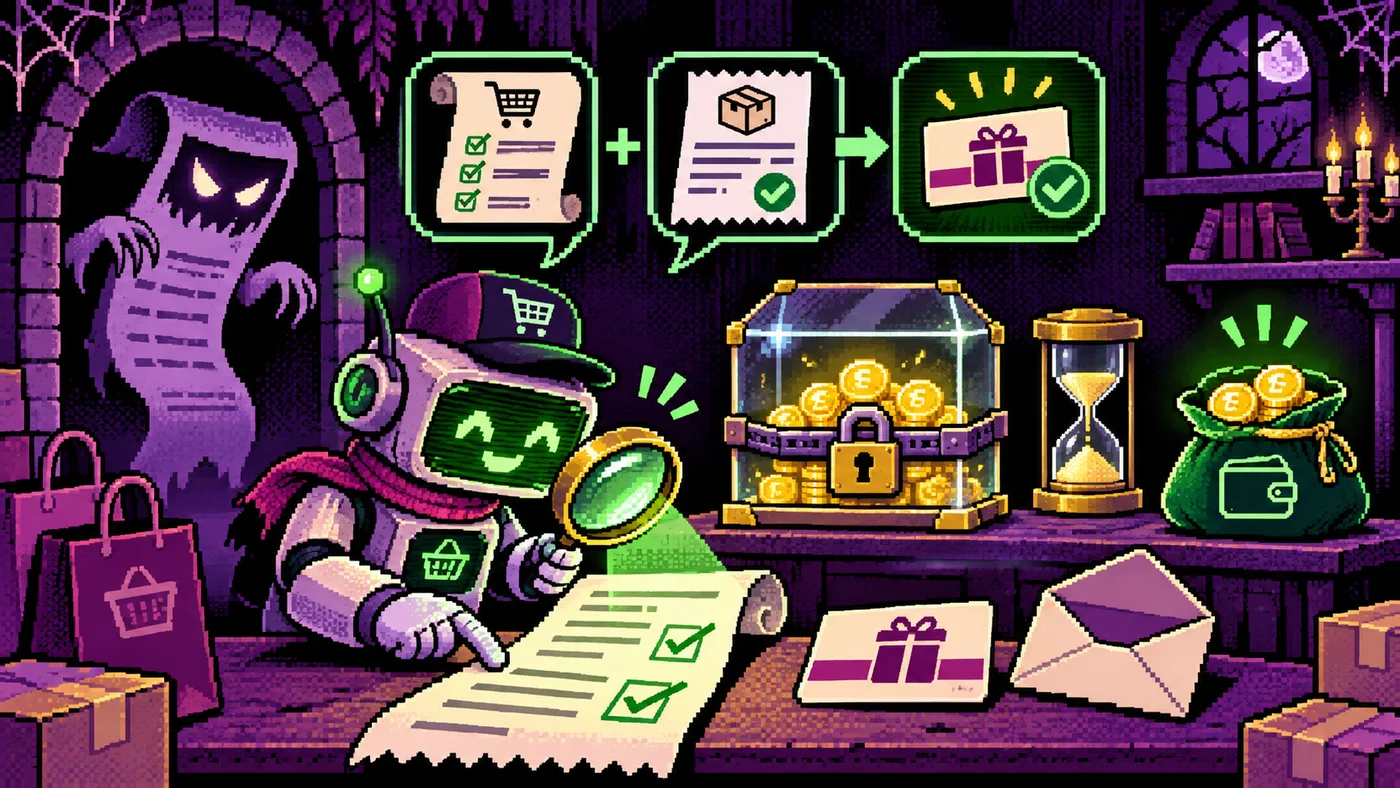
I bought the €150 gift card. Afterwards, I asked the assistant to read the order confirmation through Thunderbird. The email distinguished the order confirmation from the separate delivery of the actual voucher code and listed:
- 75 base points;
- 1,425 additional points;
- 1,500 °P in total.
The total included the base points. It was not 1,500 bonus points plus another 75.
The coupon worked: the confirmation showed 75 base points plus 1,425 extra points, exactly 1,500 °P. At €0.01 per point, that is €15, or 10% of the €150 gift-card value. The release period still applies before those points can be spent.
I paid €150 upfront and received €150 in retailer credit. It was not a gift card sold for €135.
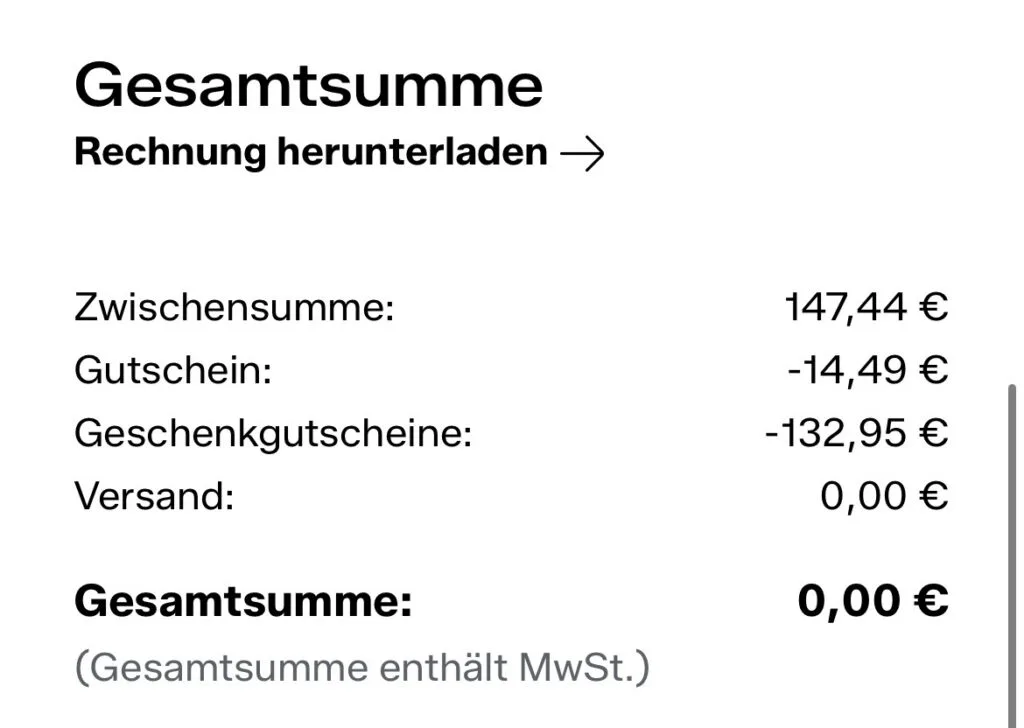
This case worked because the assistant checked an offer already available to me and read the confirmation after I paid. The €15 reward was worth investigating. It would have been much less appealing if it required buying something I did not want or leaving a large unused balance behind. The 20% off coupon still applied to one of the jackets so in the end it saved me 29.49€, which is almost the Grok Bot subscription price.
Getting the value out of PAYBACK points
Offloading the account work also means thinking about how points become usable savings. I do not want another balance to admire while continuing to pay full price for everything. A reward only helps the budget when it replaces spending or becomes money I can use.
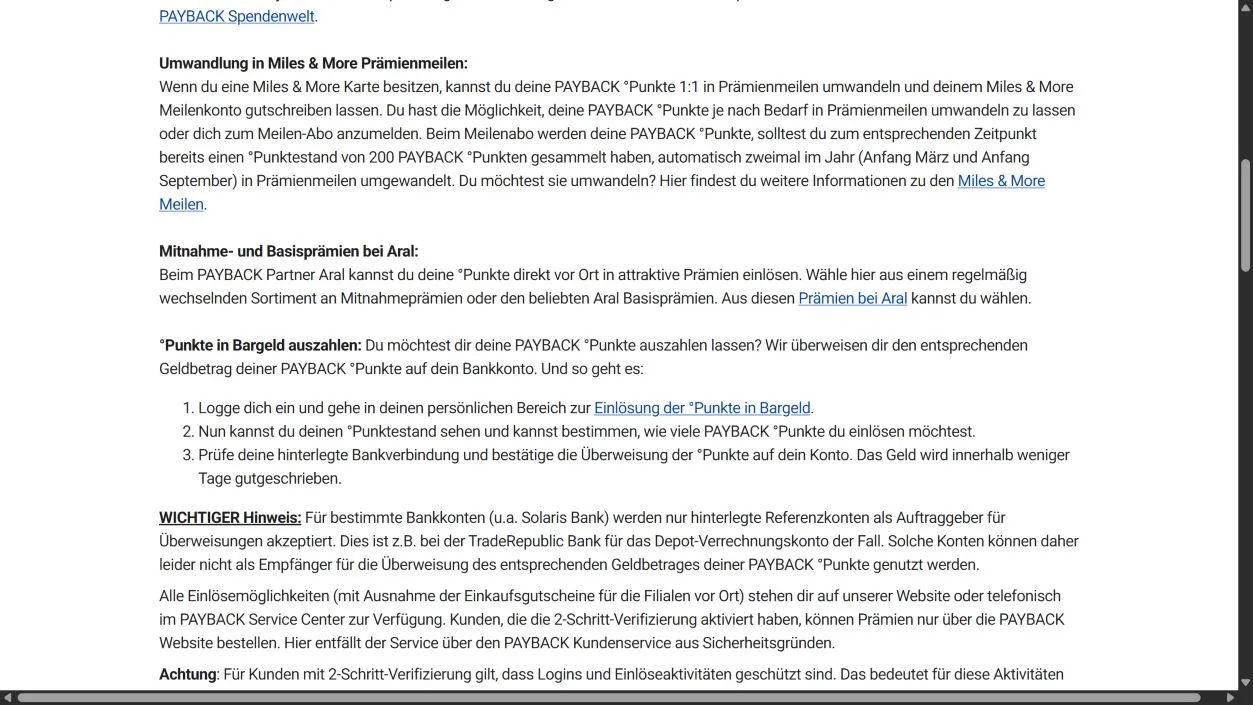
PAYBACK offers several redemption routes, including partner checkout, gift cards and rewards, or a transfer to a bank account. Its official redemption guide sets a minimum balance of 200 points. At the €0.01-per-point value in the program terms, that is €2; 1,500 points corresponds to €15.
Cash out instead of inventing another purchase
The bank-transfer redemption page is the direct route for cashing out. Sign in, choose the number of redeemable points, review the receiving bank account and confirm. PAYBACK says the money arrives within a few days; its guide also notes restrictions for accounts that accept transfers only from a designated reference account. Use a supported account in your own name.
The screenshot below shows the public instructions, not my balance or bank details. The assistant can find the route and explain the steps, while I retain control of the redemption and any verification prompt. Daily coupon activation does not authorize it to spend points or initiate transfers.
Compare redemptions with their cash value
For a reward or gift card, divide the points required by 100 to get the euro value being spent, then compare that with the ordinary purchase price. A reward that consumes €30 worth of points is poor value if I can buy the same item for €20 delivered. This is the ESN lesson applied in the other direction.
Keep locked points out of the amount available to redeem today. For the Zalando case, the confirmation established the 1,500-point award, while the coupon’s release period determined when those points could be used. A useful report separates the available balance from pending awards and flags an expected credit that has not arrived after its stated window.
Grok Bot can offload the research and reconciliation: locate the relevant terms, compare redemption values, and check whether a confirmation matches the expected points. I make the decision about where the value goes. That is enough automation to remove most of the admin without turning a coupon routine into an unattended payment system.
How to set up a similar workflow
In Grok Bot, install the app from the official download page, sign in or set up account access, then create a Bot for the shopping job. Name it something recognizable, such as “Shopping Bot · Deals & Coupons,” and give it the instructions below. The official setup guide covers the current sign-in flow.
Grok Bot supports recurring routines, which I use for the daily coupon checks. Some retailer steps still require a manual login, phone approval or an app-only action. Start with one account and verify a complete run before scheduling it. If you use another assistant, check that it supports both the account access and recurring execution needed for this workflow.
1. Define the permitted actions
Write a short policy before granting account access. Separate reading offers, activating existing free coupons, enrolling in programs and making purchases. These are different actions, even when a website places them next to one another.
The following is a starting point to adapt:
Check offers only in the accounts and stores I have specified.
Activate existing free coupons and multipliers only when their terms are clear.
Skip subscriptions, contracts, credit, insurance, energy/mobile switches
and paid lotteries. Skip ambiguous offers and explain why.
Ask before enrollment, sharing additional personal data, ordering or payment.
Compare the exact product and total payable price, including shipping.
Show uncertain points separately and calculate a zero-points fallback.
Never include passwords, voucher codes or account identifiers in reports.
Report incomplete steps, failed logins and actions outside these rules.
2. Set up access and test one run
Use a private device and the service’s normal login flow. Keep credentials in a password manager and complete two-factor approval yourself. Do not put passwords or recovery codes into the recurring task description.
Run the coupon task manually first. Inspect the account afterwards and compare the actions with the report. An assistant saying it clicked a button is weaker evidence than the coupon appearing activated in the account.
3. Add the schedule and a useful report
I check for new coupons daily. When setting up your own routine, specify the daily time and time zone, which accounts to inspect, which categories to exclude, and what should happen when a session expires. A day with no new coupons should be reported as no change, not as another batch of newly activated offers.
Ask the report to separate newly activated offers, skipped offers and incomplete steps. Keep balance changes separate from claimed savings. For actual purchases, record the cash paid, expected reward and whether that reward is pending or released.
4. Give purchase requests enough detail
Specify the exact item, quantity and delivery requirement. For consumables, ask for a unit-price comparison. For clothes, include size and color so an irrelevant cheap listing does not win the comparison.
A useful request is: “Find the lowest delivered price for this exact product and pack size. Give me one recommendation, show the payable amount first, and list points separately with their eligibility and release conditions. Do not buy it.”
Before approving, check the product match, final checkout total and terms that make the recommendation cheaper. Save the relevant coupon terms and confirmation privately if you need them for a missing-points query. Keep account numbers, voucher codes and addresses out of public screenshots.
5. Reconcile the result
After purchase, compare the confirmation with the promised offer. Later, check the points account when the stated release window has passed. If you grant mail access, restrict the task to the relevant order rather than asking the assistant to inspect unrelated messages.
Treat pending points, a confirmed award and spendable points as separate states. That makes it possible to tell whether the workflow saved money instead of merely producing an encouraging report.
…..or honestly, just talk to Grok Bot and it will help you set this up, it is as simple as that.
Summary
The assistant saves me time on coupon activation and comparison work. I still approve sensitive account steps and purchases, and I check the result against the actual checkout and points history.
The Zalando order gave me €150 in gift-card credit and a confirmed award of 1,500 points, worth €15 once released. Grok checked the terms, I made the purchase and verified the confirmation. The same routine also activated my coupons, handled the dm baby perks and helped me avoid paying more for dishwasher tabs or chasing dubious points on whey.
Start with one account, narrow permissions and a manually checked run. Add recurring tasks once the actions and reports match. With a newborn at home, fewer evenings spent clicking coupon buttons is already a fairly good result.
By the way, since within a week my PAYBACK balance doubled to about 6400 points using Grok.
If you take away anything form this, then it should be the idea that you an use Grok Bot in this way to save money and that you can set this up by simply asking Grok and letting it figure things out.
Thanks for reading this very long post, I added a copy button at the top so your agent can summarize it for you and possibly read it as a bed time story in a sensual voice.
Goodnight XOXO 💕😍