My AMD GPU Has a New Job: Running llama.cpp Without Guessing What Fits
How I run llama.cpp on an AMD GPU with HIP, verified GGUF weights, a private API and measured context limits instead of optimistic VRAM maths.

In this story
My Radeon RX 7900 XTX has 24 GiB of VRAM. This sounds like an enormous amount of memory until I ask a language model to remember a small library and look at a picture at the same time.
I had already been running local inference through Ollama. Eventually I moved the serving job to native llama.cpp with AMD’s HIP stack. I wanted control over the build, context, cache precision and the exact model files being loaded. Inference means running a trained model to generate answers.
I got that control. I also got compiler dependencies, context experiments and a much better understanding of why “the weights fit” is only the first sentence of the conversation. 🙃
Start with a Working AMD Stack
My deployment runs llama.cpp as a native Linux service inside an LXC on my Proxmox. The GPU driver belongs to the host; the application uses a compatible ROCm userspace. In an LXC, access to /dev/kfd and the appropriate render device must also be mapped into the guest.
ROCm is AMD’s GPU-computing software stack; HIP is its C++ GPU-programming interface. An LXC is a Linux container sharing the host’s kernel, which explains why the GPU driver belongs on the host.
A reader starting fresh should use an OS/GPU combination listed in AMD’s ROCm compatibility documentation. Check the host driver and device access before compiling the application:
ls -l /dev/kfd /dev/dri/renderD*
rocminfo
hipconfig --version
Run the checks as the intended service user too. A successful root test does not prove your daemon can open the GPU. Device group names and IDs vary; inspect them rather than copying someone else’s numeric group.
I would not start by forcing an unsupported architecture through an override. First establish that the driver, userspace and actual GPU agree about what they are.
Build a Version You Can Identify
The upstream llama.cpp build guide documents the HIP backend. With the documented compiler dependencies installed, a build for my RDNA3 GPU looks like this:
git clone https://github.com/ggml-org/llama.cpp.git
cd llama.cpp
git rev-parse HEAD
cmake -S . -B build-hip \
  -DGGML_HIP=ON \
  -DAMDGPU_TARGETS=gfx1100 \
  -DCMAKE_BUILD_TYPE=Release
cmake --build build-hip --config Release -j 4
./build-hip/bin/llama-server --help
gfx1100 is the target for this GPU, not a synonym for AMD. Use the architecture reported for yours. Record the commit and build options; when a later update changes behavior, those details are much more useful than “I installed the newest one.”
Keep the working binary while testing a replacement. Build failures should not remove the server that was answering requests five minutes ago.
Treat the Model as More Than a Filename
I serve a quantized 27B model, this one: DavidAU’s Qwen3.8 27B derivative. For vision, I also need its matching projector. Those are separate artifacts, and the projector has to match the model family and supported implementation.
A quick translation of those filenames
The names get a lot less mysterious once you separate the model from its packaging:
- Weights are the learned numbers that make up the model. 27B means roughly 27 billion parameters, not a 27 GB download. The original Qwen model card describes this as a dense vision-language model: it can work with text and images.
- GGUF is a binary model-file format used by llama.cpp. It stores weights and metadata such as architecture and tokenizer information. It is the container, not a model family or a guarantee of quality. See the GGUF specification.
- Quantization stores weights at reduced precision to save memory, with a possible accuracy trade-off. Q4_K_M is a mixed K-quant preset centred on 4-bit weights; the
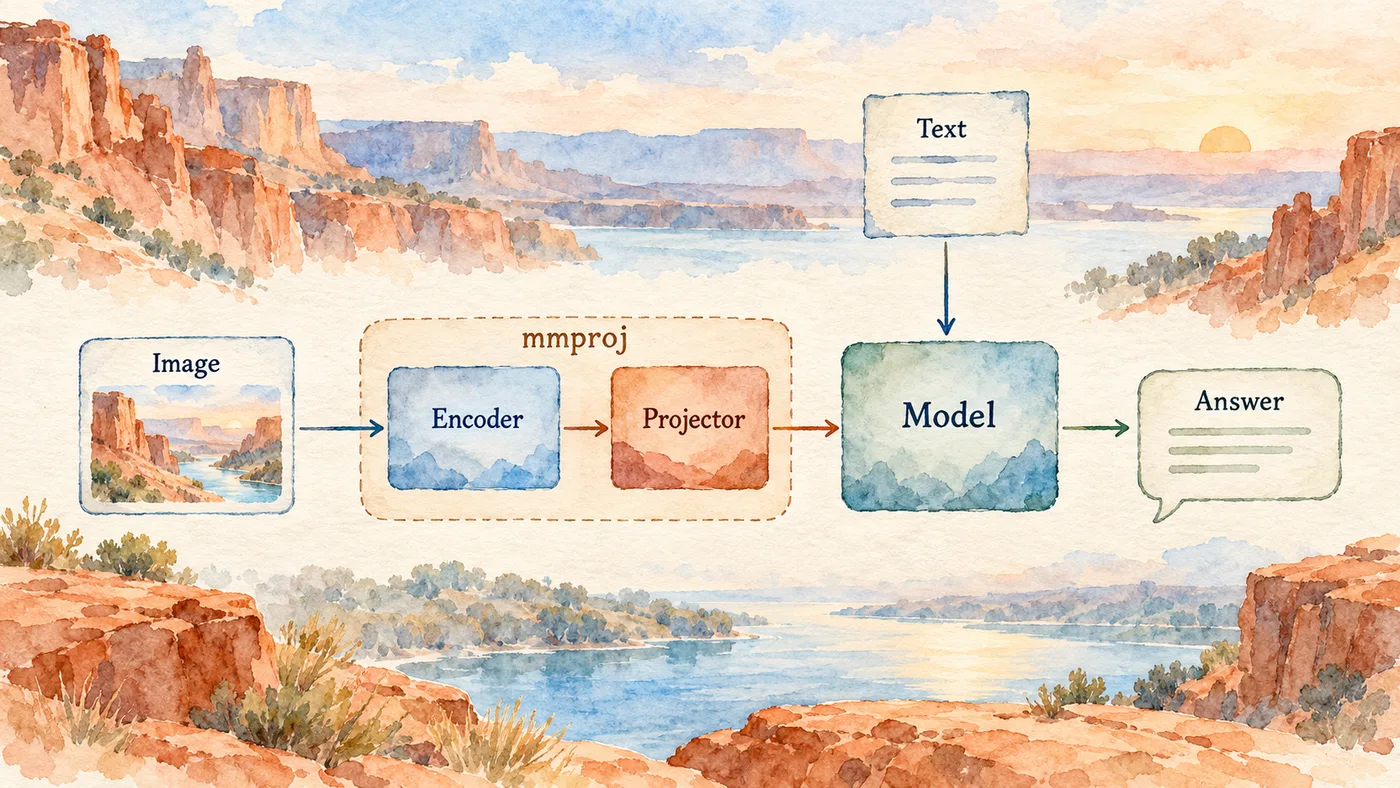
Mdistinguishes the medium variant. It does not mean every number in the file is exactly four bits. The llama.cpp quantization guide explains the formats. - A projector translates image features into the numeric representations the language model can consume. The separate mmproj GGUF can contain the image encoder as well as the projection layers. llama.cpp’s guide calls it a “multimedia projector.” F16 means 16-bit floating-point precision for that file, independently of the main model’s Q4 quantization. That is why these two GGUFs can have different precision. See the multimodal conversion notes.
For text-only use, the main model is enough. For image input, llama.cpp also needs compatible multimodal components, selected with --mmproj. The multimodal guide shows that pairing.
And that spectacularly long model name?
DavidAU/Qwen3.8-27B-TURBO-Fable-Cold-Fusion-735-882-Heretic-Uncensored-NEO-CODER-MAX-MTP-GGUF looks like several projects collided in a download folder. Here is how to read it:
DavidAUis the publisher of this derivative;Qwen3.8-27Bidentifies the underlying model family/release and parameter scale.TURBOdescribes the publisher’s tuning to reduce thinking-token consumption. It is not a GPU clock setting.Fable-Cold-Fusionnames the publisher’s training methods.735-882refers to the publisher’s ARC-C/ARC-E benchmark score labels, not model size or a speed guarantee.Heretic-Uncensoreddescribes refusal-reduction modifications using Heretic. It does not guarantee correct answers.NEO-CODER-MAXis publisher-specific quantization branding, not a standard llama.cpp option.MTPmeans multi-token prediction: a supported server can draft extra tokens and verify them to accelerate generation. It needs runtime support and is not automatically faster.GGUFidentifies the distributed file format. The actual downloaded filename adds the quantization, such asQ4_K_M.
Those tuning and benchmark descriptions come from the publisher’s model card, not my own measurements. The repository contains regular and MTP files; choose the actual variant deliberately.
Verify downloaded files against the publisher’s hashes or repository metadata, and record which quantization you chose:
sha256sum /srv/models/model-q4_k_m.gguf
sha256sum /srv/models/mmproj-f16.gguf
Do not rename an arbitrary projector and hope the loader appreciates your optimism. Check the model card and the server startup log.
Start small. This example is a loopback-only baseline, not my maximum-context profile:
./build-hip/bin/llama-server \
  --model /srv/models/model-q4_k_m.gguf \
  --alias local-model \
  --host 127.0.0.1 --port 8080 \
  --ctx-size 16384 --parallel 1 \
  --n-gpu-layers 99
The model paths are placeholders. Add the matching --mmproj only when testing vision. Confirm the actual offloaded layers and memory allocation in the log. Requesting GPU layers is not proof that they all landed there.
The Context Was the Expensive Part
Weights, KV cache, compute buffers and vision all compete for memory. Context size and concurrent slots change the budget. The model’s advertised maximum is not a promise that my card can serve it at an acceptable latency.
In that memory budget, a token is a chunk of text, not necessarily a whole word. The context window covers the input and generated response. The KV cache holds attention keys and values from earlier tokens so the server can reuse them; it consumes memory too. Prefill processes the prompt, while decode generates the response token by token. Flash Attention is a more memory-efficient way to compute attention. These explain why a model can load successfully and still run out of room on a long request. The llama-server documentation covers its context, cache and attention options.
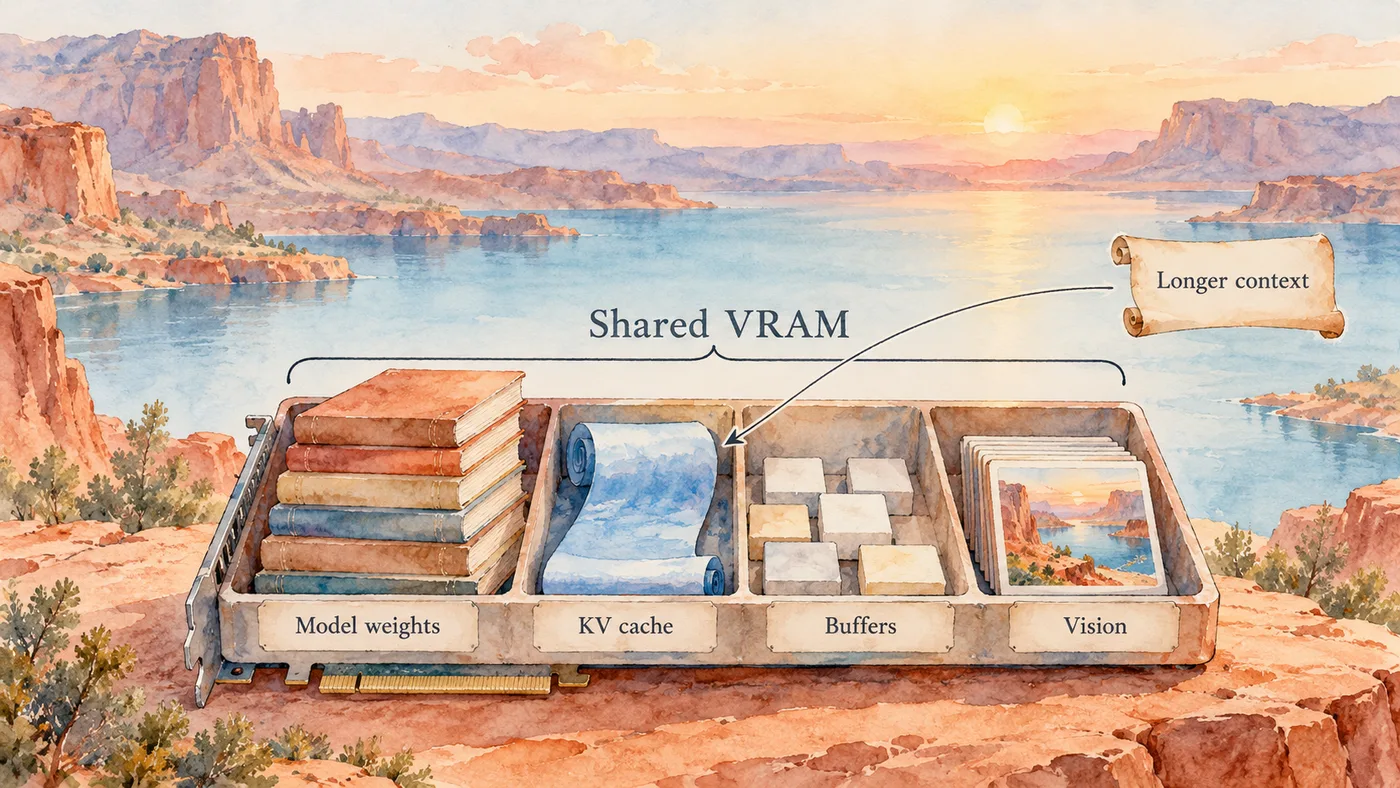
My later profile used one slot, Flash Attention and reduced-precision K/V caches to reach 128K configured context. A long text-plus-image check passed on the 24 GiB card. That established that this workload completed; it did not establish perfect recall across 128K or general answer quality.
I also measured decoding at different prompt lengths. In one set of trials, long-context decode was around 28–32 tokens per second. A large cold request took minutes to process. These are dated measurements from my model and build, not an AMD performance chart.
Change one setting at a time. Keep the same input and output budget when comparing. Test a retrieval question with a known answer, a coding task you can check, and the image content if vision matters. Faster nonsense is still nonsense, just more efficiently delivered.
Put a Real Service Boundary Around It
After the loopback server works, give it a dedicated Unix account, read access to the model files and the necessary GPU devices. A minimal systemd unit can start the same known command:
[Unit]
Description=Local llama.cpp inference
After=network.target

[Service]
User=llama
Group=llama
WorkingDirectory=/srv/llama.cpp
ExecStart=/srv/llama.cpp/build-hip/bin/llama-server --model /srv/models/model-q4_k_m.gguf --alias local-model --host 127.0.0.1 --port 8080 --ctx-size 16384 --parallel 1 --n-gpu-layers 99
Restart=on-failure
RestartSec=5
NoNewPrivileges=true

[Install]
WantedBy=multi-user.target
Create that account and grant verified device access before enabling the unit. Adjust paths to the installation you actually built. This unit does not provision drivers or model files.
My clients use a private HTTPS reverse proxy with streaming enabled and a timeout appropriate to long prefill. Keep the backend private. An SDK placeholder key is not authentication; use actual authentication or a deliberately enforced private access boundary.
Check the API and Keep a Way Back
A minimal OpenAI-compatible completion test is enough to find plenty of configuration mistakes:
import json
import urllib.request

payload = {
    "model": "local-model",
    "messages": [{"role": "user", "content": "Reply with READY."}],
    "max_tokens": 32,
}
request = urllib.request.Request(
    "http://127.0.0.1:8080/v1/chat/completions",
    data=json.dumps(payload).encode(),
    headers={"Content-Type": "application/json"},
)
with urllib.request.urlopen(request, timeout=120) as response:
    result = json.load(response)
assert result["choices"][0]["message"]["content"].strip()
print("Completion returned; inspect the actual answer.")
Then test streaming, function calls if your agent uses them, restart recovery and a representative long request. Keep the previous unit, binary and verified model available until those pass.
What does it actually do in tokens per second?
Enough memory to load the model is nice. I also want it to answer before I lose interest. So I ran the current setup through fifteen sequential requests on 22 October 2026: three each with roughly 512, 8K, 32K, 64K and near 128K input tokens, generating 256 output tokens per request. The near-limit case used about 130,000 input tokens, leaving room for the response inside the 131,072-token window.
The GPU was the Radeon RX 7900 XTX, 24 GiB. The server was already loaded; these numbers exclude loading the weights from disk. Each request used a different synthetic sensor-record prompt with prefix reuse disabled (cache_prompt: false). Thinking was disabled, and the output budget was fixed at 256 tokens with ignore_eos: true so an early answer would not shorten a sample. The table shows medians of three runs.
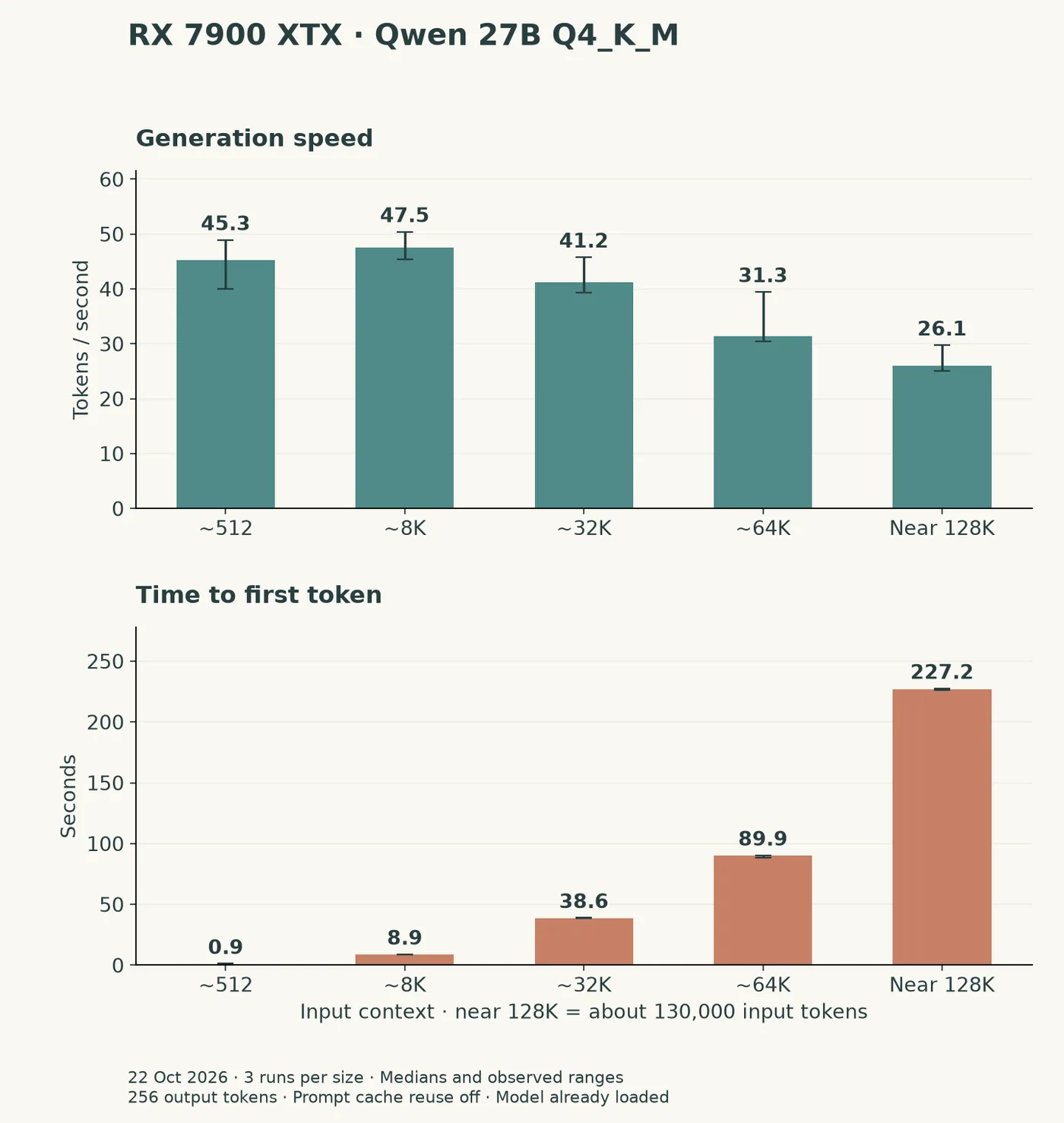
| Actual input tokens | Generation tok/s (range) | Prompt processing tok/s | First token | Total time | Peak VRAM |
|---|---|---|---|---|---|
| 534–539 | 45.3 (40.0–48.9) | 701.4 | 0.91 s | 6.55 s | 23.63 GiB |
| 8,210–8,211 | 47.5 (45.3–50.4) | 948.6 | 8.89 s | 14.26 s | 23.63 GiB |
| 32,788–32,800 | 41.2 (39.3–45.8) | 858.9 | 38.60 s | 44.64 s | 23.63 GiB |
| 65,550–65,565 | 31.3 (30.4–39.5) | 737.5 | 89.95 s | 98.09 s | 23.63 GiB |
| 130,011–130,030 | 26.1 (25.0–29.8) | 576.7 | 227.15 s | 237.34 s | 23.63 GiB |
Generation is the rate at which the server produces output tokens. Prompt processing is the rate at which it reads the new input. Time to first token includes processing that input; it is why a long document can feel slow even when the answer then streams at a decent speed. The measured input counts include the chat template and instruction, so they are slightly above the nominal sizes.
At 64K input, generation reached 31.3 tokens/s and the first token arrived after 89.9 seconds. Near the context limit, generation was 26.1 tokens/s, with 227.2 seconds before the first token. This is where a large Hermes conversation starts to hurt: the model has to read all that input before it can answer. These tests force a full prompt read; an unchanged prefix that llama.cpp can reuse will change the wait. The driver reported a peak of 23.63 GiB allocated; the serving profile kept its 128K context configured throughout.
Here is the serving profile behind those numbers:
| Setting | Measured configuration |
|---|---|
| llama.cpp | f174553, version 0.7.0-dev |
| GPU backend | HIP, ROCm Core SDK 10.1.0, gfx1100 |
| Model | DavidAU Qwen3.8 27B MTP, Q4_K_M weights |
| Vision projector | Matching mmproj-F16.gguf loaded; text-only benchmark |
| Configured context | 131,072 tokens |
| Concurrent slots | 1 |
| GPU layers | All model layers requested (--n-gpu-layers 999) |
| KV cache | q4_0 for K and V |
| Flash Attention | On |
| Speculative decoding | draft-mtp, maximum 2 draft tokens |
| Batch / microbatch | 2,048 / 1,024 |
| GPU graphs | Disabled (GGML_CUDA_DISABLE_GRAPHS=1) |
| Sampling | Temperature 0.6; top-p 0.95; top-k 20; min-p 0; repeat penalty 1.0; presence penalty 0 |
| Repeats | Seeds 42, 43 and 44 at each input size |
Those are the settings I measured, including the graph switch. If you compare another build or card, keep the input length, cache behavior and output budget in the comparison. A 512-token prompt and a 32K document are different jobs even when the same model answers both.
For a quick check on your own server, the native OpenAI-compatible endpoint returns llama.cpp’s timing fields. Run this on the inference host, or replace the loopback URL with your private endpoint:
import json
import urllib.request

payload = {
    "model": "qwen3.8-hermes:27b-q4_k_m",  # your configured alias
    "messages": [{"role": "user", "content":
        "Explain how to build and maintain a local inference server in detail."}],
    "max_tokens": 256,
    "ignore_eos": True,
    "cache_prompt": False,
    "temperature": 0.6,
    "top_p": 0.95,
    "top_k": 20,
    "min_p": 0,
    "repeat_penalty": 1.0,
    "presence_penalty": 0,
    "seed": 42,
    "chat_template_kwargs": {"enable_thinking": False},
}
request = urllib.request.Request(
    "http://127.0.0.1:11435/v1/chat/completions",
    data=json.dumps(payload).encode(),
    headers={"Content-Type": "application/json"},
)
with urllib.request.urlopen(request, timeout=600) as response:
    result = json.load(response)
print(json.dumps(result["timings"], indent=2))
predicted_per_second is generation throughput; prompt_per_second is prompt processing. This short example checks the timing output. For the table above I used the longer synthetic prompts, streamed the responses to measure time to first token, and recorded VRAM use while each request ran. The llama.cpp server documentation describes its API and timing fields.
Where this ended up: Hermes
This server now supplies the model behind my Hermes agent. Hermes handles the conversation, tools and skills; llama.cpp runs the model that decides what to say or which tool to request. Those are separate jobs. Giving the server an OpenAI-compatible API does not mean it sends the prompt to OpenAI.
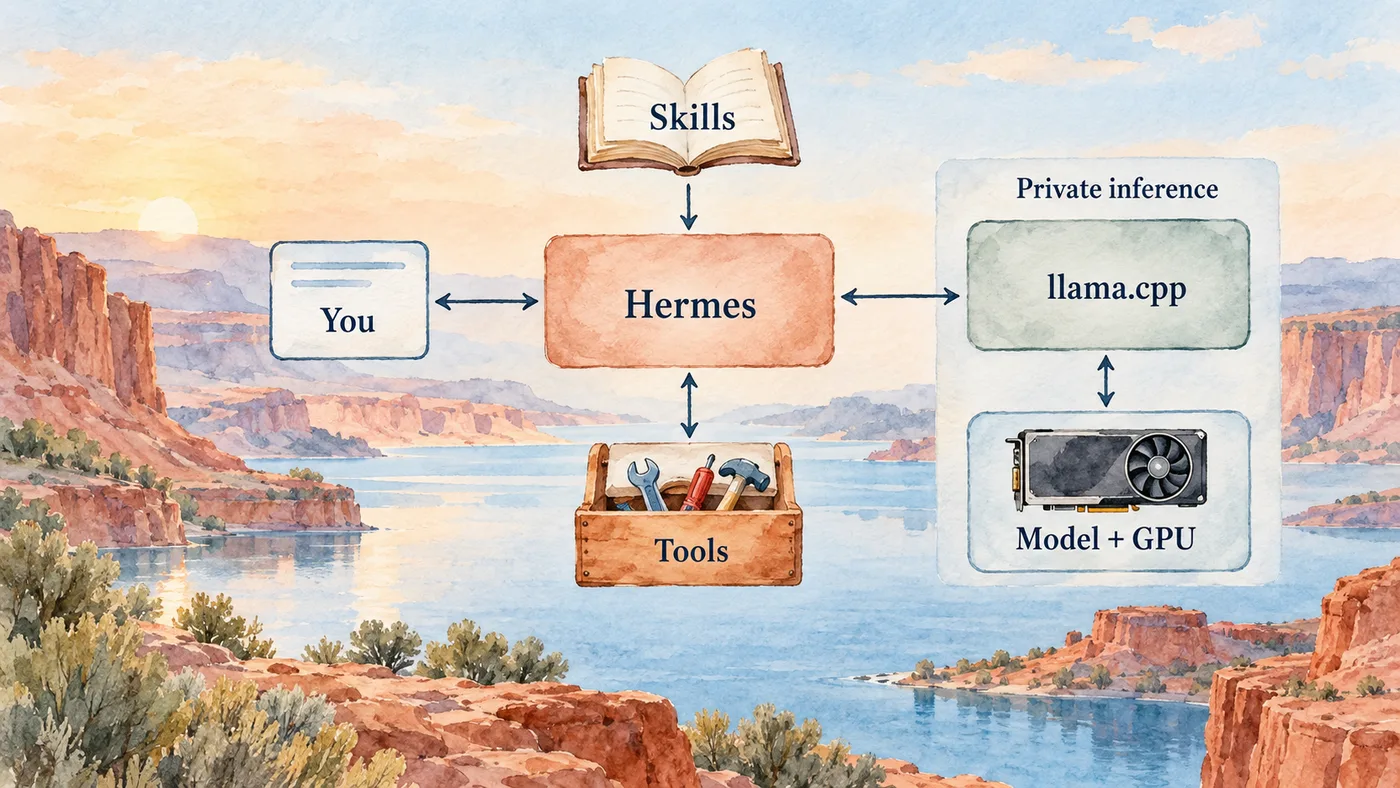
I connect Hermes through its custom OpenAI-compatible provider, pointing it at the private server’s /v1 base URL and the model alias exposed there. My setup sends the main conversation, vision and context-compression requests to that local backend. If you copy the arrangement, check the auxiliary-model settings too; selecting a local chat model alone does not establish where every other request goes. The Hermes provider documentation explains the connection options.
That gives the AMD card a useful job beyond producing a nice benchmark number: answering the agent while its tools do the work. Local inference has not made electricity free or context arithmetic optional. But I can choose the weights, see the memory budget and keep the inference endpoint private. For me, that is worth a little compiler-related suffering. 🙃