searchi: Find the Damn File
My local desktop search project combines names, keywords and meaning, with document previews, optional agent access and explicit privacy boundaries.

In this story
I remember what was in the document. The paragraph I need, what it was about, sometimes even the project it belonged to. Ask me what I called the file and suddenly I know absolutely nothing.
Very helpful, brain. Thank you. 😁
So I built searchi. I wanted to describe the thing I was looking for, see the passage it found and open the file. I also wanted my documents to stay on my computer. Forgetting a filename felt like a fairly stupid reason to upload a directory of personal files to another service.
I built and installed it on my MacBook, then tried an agreement and a retry function with descriptions of what I was looking for. After that came the recordings and video. I wanted to get from an annoyingly vague memory to something I could actually open and check.

Searching by meaning, then reading the evidence
Here is the supplier clause I put in the sample file:
The supplier agreement can be ended with sixty days of written notice.I searched for “ending the supplier partnership” and got the agreement as the primary match. The preview showed the original clause and its source location. The weaker neighbors went under Related suggestions, where I could open them if the first result was not what I needed.
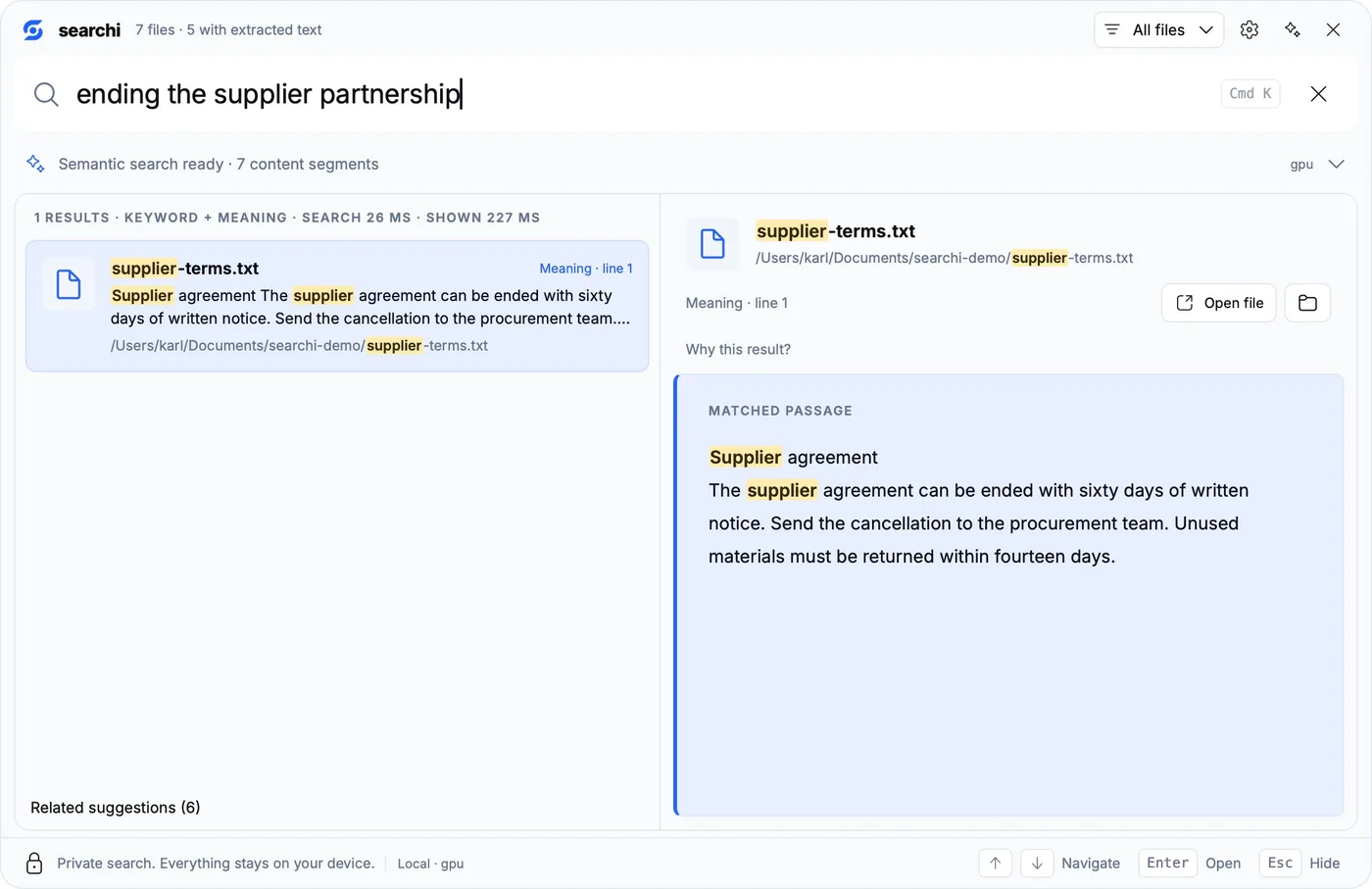
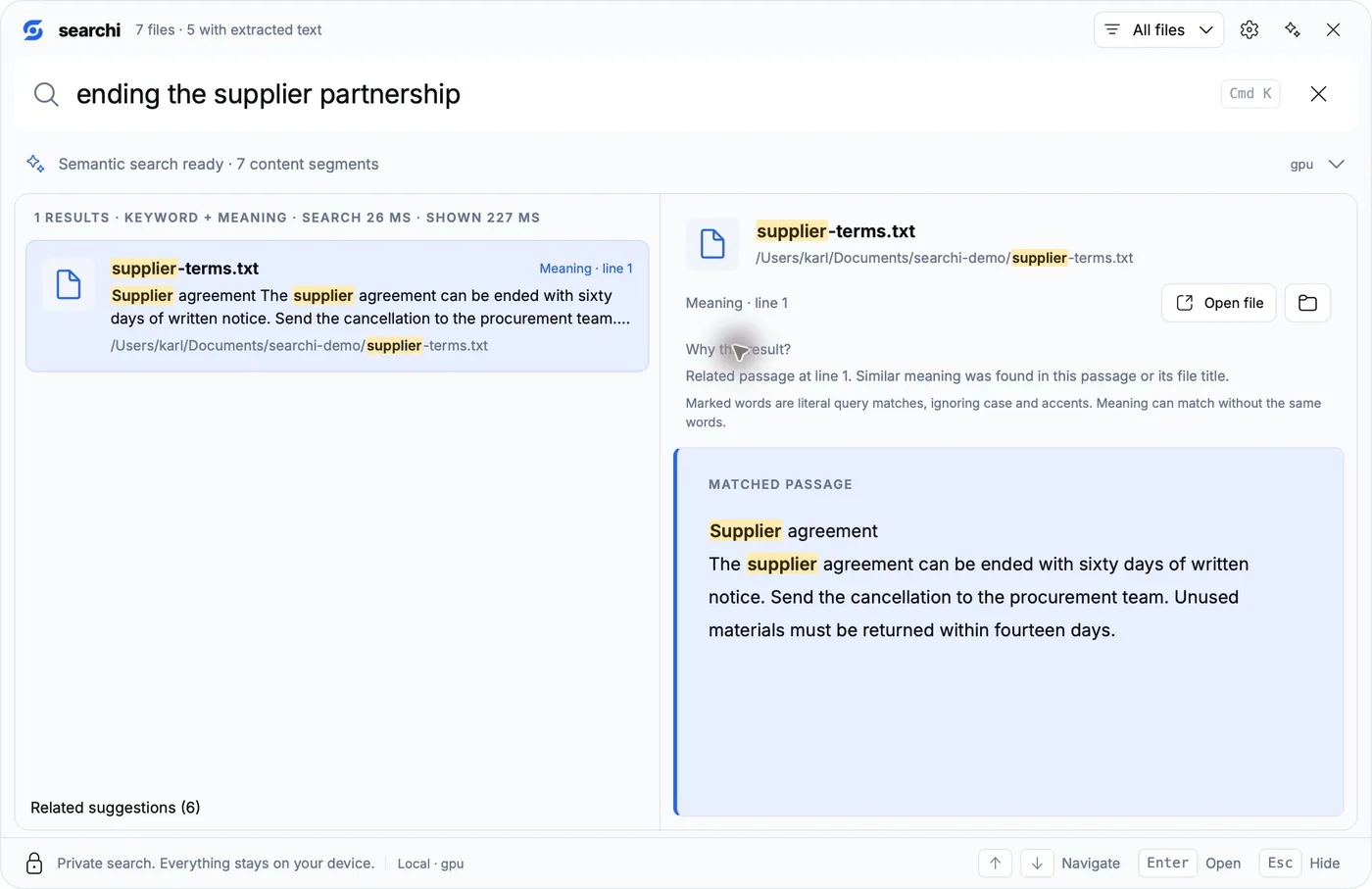
Open Why this result? to see what kind of match you got. The highlighted words are literal query matches. The semantic part can connect different wording, including a passage with no identical words to highlight.
Then I tried “Kündigung beim Lieferanten.” Same English agreement. None of those German words appears in the document, so this gave me a useful check of the cross-language retrieval.
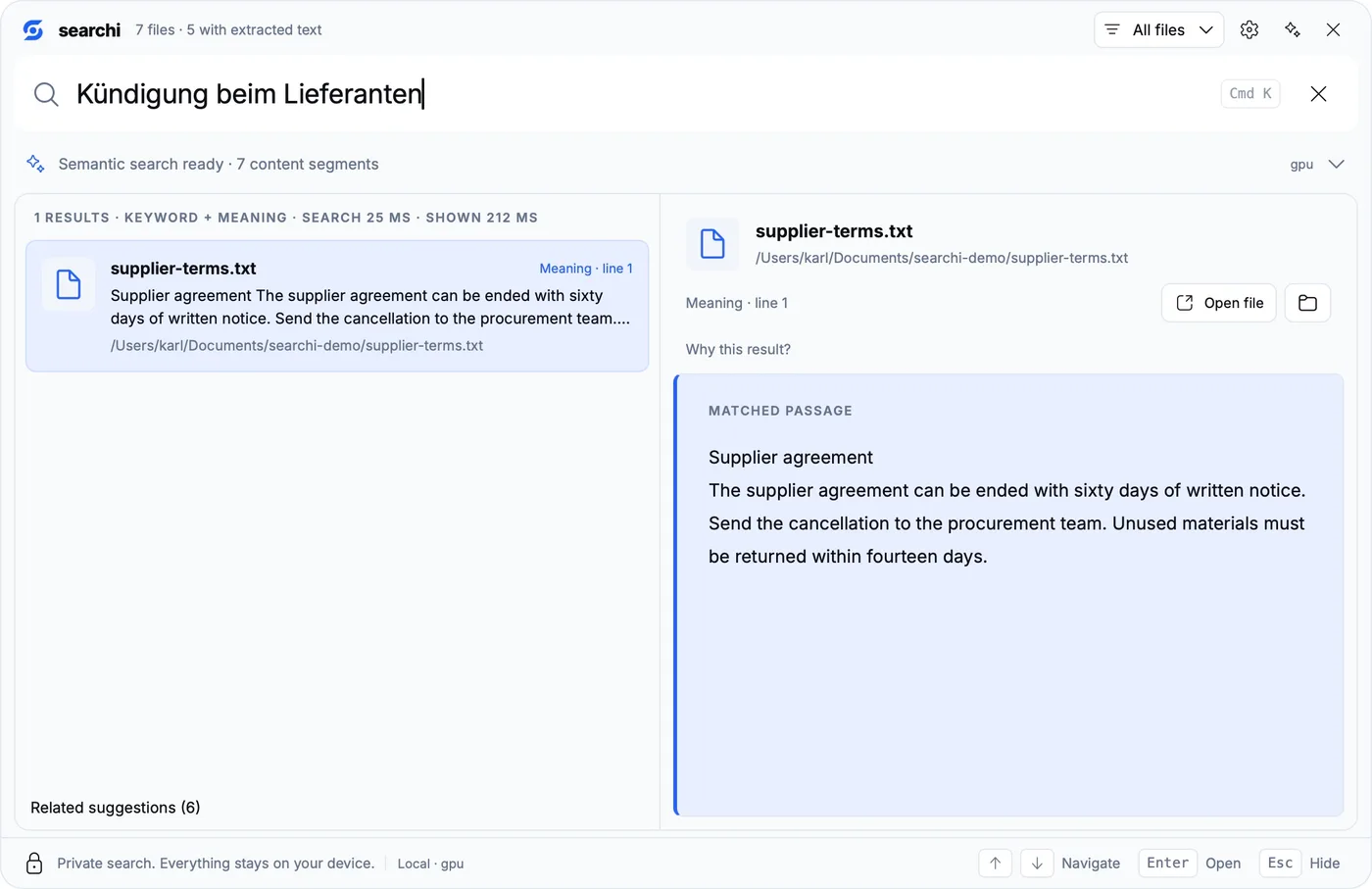
I still have to read what it found. Having the original clause and its location in front of me is what makes this useful. A related suggestion is something to inspect, and may contain nothing useful at all.
Code search that leads back to the implementation
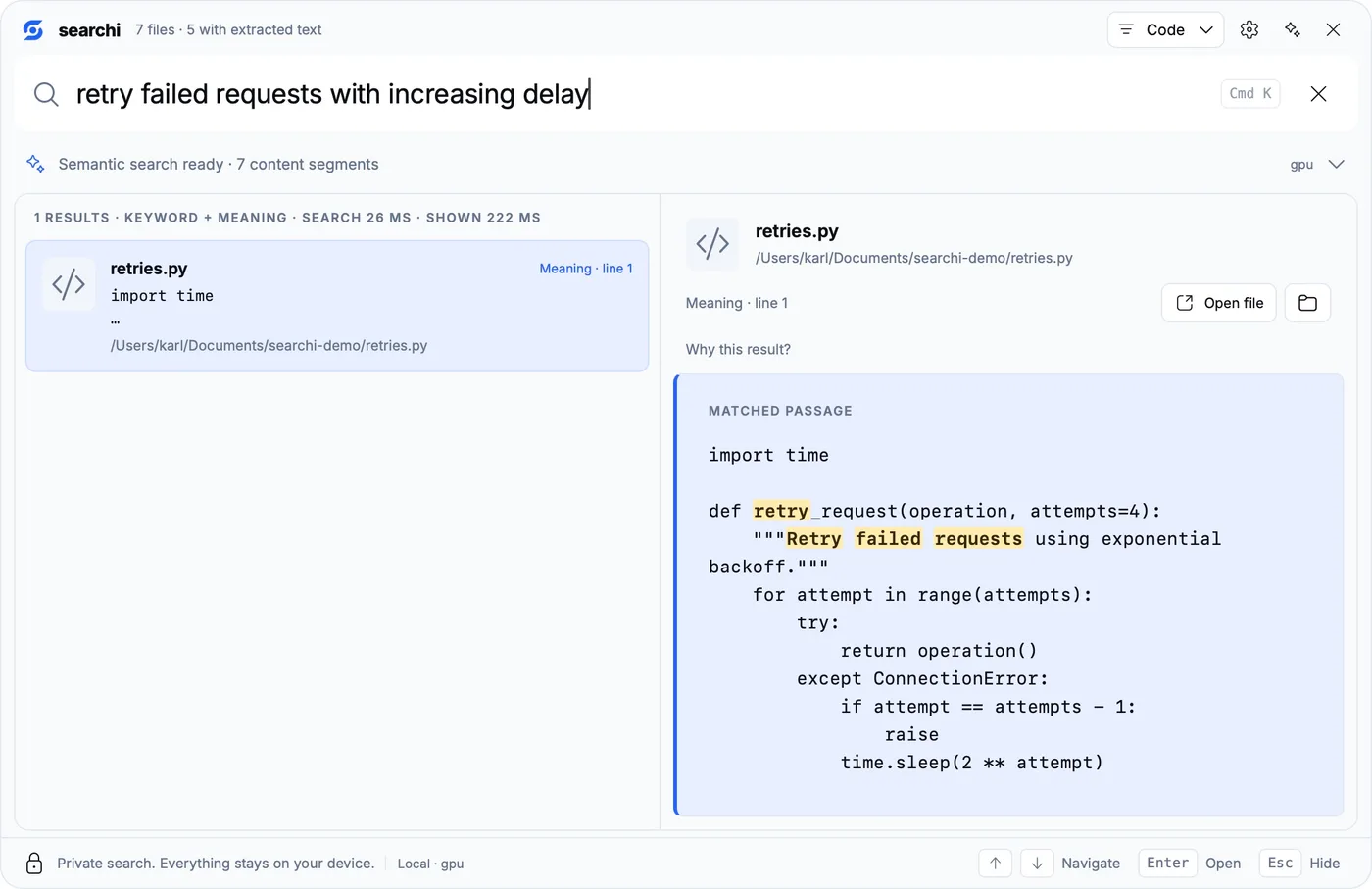
Next I selected Code and asked for “retry failed requests with increasing delay.” It found retries.py, which retries a failed operation and waits 2 ** attempt seconds between attempts.
The preview kept the Python indentation and showed the starting line. The CLI’s code-only search found the same file. That gets me from “I know there was a function doing this” to the implementation I can read.
If I already know the symbol, I want to search for it directly. refreshAccessToken should keep its place ahead of a function that merely sounds similar. Meaning-based retrieval is useful for the times I cannot remember that identifier.
Yes, video and music too
It also searches audio and video from a text query. You remember a scene, a sound, or a few words, but the filename is absolutely no help. Apparently this problem follows me across file formats.
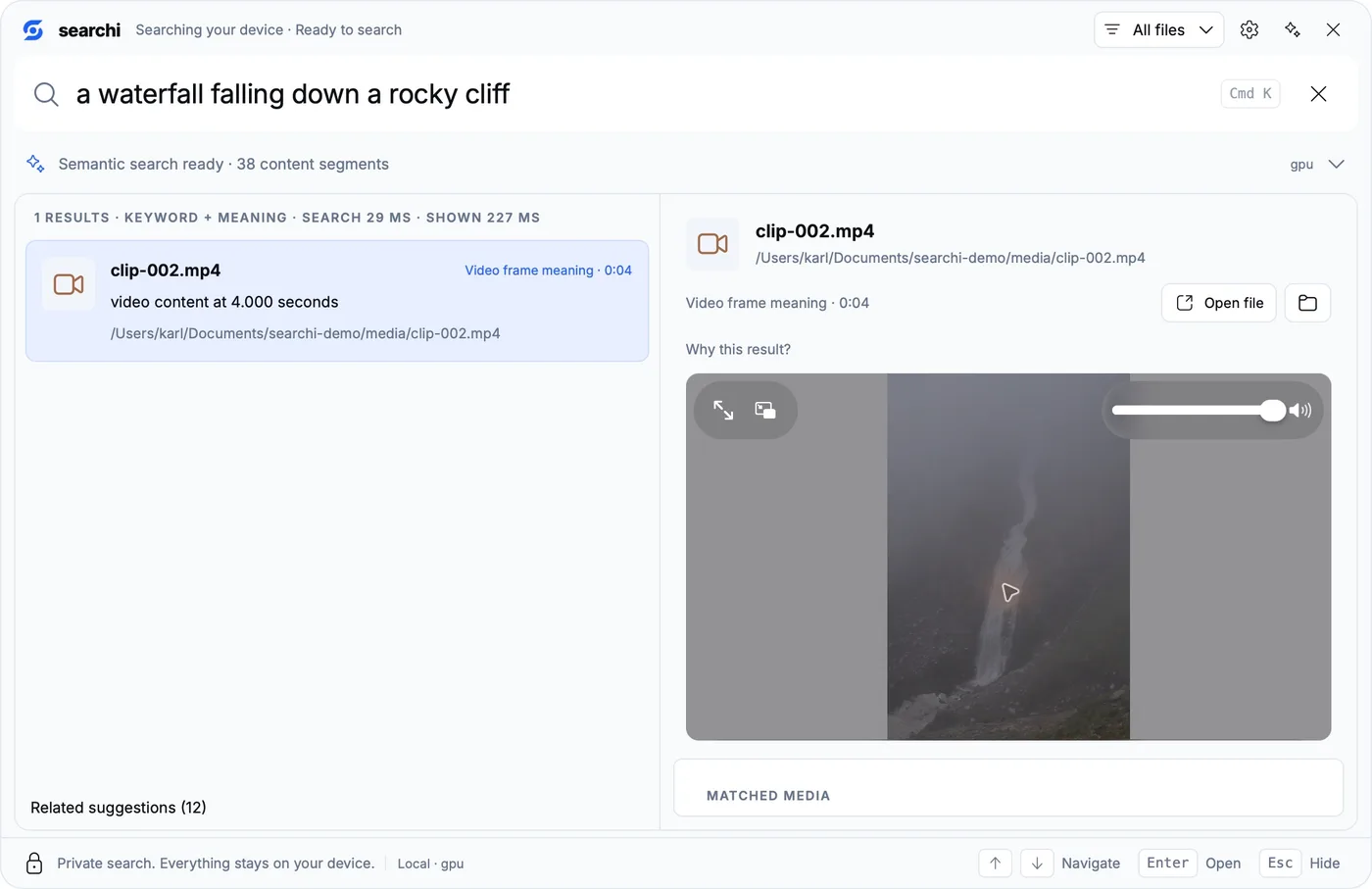
For video, FFmpeg samples frames and decodes the soundtrack. EmbeddingGemma 2 embeds those inputs locally, so a description can match the visual content or the audio. I tried “a waterfall falling down a rocky cliff” against a clip with a neutral filename. It found the video and marked a frame at 0:04. The installed Mac app opened the preview there and played it.
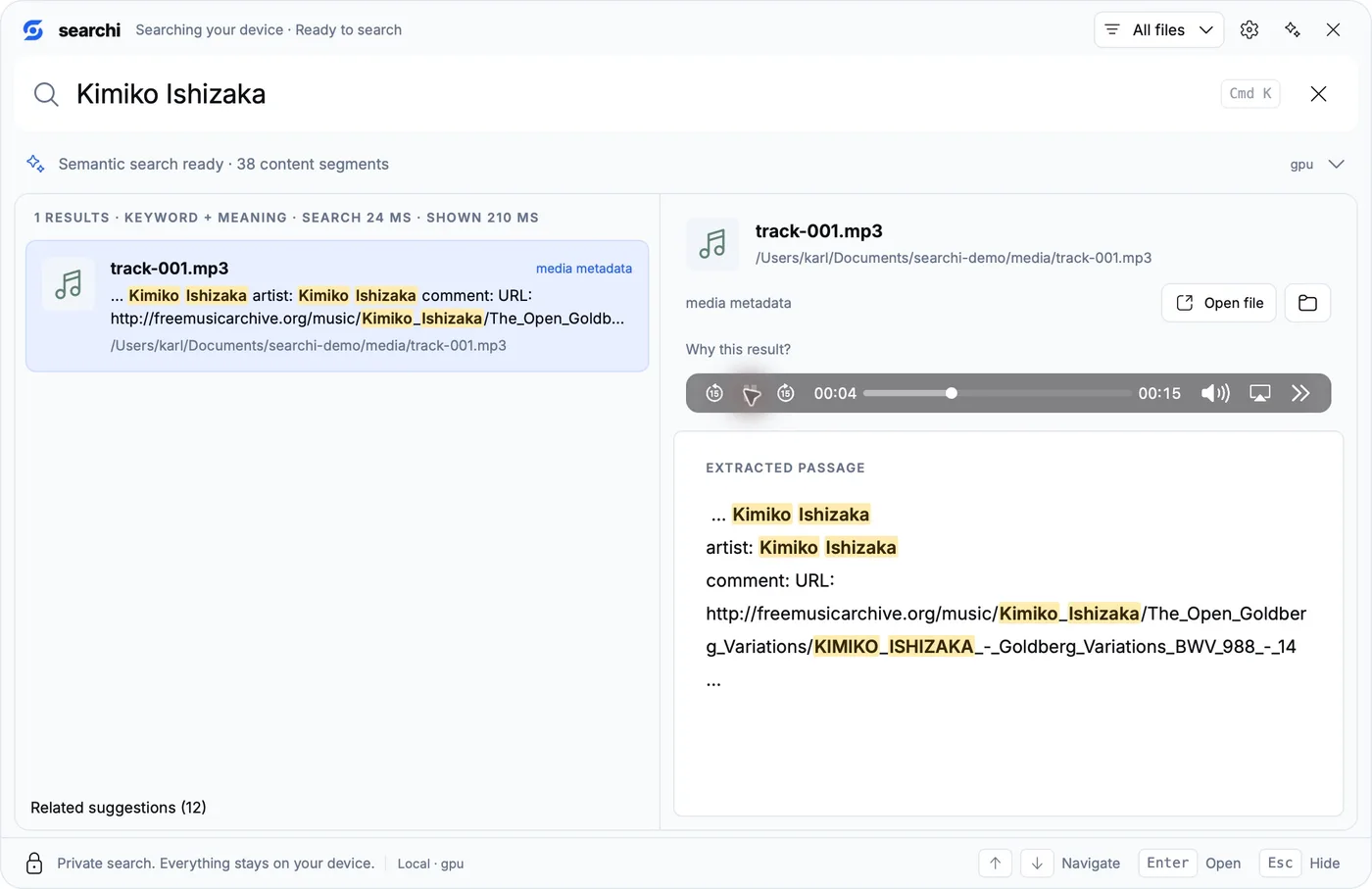
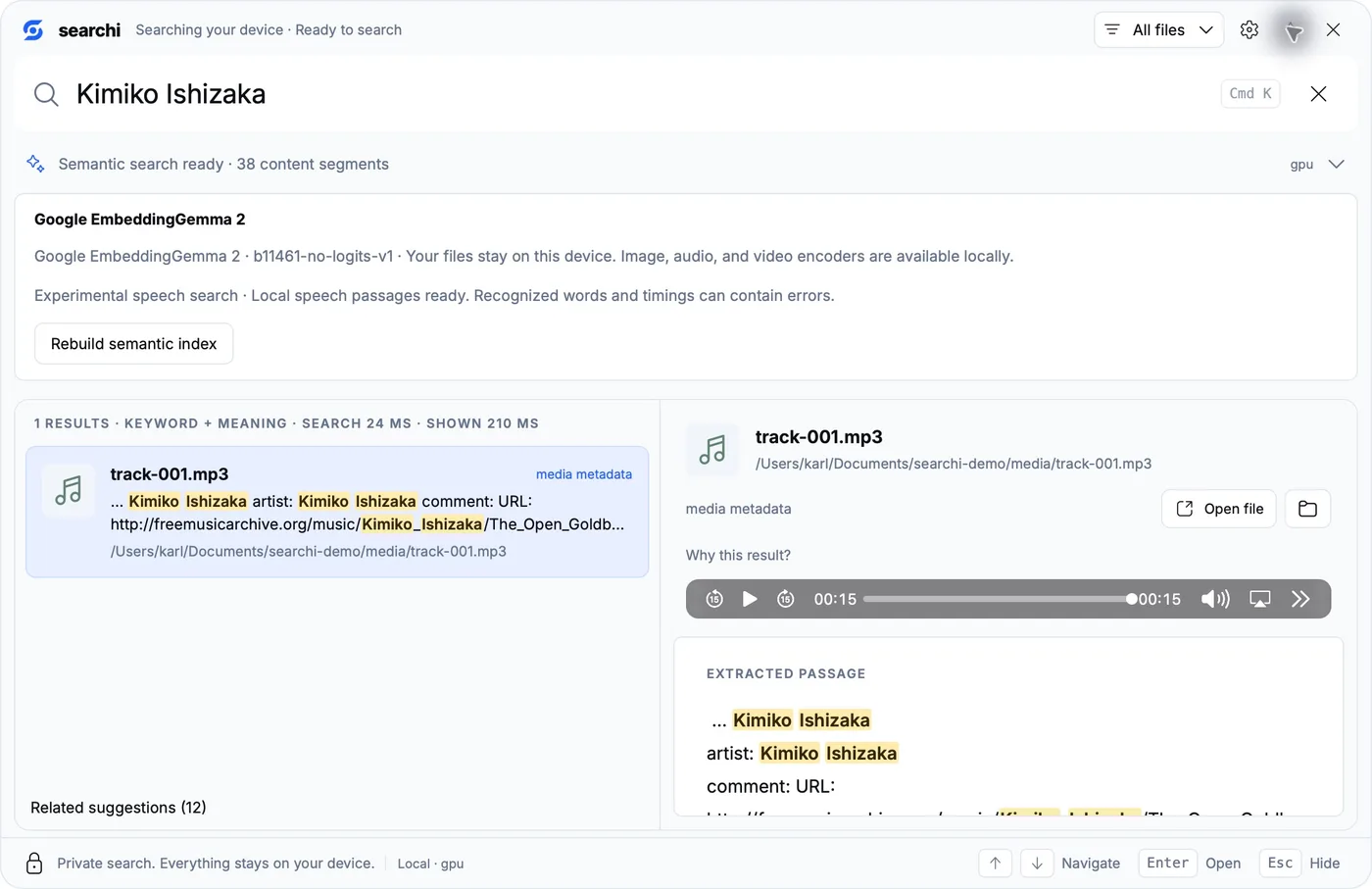
Music has two useful search routes. The audio encoder can compare a description such as “soft solo piano music” with the actual recording; that query ranked the piano sample first in my test, under related suggestions. Names and tags are more direct when I know them. Searching for Kimiko Ishizaka found the piano recording through its artist metadata, and I could play the track in the preview. The Artist (exact) and Track title (exact) filters also use the real tags. A dedicated artist-filter check returned the same file.
Then there are the words. Remembering some lyrics without remembering the song name is exactly the sort of query I want to try. Local whisper.cpp recognition turns detected speech into searchable passages, which EmbeddingGemma 2 indexes alongside the other content. Silero identifies speech; the multilingual Whisper base model recognizes it. This runs on the Mac too, with a Metal-capable runtime and CPU fallback.
For a check with known words, I used a public-domain reading of the Universal Declaration of Human Rights. I indexed the audio and a video containing that same recording. “All human beings are born free and equal” found both files, showed the recognized sentence and linked it to a timestamp near 0:02. Playing the audio result started near that passage. The speech worker also reported the Mac Metal backend during a direct recognition check.
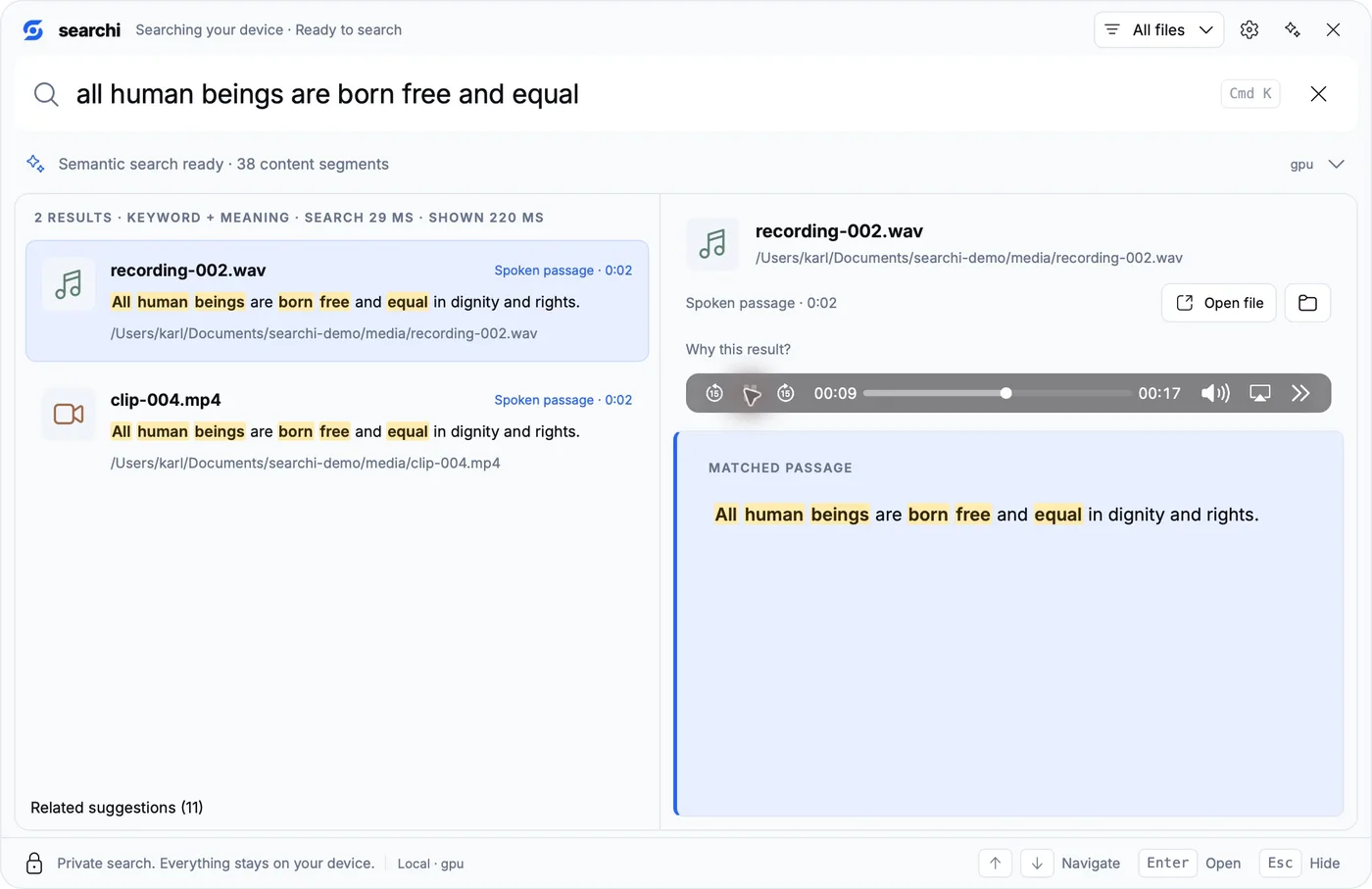
That gives remembered words a route into search without requiring a transcript file next to every recording. Singing and accompaniment can make recognition harder, so finding this spoken sentence does not establish that every lyric will be recognized. I still open the result and listen. Video frames are sampled too; a brief action between frames may be missed. The media-search notes cover retrieval behavior, and the speech documentation explains recognized passages and estimated timings.
EmbeddingGemma 2
I needed an encoder that could compare the contents of those files with a written description. It had to handle both English and German, and I wanted the same local setup to cover code and media.
Filename and keyword search still handle the things I remember precisely. EmbeddingGemma 2 supplies the meaning-based part: it gives searchi a way to compare my description with indexed content even when the wording differs. Getting that comparison was one part of the build; turning it into a result I could inspect took the rest of the engine.
The name needs a little unpacking
Google’s model card lists a 270-million-parameter text component, plus separate vision and audio encoders, for 740 million parameters with everything included. Those encoders place different input types into the same 768-dimensional space. That shared space is why a written description can lead to a video frame or a recording. The model supports more than 100 languages. Those were useful properties for a search application that has to deal with my English and German documents, source code and media. See Google’s model card for the architecture and supported modalities.
An embedding is an array of numbers describing an input. searchi stores one for each indexed passage or media segment and creates another for your query. Nearby vectors become candidates for the results. You can ask about ending a supplier relationship even when the paragraph says “termination” and “written notice.” There is no list of synonyms that I have to maintain by hand.
The engine normalizes the vectors to length one. Their dot product then measures cosine similarity: roughly, whether they point in a similar direction. A similarity score is useful for ranking candidates; it is not a probability that a result answers the question correctly. That is why I want the passage and its location beside the result. I can read what the agreement actually says before doing something expensive with it. 😅
What the model files do
The native runtime uses GGUF files. GGUF packages model tensors and metadata in a format used by llama.cpp and related runtimes. Our text file is embeddinggemma-2-Q8_0.gguf. Q8_0 identifies the quantization scheme: the weights use an 8-bit representation to reduce their storage footprint.
The second file, mmproj-embeddinggemma-2-Q8_0.gguf, carries the multimodal side needed by this runtime. “mmproj” is short for multimodal projector. It lets processed media enter the representation used alongside text. Downloading just the text GGUF leaves the media setup incomplete. searchi’s downloader checks both files against pinned sizes and SHA-256 hashes before using them. Together, the two pinned assets are about 865 MB.
For task formatting, a normal query gets task: search result | query: , while code search uses task: code retrieval | query: . Documents use title: {title} | text: {text}. Those prefixes tell the encoder what job the input is doing. The native implementation pools token representations and normalizes the resulting vector; it does not generate a chat response and then try to search with that. The Transformers documentation also describes task-specific input formatting.
searchi uses 768 dimensions throughout this setup. The model’s maximum context and the application’s working budgets are separate decisions: our query worker has a 512-token context and document work uses a 2,048-token context. Long files are split into passages.
Why I built around it
I wanted a local index I could use from a small desktop launcher and from my tools. Requiring an embedding API account every time I misplaced a document would have defeated a good part of the point. A shared multilingual and multimodal encoder also keeps the retrieval architecture manageable: the engine can compare descriptions with different kinds of content without maintaining a separate hosted service for each one.
I still care about exact filenames and the spelling of code identifiers. For music, an artist tag can be more useful than my attempt to describe a sound. I kept those search routes alongside the model. Once I know the filename, I expect searchi to find it without getting creative about the answer.
What actually runs on the machine
Folders and file changes
        |
Bounded discovery and extraction
        |
        +---- filenames, metadata and text ---- SQLite / FTS5
        |
        +---- source passages ---- local Google embedding worker
                                         |
                                  vectors / USearch ANN

Query ---- exact names + keywords + semantic candidates
                              |
                 filters and rank fusion
                              |
                 results + original source preview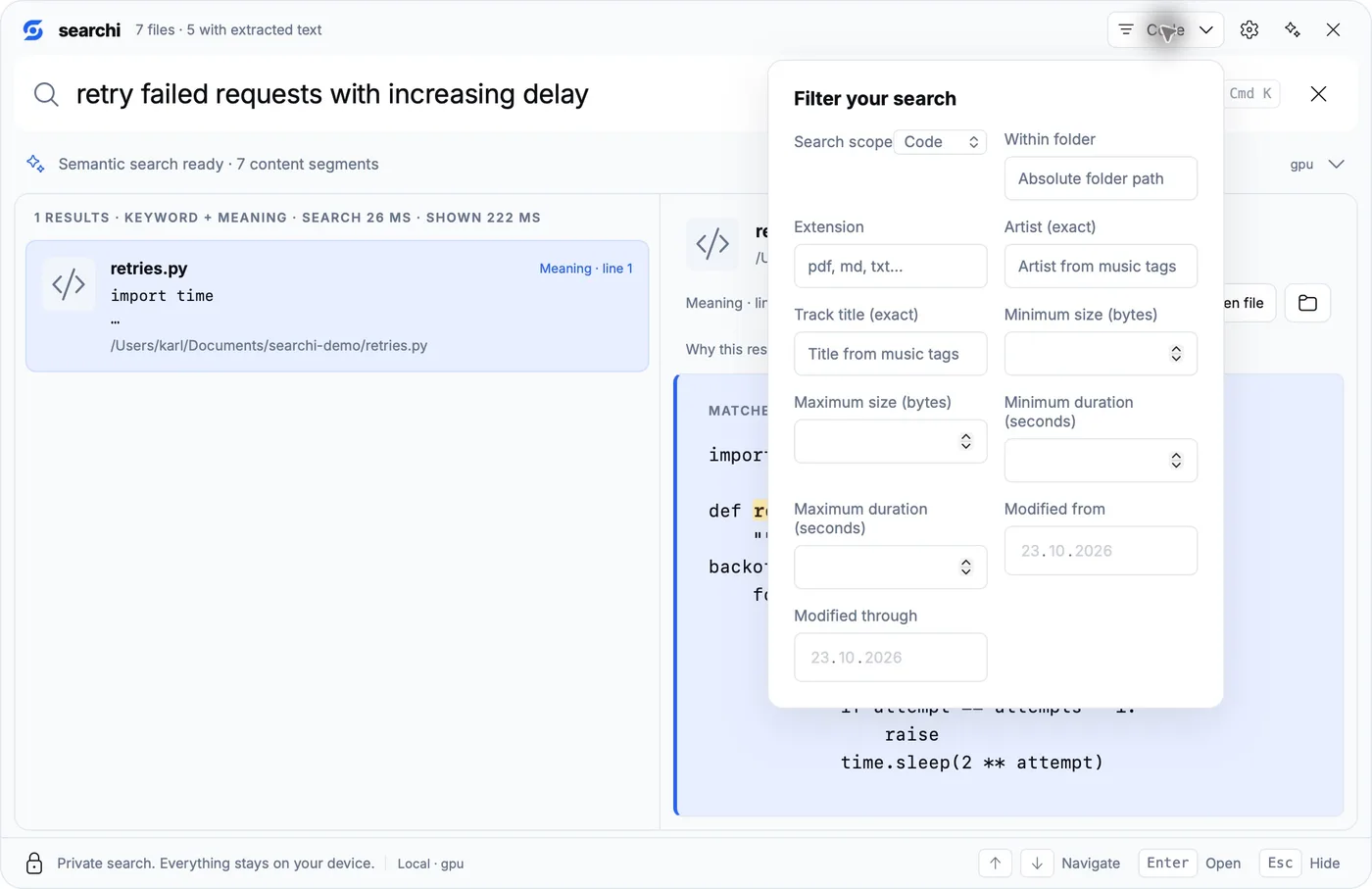
Following a file through the engine
I wanted the launcher, scripts and an assistant to find the same files and agree about filters and source locations. I kept that work in a shared Rust engine. The desktop is a Tauri application with a web interface over it; the CLI and MCP server call the same engine. Maintaining a separate search implementation for each interface sounded like an excellent way to give myself more work.
Before the model can compare anything, I need readable content and a location to return to. Discovery records file metadata and decides what can be extracted. Text and source code produce passages with line locations; document extraction preserves supported page or paragraph locations. PDF and DOCX parsing run in a separate extraction worker with bounded input, output and execution time. The parent verifies the source identity. A missing helper is reported as a missing capability; the desktop does not quietly take over parsing.
SQLite stores the file catalog, extracted content and indexing state. Its FTS5 index supplies lexical matches. A USearch approximate-nearest-neighbor index supplies vector candidates. “Approximate” means the vector index avoids comparing a query with every stored vector on every request; it trades an exhaustive scan for a much cheaper candidate search.
The retrieval lanes meet through reciprocal rank fusion. searchi uses k = 60: a candidate’s contribution from a lane is based on 1 / (60 + rank). This combines ranked lists without pretending that an FTS score and a cosine similarity have the same scale. Filename and identifier handling still get their own priority. The source is in the repository, including the retrieval and quality notes.
Filters belong inside retrieval. If I choose code scope or an exact artist, unrelated vector neighbors must not slip back into the results afterward. Candidate collection is bounded too, so asking for twenty results does not turn into an unlimited scan through every passage.
Chunks are part of the result
A whole document compressed into one vector would be awkward when I need one clause on page twelve. searchi breaks content into overlapping windows and keeps the source location with each chunk. The overlap gives a sentence crossing a boundary another chance to remain intact. Code windows are line-based, up to 128 lines with a 32-line overlap. That is useful for finding an implementation, though it does not give the index the structural knowledge of a compiler or a call graph.
Media takes another route into the same index. FFmpeg decodes audio and samples video frames. Audio is converted to mono 16 kHz windows, with 30-second windows and two seconds of overlap. Video work is capped rather than decoding every frame forever. The result carries a timestamp so the preview can open near the matched segment.
Recognized speech adds a further retrieval lane. Silero detects speech, Whisper recognizes the words, and those passages become searchable text with timings. An audio embedding can match the sound of a recording; a recognized passage can match the words spoken in it. Keeping both is useful when I remember either “piano music” or an actual sentence.
Changes, stale results and coverage
A file watcher supplies hints about changes, and periodic reconciliation checks the filesystem again. The index ties content and vectors to source fingerprints. New semantic generations are prepared before being published, and revision checks prevent an old vector from being presented as if it described a changed file. After editing a source, let indexing catch up before trusting its previous excerpt.
Indexing a large home directory still costs disk space and time. During this installation, a broad scan grew SQLite’s write-ahead log substantially before its transaction finished. I paused the scan and checkpointed the database; I also added Mac exclusions for system trees and the user’s Library app-state directory. For a first installation I would start with Documents or one project, verify the result, then widen coverage. Watching a progress indicator for your entire machine is a fairly dull way to discover that your sample folder was never selected.
Keeping inference local also means keeping a local copy of sensitive information. The index contains paths, extracted passages, media metadata and vectors. Keep it under your own account and include it in your backup decisions. Ordinary search avoids a hosted embedding API, but the extracted text in SQLite still needs protecting.
Building the complete Mac installation
I tested this on an Apple M4 with 16 GiB of unified memory, running macOS 26.6.2. I built desktop version 0.1.9 from source; the commands below pin the final Mac fixes to revision a85a4e1. There is no downloadable Mac installer for this release. Native Metal queries, document extraction, video and music previews, and local speech recognition were exercised on that machine.
Install Apple’s command-line tools, stable Rust, Python 3.11 or newer, CMake and Node 24 LTS. Full Xcode also works. With Homebrew already installed, the non-Rust prerequisites can be installed as follows; install Rust through rustup if you do not already have Cargo:
xcode-select -p
# If Apple's tools are missing, run xcode-select --install first.
brew install node@24 cmake python ffmpeg
export PATH="$HOME/.cargo/bin:$(brew --prefix node@24)/bin:$PATH"
node --version
cargo --version
cmake --version
python3 --version
I used Node 24.19.0. All 66 frontend tests passed there; Node 26 failed a Unicode-highlighting test on this machine. That is a useful reason to use the documented toolchain before debugging the application itself.
Build the embedding and extraction workers
git clone https://tea.karlcom.de/karl/searchi.git
cd searchi
git checkout --detach a85a4e11845336cffa028f2d4678c595a81ed29a
git rev-parse HEAD
export CARGO_BUILD_JOBS=2
export CARGO_PROFILE_RELEASE_DEBUG=0

python3 tools/embeddinggemma2/build_runtime.py --backend auto --jobs 2
python3 tools/embeddinggemma2/download.py
python3 tools/embeddinggemma2/stage_runtime.py --backend auto --bundle-model
python3 tools/stage_extraction_worker.py
Use auto for the normal Mac runtime. It builds Metal support alongside CPU support and embeds the Metal kernels. On this installation the genuine query worker reported device: gpu, 768 dimensions and runtime b11461-no-logits-v1. The build recipe pins its llama.cpp source and applies the no-logits embedding patch, avoiding the unused chat-output work in this embedding-only worker.
The downloader verifies both Google assets. Leave room for the downloaded files, another copy inside the app and native compiler outputs. The download is about 865 MB; the checkout and build need additional disk space.
Stage video, music and speech support before packaging
The Mac media setup here uses Homebrew FFmpeg. Copy the helpers into the app resources before building the bundle:
mkdir -p apps/desktop/src-tauri/resources/media-runtime/bin
install -m 755 "$(brew --prefix)/bin/ffmpeg" \
  apps/desktop/src-tauri/resources/media-runtime/bin/ffmpeg
install -m 755 "$(brew --prefix)/bin/ffprobe" \
  apps/desktop/src-tauri/resources/media-runtime/bin/ffprobe
Those binaries retain dependencies on Homebrew libraries. Keep Homebrew available on this Mac; copying these two files does not make a standalone media distribution for somebody else’s machine.
Speech needs its own runtime. Build the pinned whisper.cpp revision with the normal automatic device selection, then stage it alongside its shared libraries:
git clone https://github.com/ggml-org/whisper.cpp.git .searchi/references/whisper.cpp
git -C .searchi/references/whisper.cpp checkout \
  d1be6fde11ac6e0407606b4e42fe72d34add8037
python3 tools/speech-runtime/build.py \
  --source .searchi/references/whisper.cpp \
  --output .searchi/speech-runtime/macos-auto \
  --device auto
python3 tools/stage_speech_worker.py \
  --runtime .searchi/speech-runtime/macos-auto/runtime \
  --platform macos --architecture aarch64
Use a fresh speech build output directory. I checked the installed runtime after moving it out of the checkout: its libraries resolved through the packaged runtime or Apple system paths, and a recognition request reported the MTL0 Metal backend. Getting that move right needed a fix, which I’ll explain before packaging the app.
The models are the multilingual Whisper base model and Silero VAD 6.2, about 149 MB together. The app provisions and verifies them separately from the Google assets. Silero detects where speech occurs; Whisper recognizes its words. The setup panel must report local speech passages ready before expecting remembered words in a recording to be searchable.
Getting the Mac bits to behave
Compiling the window was only part of this. The speech libraries also had to load after I moved the app out of the checkout. I fixed their lookup paths to use @loader_path, which resolves relative to the library or executable doing the loading. Otherwise, an app can work beautifully in its build directory and then forget where half its own parts live. Very convenient. 🙃
Document extraction needed a separate fix. Darwin rejected the finite address-space and data limits the helper tried to set, so a valid DOCX never reached the parser. The Mac parent now watches the helper’s resident memory with proc_pidinfo and rejects usage above 512 MiB. The worker keeps its 30-second CPU limit, and the parent still enforces its wall deadline and bounded input/output. Memory is sampled during the existing polling loop, so this can overshoot between checks; it is not a kernel-enforced hard cap. Linux and Windows keep their existing resource policies.
Short-lived workers exposed an exit race too: task information can disappear just before a process becomes waitable. The parent now briefly retries that transition and still rejects a live worker it cannot inspect. Ten fresh CLI/helper runs extracted the test DOCX and found its original passage. The native roundtrip test repeats that path ten times; malformed PDF rejection and cancellation are tested separately.
Automatic scanning now prunes Mac system trees, mounted volumes and the user’s Library app-state directory. The native watcher test uses canonical paths, matching the application: on macOS, /var and /private/var can name the same place while filesystem events use the resolved path. The Mac runtime notes at this revision record the native checks and remaining distribution work.
Package, install and verify
All runtime staging above happens before this step. If you change the extraction source afterward, rerun python3 tools/stage_extraction_worker.py from the repository root before packaging. The build checks its provenance and rejects a stale helper; copying an old binary into a new app does not satisfy that check.
cd apps/desktop
npm ci
npm test
npm run tauri -- build --features custom-protocol --bundles app \
  --config '{"bundle":{"active":true}}'
cd ../..

mkdir -p "$HOME/Applications"
ditto apps/desktop/src-tauri/target/release/bundle/macos/searchi.app \
  "$HOME/Applications/searchi.app"
codesign --force --deep --sign - "$HOME/Applications/searchi.app"
codesign --verify --deep --strict "$HOME/Applications/searchi.app"
open "$HOME/Applications/searchi.app"
Quit an existing searchi instance before replacing it, and keep the old app separately if you need a rollback. This is a local ad-hoc signature. Developer ID signing, notarization and an Intel Mac build were not verified here.
The installed app includes the frontend, native workers and Google model files. It opens from the user Applications folder without a development server. Its settings and index live under ~/Library/Application Support/dev.searchi.desktop/; speech models are in that profile’s SpeechModels directory. Replacing the app and deleting the index are separate operations.
The speech relocation, document-parser policy and scanning fixes are committed in the pinned revision above. The source-install guide stays with the repository, and the Mac runtime notes explain the platform-specific behavior. Use this revision for the walkthrough; a future checkout may change build requirements or command options.
Starting with a folder you can verify
Add a small folder containing a document whose wording you know, a source file and a couple of media samples. Wait for setup and semantic indexing to finish. Then try an exact filename, an exact phrase, and a description that uses different wording. Open each result and check the passage or playback location. Filename discovery can finish before embeddings and speech processing do.
For the full media check, the index contained 13 files and 38 content segments, including eight recognized speech segments. Those numbers describe that test folder. They do not mean that everything on the Mac had already been extracted and embedded.
You can widen the roots after that first check. macOS permissions determine what searchi can read. System folders, the user Library app-state tree, known credential directories, build caches and searchi’s own data/model directories are excluded from normal discovery. Explicit personal folders give you useful control over coverage. “Search my Mac” still needs a decision about which content you want indexed and available to an assistant.
Using the CLI without opening the launcher
For the Mac checks I used the CLI to test extraction and retrieval without opening the window. It also gives scripts access to the engine. Build it from the same checkout as the desktop, and put the extraction helper next to it so supported documents can be parsed outside the repository too:
# From the repository root, after staging the extraction worker above:
cargo build --release -p searchi-cli --locked
mkdir -p "$HOME/.local/bin"
install -m 755 target/release/searchi "$HOME/.local/bin/searchi"
install -m 755 apps/desktop/src-tauri/resources/searchi-extract-worker \
  "$HOME/.local/bin/searchi-extract-worker"
export PATH="$HOME/.local/bin:$PATH"
searchi --help
For a first run, use a small folder you own and a dedicated index. The fixture below creates an agreement, a tiny Rust file and an ordinary text file mentioning the same identifier. That gives the code-only filter something useful to prove. This tutorial database is separate from the desktop’s active index. Keep the paths quoted, particularly on macOS where application data folders contain spaces.
mkdir -p "$HOME/searchi-demo/documents"
printf '%s\n' 'Termination clause: sixty days written notice to end the supplier partnership.' \
  > "$HOME/searchi-demo/documents/agreement.txt"
printf '%s\n' 'pub fn refreshAccessToken() { /* retry failed requests */ }' \
  > "$HOME/searchi-demo/documents/retry.rs"
printf '%s\n' 'refreshAccessToken' \
  > "$HOME/searchi-demo/documents/symbol-note.txt"

DB="$HOME/searchi-demo/index.sqlite"
RES="$HOME/Applications/searchi.app/Contents/Resources"
MODELS="$RES/embeddinggemma2"
WORKER="$RES/searchi-gemma-worker"

searchi index --db "$DB" --root "$HOME/searchi-demo/documents"
searchi embed --db "$DB" --model-dir "$MODELS" \
  --embedding-worker "$WORKER" --cpu-threads 1 --text-only
searchi search --db "$DB" 'ending a supplier relationship' \
  --model-dir "$MODELS" --embedding-worker "$WORKER" --json
searchi stats --db "$DB" --json
index discovers and extracts content. embed builds its semantic representation. search queries it. Passing the model directory and worker enables hybrid search; omitting both runs lexical search. Having embeddings on disk does not make a bare CLI invocation automatically start the model. The --cpu-threads 1 option sets the CPU thread budget; with the normal Mac worker it does not disable Metal.
In the CLI/MCP checks, “ending a vendor relationship” found the supplier termination passage through semantic retrieval. The MCP read_source tool returned the sentence containing “sixty days.” A code-scoped identifier query returned the Rust file while excluding the ordinary text file containing the same symbol. I wanted both behaviors: finding the right source and keeping the filter honest.
There are useful filters for scripts as well:
searchi search --db "$DB" 'refreshAccessToken' --code-only --json
searchi search --db "$DB" 'written notice' --extension txt --json
searchi search --db "$DB" 'supplier' \
  --folder "$HOME/searchi-demo/documents" --limit 5 --json
For media, put your recordings in the tutorial’s media folder before running the next block. It indexes that folder, provisions the speech models, then builds a generation with the decoder and speech runtime paths. The app bundle contains the staged runtimes from the installation above; keep the speech executable beside its shared libraries.
mkdir -p "$HOME/searchi-demo/media"
# Put your audio/video files in that folder before indexing it.
searchi index --db "$DB" --root "$HOME/searchi-demo/media"

searchi setup --speech --model-dir "$HOME/searchi-demo/speech-models"
searchi embed --db "$DB" --model-dir "$MODELS" \
  --embedding-worker "$WORKER" --cpu-threads 1 \
  --ffmpeg "$RES/media-runtime/bin/ffmpeg" \
  --ffprobe "$RES/media-runtime/bin/ffprobe" \
  --speech-worker "$RES/speech-runtime/searchi-speech-worker" \
  --speech-model-dir "$HOME/searchi-demo/speech-models"
The media embedding flags are --ffmpeg, --ffprobe, --speech-worker and --speech-model-dir, in addition to the model and embedding-worker arguments. The command supplies both members of each required pair and leaves off --text-only. Decoding, recognition and embedding take time during preparation; the later search reads that prepared content.
An exact artist query can be scripted without asking the embedding model to guess the artist. Replace the name below with an artist tag actually present in your indexed files; the example name is from the piano recording I tested. The speech query also needs a recording containing words you remember.
searchi search --db "$DB" --media-artist 'Kimiko Ishizaka' --json
searchi search --db "$DB" 'spoken words you remember' \
  --model-dir "$MODELS" --embedding-worker "$WORKER" \
  --performance --debug-performance --json
Plain search --json returns a result array. The performance options add an object containing results and measured statistics, with more stage detail under --debug-performance; account for that shape when scripting. Worker loading, query encoding and showing a preview are different pieces of work. After files change, run index and embed again for a manually maintained CLI index. The desktop manages its own background indexing. The CLI definitions at this revision list the accepted options.
Giving an agent access through MCP
I also wanted an assistant to find the same passage I could open in the launcher, then read the source before answering. That is what the MCP interface is for. MCP is the Model Context Protocol: it lets a client discover tools, call them and receive structured results. searchi runs its server over local standard input and output. The client launches a child process, and JSON-RPC messages travel over those pipes. There is no listening HTTP port to publish or reverse proxy.
The server uses the same index and retrieval implementation as the CLI. Start with an index that contains only material you want the assistant to access. A client configuration looks like this; replace every example path with an absolute path from your installation:
{
  "mcpServers": {
    "searchi": {
      "command": "/Users/you/.local/bin/searchi",
      "args": [
        "mcp",
        "--db", "/Users/you/searchi-demo/index.sqlite",
        "--model-dir", "/Users/you/Applications/searchi.app/Contents/Resources/embeddinggemma2",
        "--embedding-worker", "/Users/you/Applications/searchi.app/Contents/Resources/searchi-gemma-worker",
        "--cpu-threads", "1"
      ]
    }
  }
}
The exact configuration file depends on your MCP client. A shell’s $HOME expansion does not happen inside a JSON argument array, which is why these paths are written out. The database must already exist. For the hybrid configuration shown here, finish index and embed first: the server requires a semantic generation with indexed chunks and warms its query worker during startup. Omitting both model arguments starts a lexical-only server; supplying just one is rejected.
There are three tools:
| Tool | What I use it for |
|---|---|
stats |
Check index size, hybrid readiness and the actual worker/backend |
search |
Retrieve candidates, snippets, source locations and available source handles |
read_source |
Read a bounded passage from a result already returned in this session |
An agent can search for a termination clause and then read the evidence before answering. At the protocol level, after initialization, the tool calls look like this:
{
  "jsonrpc": "2.0",
  "id": 1,
  "method": "tools/call",
  "params": {
    "name": "search",
    "arguments": {
      "query": "ending a vendor relationship",
      "extension": "txt",
      "limit": 3
    }
  }
}
A text result can include a source_handle. Pass that exact value back in the same MCP session:
{
  "jsonrpc": "2.0",
  "id": 2,
  "method": "tools/call",
  "params": {
    "name": "read_source",
    "arguments": { "handle": "COPY_THE_RETURNED_SOURCE_HANDLE" }
  }
}
Handles are opaque and session-scoped. read_source checks the indexed source identity and returns a bounded excerpt, up to 4,096 characters. It does not accept an arbitrary filesystem path. I checked that boundary with an invented handle and verified it was rejected. An assistant can read a passage returned by search; knowing a path alone does not give it access through this tool.
Search input and result counts are bounded too. MCP’s search limit is 100, compared with the CLI’s maximum of 1,000. Filters such as folder, extension, code scope and exact media artist are available to the tool, so an agent can narrow a request before retrieving passages.
All three tools are read-only. They cannot edit a document or run a command. Read-only access still exposes the returned text to the client, though. If that client uses a cloud model, your excerpt may be sent there. I would give an agent a deliberately selected index before pointing it at an entire home folder.
The API underneath the interfaces
The project also exposes its engine as Rust crates. searchi_core provides the index and lexical retrieval types; searchi_service supplies HybridSearch and the shared service behavior used by the application. HybridSearch::open_query opens a query engine with the database, model assets and native worker. Its search methods accept the query and search options. The desktop calls Rust through Tauri commands, while the CLI and MCP adapter wrap that same underlying work.
There is currently no searchi REST endpoint for curl. For language-independent automation, the supported machine interface is the JSON-RPC MCP server above, or the CLI’s JSON output. An application embedded in Rust can use the crates directly. The source tree is the reference for the exact types at your checked-out revision.
When I fix a filter or reject a stale source, I want that behavior in the launcher, CLI and MCP server. Keeping the engine shared is how I avoid fixing the same problem in three places.
Optional answers after finding the passage
Sometimes I want a short explanation after finding a document. searchi has an optional Summarize or ask panel for a selected document passage. Configure an OpenAI-compatible endpoint, model and key in settings, inspect the prepared excerpt, then explicitly choose Summarize or Ask.
A local compatible server might use http://127.0.0.1:1234/v1; searchi appends /chat/completions. The endpoint must support the response shape described in the answer integration documentation, including structured answer text and source citations. Configuration is session-only, so it needs re-entering after restarting the application.
Normal searching and selecting results do not send that request. The explicit action sends the displayed excerpt and your question, if present. With a hosted endpoint that content leaves the machine. The answer still needs checking against its source; validating a citation ID cannot establish that every sentence the model wrote is correct. I left this integration unconfigured for the installation tests here.
What worked on this Mac
| Check | Result |
|---|---|
| Installed native app | Opened from the user Applications folder |
| Bundled Google assets | Both sizes and SHA-256 hashes verified |
| Native embedding worker | GPU backend, 768-dimensional normalized vectors |
| Filename and text indexing | Five sample text/code files extracted without failures in the CLI test |
| English semantic search | Supplier agreement ranked first in CLI and desktop |
| German query against English text | Same agreement found in the desktop |
| Code-only semantic search | Retry implementation found with a line reference |
| Desktop filters and preview | Inspected in the installed app |
| Frontend checks | 66 tests passed under Node 24 |
| Speech recognition | Local Whisper/Silero runtime installed; Metal recognition and timestamped audio/video results verified |
| Video search and playback | Waterfall description found the video at 0:04; preview played the matched segment |
| Music search and playback | Artist metadata lookup and local player passed; semantic piano query ranked the sample first under related suggestions |
| Native document helper | DOCX passage extraction/retrieval passed in ten fresh CLI runs; malformed PDF rejection and cancellation passed |
| Workspace and desktop checks | 192 workspace tests and 57 desktop tests passed; 34 existing opt-in tests ignored, none filtered out |
| Strict Clippy and formatting | All-target workspace Clippy with -D warnings, Rust/desktop formatting and frontend format/build passed |
The checks behind this build
The final source revision passed the full workspace run: 192 tests passed, with 34 existing opt-in tests left ignored and no tests filtered out. The native desktop suite passed all 57 tests, and the frontend passed all 66 tests under Node 24. Strict all-target Clippy with warnings treated as errors, Rust and frontend formatting, the frontend build, and the three speech-builder tests also passed.
A folder can contain a file the current user cannot read. I want searchi to preserve that file’s previous index record, skip it and still commit readable changes. The reconciliation test had expected the whole transaction to fail on permission denial, so I corrected it to check the actual read-error category and preservation behavior. Other I/O errors still require rollback. A separate test cancels after a write transaction begins and checks that none of its changes become visible.
These checks cover the published source and the native Mac paths exercised here. The opt-in model/platform suites remain separate; a green regular test run does not mean I ran every possible hardware combination. The validation notes include the final results.
What I measured, and where the time goes
I ran another check using the installed CLI and its normal Metal-capable worker on the M4. The test index contained three owned text/code files. MCP semantic retrieval, code filtering and source reading passed; a made-up source handle was rejected. The worker reported GPU operation, 768 dimensions and a 512-token query context.
With that MCP process already running, ten different semantic queries took a median 8.28 ms from sending the tool request to receiving the JSON result (7.45–9.00 ms). Repeating an already-used query ten times took a median 0.29 ms, exercising the query cache. Three separate CLI processes took a median 1,018 ms each (1,010–1,170 ms), including their startup and worker/model loading.
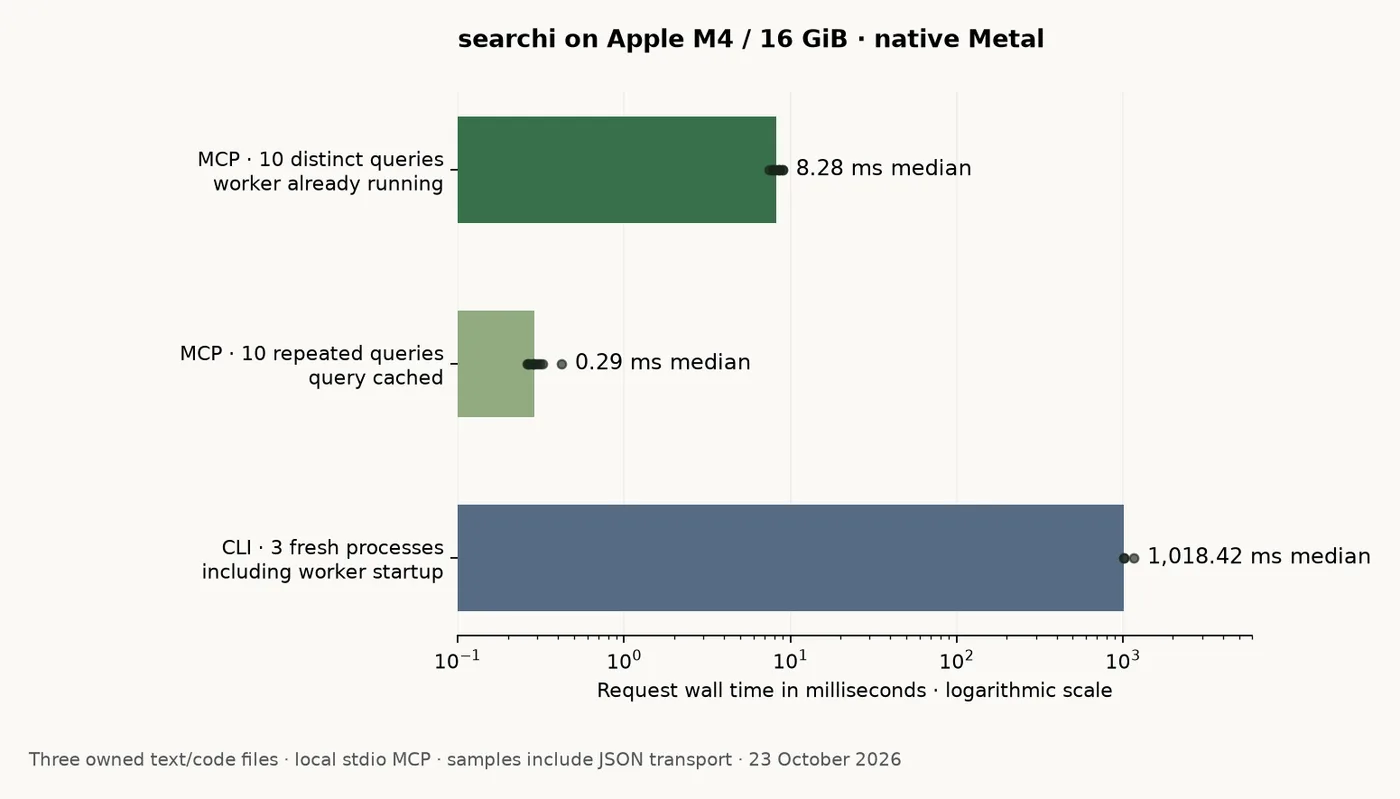
That gives me a practical reason to keep MCP running for an agent session. Re-launching a model worker for every command adds work that a retained process can avoid. The repeated-query figure is useful for understanding caching; the distinct-query figure includes fresh query encoding in an already-running engine. These are small-index timings, not a throughput claim for a million-file library or a measurement of the desktop’s input-to-visible-results time.
For the earlier media run, eight media files were processed without reported media or speech failures. The known spoken sentence was found in both its audio and video versions, the waterfall query opened the video at four seconds, and the artist lookup played the tagged music sample. The screenshots show those paths in the installed application. My next useful scale test is a larger labeled collection with expected answers, so I can measure retrieval quality as well as latency.
So yes, I spent time building a search application because I kept forgetting filenames. It found the clause, the retry implementation and the sentence in the recording. Whether this finally convinces me to name my files sensibly is another question. Thanks for reading, cutie. Love ya 😚