Tag: windows

  • Windows 11 VM Performance: Hardening, Debloating, and Setup Guide

    I am currently testing a Windows 11 VM for gaming with GPU passthrough, instead of CachyOS, which I talked about in my previous post. While Linux has made massive strides as a host, Windows still holds several advantages for high-performance virtualization: seamless driver management and crucially-superior handling of virtual displays.

    The “Dummy Plug” Problem

    In most Linux distributions, users resort to a physical HDMI “dummy plug” to trick the GPU into detecting a monitor. However, Windows supports a much more elegant software-based approach.

    Why does this matter? If you are aiming for high-bandwidth, high-refresh-rate remote access, resolution matching is vital. If your physical client is 1080p but your dummy plug forces a 4K output, you are wasting significant compute power and network bandwidth. By utilizing a virtual display, you can match your exact screen size, eliminating unnecessary overhead and maximizing Windows 11 VM performance for streaming.

    Gear Up: What You’ll Need

    Before we flip the switch, make sure you have these essentials ready:

    The Quick-Start Installation

    Once you’ve gathered your files, the process is straightforward (if a little tedious).

    Here is the “TL;DR” version of the setup:

    • You should follow this guide here, it tells you how you need to install Win 11 with drivers (to detect drive and network). Just mount both in Proxmox and when the Win 11 screen allow you to search and install all the drivers.
    • Start the VM

    Finish Setup: Complete the OS installation and navigate through the (admittedly annoying) Windows 11 “Are you sure you do not want to install M365 and send us telemetry ?”…”Are you really sure? You can decide later too”.

    The “Windows Hello” Hurdle (Or: Why I’m Screaming)

    Before you can enjoy the glory of Remote Desktop (RDP), you have to dance the Windows security tango.

    By default, Windows 11 loves Windows Hello (PINs, biometrics), but RDP usually demands a traditional password.

    To get this working, you need to:

    1. Disable Windows Hello in the Account Settings.
    2. Enable Password Login.
    3. Log in manually with your password at least once.
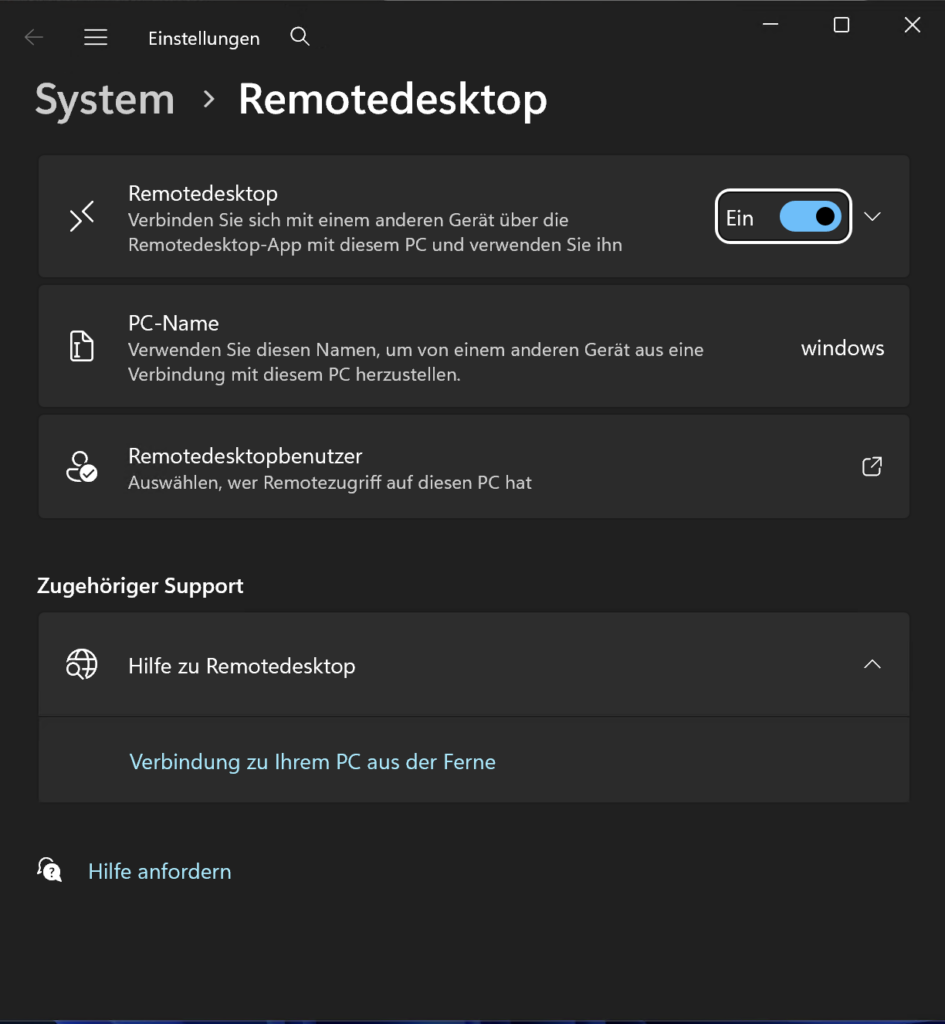
    4. Enable Remotedesktop

    The Struggle is Real: My Microsoft password is a 64-character fortress of symbols and digits. Trying to type that manually into a Windows host with a Mac keyboard while setting up a VM is a special kind of torture. If you see me screaming into the void, this is why.
    Trimming the Fat: Debloating Windows 11

    Out of the box, Windows 11 is… well, it’s a lot. It’s bloated, heavy, and full of features you’ll never use for gaming. It’s basically the OS equivalent of me after two Döner Kebabs, sluggish and in desperate need of a nap.

    Thankfully, Raphire created an incredible script to fix this. (To be clear, it fixes the Windows bloat, not my Döner habit, I tried opening a GitHub issue for the latter, but no luck so far.)

    When I run this script, I don’t hold back. I remove basically everything. For a dedicated gaming VM, you want every spare cycle of your CPU and every megabyte of RAM focused on the game, not on “News and Interests” or background telemetry.

    The screenshot on the right shows what’s left after my purge, I removed about 100 preinstalled apps. While the script lets you set system tweaks however you like, I chose to be a bit more selective with the gaming features.

    Why I kept the Xbox App: Even though “Xbox” sounds like bloat to some, I decided to keep it in my VM. I use it for actual gaming, I own an Xbox console, and I frequently use gamepads that need those background services to function correctly.

    Rule of Thumb: If you plan on using Game Pass or an Xbox Controller, don’t let the script nuking those specific services!

    Hardening Windows 11 (Without Breaking It)

    Despite what people say, Windows with Defender can be a reasonably secure OS, provided you tweak the right settings and lock it down.

    Step 0: SNAPSHOT YOUR VM!

    Before you touch a single security setting, take a snapshot in Proxmox. Everything we’re about to do is difficult to reverse. If something breaks, it’s 10x faster to roll back a snapshot than it is to troubleshoot a locked-down registry.

    Why Most Hardening Scripts Fail

    There are plenty of “Ultra-Hardening” PowerShell scripts out there, but in my experience, they break Windows 100% of the time. People enable every toggle, and suddenly the OS is a digital paperweight.

    Instead, I recommend Harden-Windows-Security. You can actually find it in the Microsoft App Store. It provides a GUI that helps you audit your system and align with industry standards (like NIST or CIS).

    What I Enable (and Why)

    Here is the breakdown of the modules I use:

    • Microsoft Security Baseline
    • Microsoft Baseline Overrides
    • Microsoft Defender
    • Attack Surface Reduction (ASR): These are essentially “behavioral” blocks. They stop things like Office apps from creating child processes or scripts from running obfuscated code.
    • TLS Security
    • Windows Firewall
    • Windows Update
    • Edge Browser
    • Country IP Blocking: Uses Windows Firewall to block traffic from specific geographic regions known for high botnet activity.
    • Non-Admin Commands

    If you want a detailed description and explanation the original documentation is absolutely fabulous.

    Fixing the RDP Lockout

    Heads up: Enabling these settings will break your RDP login. The “Non-Admin” and “Security Baseline” modules often trigger a policy that views RDP as a security risk for local accounts. You’ll be locked out and forced to log back in via the Proxmox console to fix it:

    1. Open Local Security Policy: Press Win + R, type secpol.msc, and hit Enter.
    2. Navigate to User Rights: In the left pane, go to Local Policies > User Rights Assignment.
    3. Find the “Deny” Policy: Look for “Deny log on through Remote Desktop Services” on the right side.
    4. Remove the Block: Double-click it. If you see “Local account” or “Administrators” listed, select them and click Remove.
    5. Apply & OK: You should now be able to RDP back in.

    Summary

    By using Raphire’s debloater and Harden-Windows-Security, we’ve transformed a clunky, telemetry-heavy OS into a streamlined secure gaming beast.

    Why this setup wins:

    • Performance: No more 4K “dummy plug” overhead, just 120 FPS optimized for your actual screen.
    • Security: You’ve got a hardened system that would make a CISO proud, without the “broken OS” headaches of more aggressive scripts.
    • Convenience: You kept the Xbox services you actually use while nuking the 100+ apps you don’t.

    Just remember: Snapshot early and snapshot often. Whether you’re fighting Windows Hello or accidentally locking yourself out of RDP, that “Rollback” button in Proxmox is your best friend.

    Now that the OS is lean, mean, and secure, it’s finally time to stop looking at loading bars and start actually playing.

    Thank you for reading my short blog post today! Hugs and kisses 😚 byeeeeeeeeee ❤️

  • x64dbg: A Modern, Open-Source Debugger for Windows Reverse Engineering

    Introduction

    If you’re diving into the world of reverse engineering on Windows, x64dbg is a name you absolutely need to know. This open-source debugger supports both 32-bit and 64-bit executables and offers a powerful yet user-friendly environment for debugging, disassembly, and binary analysis. Built by a passionate community and packed with features typically reserved for premium tools, x64dbg is a must-have in every reverse engineer’s toolkit.

    Purpose and Real-World Use Cases

    x64dbg is designed for software reverse engineering, malware analysis, exploit development, and general-purpose debugging. Whether you’re a student learning Windows internals or a professional digging through proprietary executables, x64dbg makes it possible to:

    • Analyze executables (.EXE) and dynamic link libraries (.DLL)
    • Trace and debug code execution step by step
    • Patch binaries and rebuild imports
    • Identify runtime behavior, memory usage, and function calls
    • Use YARA rules to scan for known patterns
    • Leverage plugins for extending and automating workflows

    Installation and Setup

    Getting started is easy. Precompiled binaries are available from the official downloads page. For nightly builds and testing the latest features, snapshots are hosted here. Developers can also compile x64dbg themselves-just be sure to follow the compiling guide and run install.bat before contributing code.

    Core Features and Highlights

    x64dbg brings together an impressive suite of debugging tools with a slick, intuitive interface. Some of its standout features include:

    • Full Debugging Support: Debug both EXE and DLL files with TitanEngine.
    • IDA-like UI: Includes instruction jump arrows, register highlighting, and token visualization.
    • Disassembler: Powered by Capstone, for fast and accurate disassembly.
    • Decompiler: Integrates Snowman for converting assembly to C-like code.
    • Scriptable Automation: A robust scripting engine for repeatable tasks.
    • Assembler and Patcher: Built-in assembler via XEDParse and binary patching tools.
    • Memory Tools: Memory maps, multi-datatype memory dumps, and dynamic stack views.
    • Data Visualization: Source view, thread view, symbol view, and context-sensitive registers.
    • Import Reconstructor: Integrated Scylla support for rebuilding import tables.
    • Plugin Support: Extend functionality through a rich plugin API.
    • Color Schemes and Theming: Fully customizable UI with dark mode support.
    • User Comments and Bookmarks: Save your analysis with labels, notes, and visual markers.
    • YARA Integration: Scan for known binary patterns using YARA rules.

    Security Considerations and Dependencies

    x64dbg is open-source and licensed under GPLv3. While it allows for closed-source and commercial plugins, any modifications to the x64dbg codebase must be shared under the same license. The tool integrates various third-party components such as Capstone (disassembly), XEDParse (assembly), and Scylla (import reconstruction). Users should always download builds from official sources to avoid tampering or malware risks.

    Why Developers Love It

    Unlike many heavyweight commercial debuggers, x64dbg balances power with approachability. Its familiar UI makes it accessible for IDA Pro users, while its scripting capabilities and plugin system allow seasoned developers to go deep. It also supports symbol loading, patch creation, and file analysis-all in a streamlined interface that respects your time.

    Contributions and Community

    x64dbg has been built and maintained by a vibrant developer community since 2015. Contributions are encouraged, whether you’re submitting patches, writing plugins, or sharing usage tips. The project credits numerous developers and communities like EXETools and Tuts4You for their support and insights.

    Conclusion

    x64dbg is not just a debugger-it’s a full-fledged reverse engineering environment that empowers users to analyze and manipulate Windows binaries with precision. Whether you’re debugging malware, unpacking software, or exploring Windows internals, x64dbg offers the features and flexibility to get the job done. Download it, explore it, and consider contributing to one of the most respected open-source tools in the reverse engineering ecosystem.

  • CVE-2025-21311: Critical Elevation of Privilege in Windows NTLM V1

    Overview

    On January 14, 2025, Microsoft disclosed CVE-2025-21311, a critical vulnerability in the NTLM V1 authentication protocol implementation in Windows. The vulnerability allows for elevation of privilege and has been rated with a CVSS v3.1 score of 9.8, placing it in the Critical severity category.

    What is NTLM V1?

    NTLM (NT LAN Manager) is a legacy authentication protocol used in Windows environments. While NTLMv2 is recommended for modern deployments, NTLMv1 is still enabled in some systems for backward compatibility. NTLMv1 has long been known to have cryptographic weaknesses, and CVE-2025-21311 exposes a specific vulnerability in how NTLMv1 is implemented within certain Windows versions.

    Technical Details

    The issue is classified under CWE-303: Incorrect Implementation of Authentication Algorithm. This means the algorithm meant to securely verify identities is flawed, potentially allowing unauthorized users to bypass authentication mechanisms and escalate privileges on affected systems. The vulnerability is remotely exploitable and requires no user interaction or prior access.

    According to the CVSS vector CVSS:3.1/AV:N/AC:L/PR:N/UI:N/S:U/C:H/I:H/A:H, the vulnerability enables an attacker to:

    • Gain remote access over the network
    • Execute attacks without user interaction
    • Achieve high impact on confidentiality, integrity, and availability

    Affected Versions

    The vulnerability affects the following Windows versions:

    • Windows Server 2025 (Server Core)
    • Windows Server 2022, 23H2 Edition (Server Core)
    • Windows 11 Version 24H2 (ARM64 and x64)

    All affected systems fall between the following version ranges:

    • 10.0.25398.0 to 10.0.25398.1369
    • 10.0.26100.0 to 10.0.26100.2894

    Mitigation

    Microsoft has released patches that should be applied immediately. Additional mitigation strategies include:

    • Disabling NTLMv1 where possible
    • Enforcing modern authentication protocols such as Kerberos
    • Auditing authentication flows to detect legacy usage

    The CISA SSVC assessment indicates that this vulnerability has total technical impact and is automatable, underscoring the urgency for response.

    Conclusion

    CVE-2025-21311 highlights the risks of relying on outdated protocols like NTLMv1. Organizations should prioritize patching affected systems, modernize their authentication infrastructure, and audit configurations to reduce exposure to similar threats in the future.

    More details are available in the official Microsoft advisory.

  • CVE-2025-21307: Critical Remote Code Execution in Windows RMCAST Driver

    Overview

    Microsoft disclosed a critical vulnerability identified as CVE-2025-21307 in the Windows Reliable Multicast Transport (RMCAST) driver on January 14, 2025. This vulnerability allows remote code execution and affects a broad range of Windows versions, including Windows 10, 11, and multiple Windows Server editions. With a CVSS v3.1 base score of 9.8, it is classified as Critical.

    Technical Details

    The root cause of this vulnerability is a Use After Free flaw, classified under CWE-416. This type of issue arises when a program continues to use memory after it has been freed, potentially allowing attackers to execute arbitrary code with kernel-level privileges. RMCAST, as a low-level driver responsible for multicast traffic, becomes a dangerous attack surface when such flaws are present.

    CVSS and Risk Analysis

    According to the CVSS v3.1 vector CVSS:3.1/AV:N/AC:L/PR:N/UI:N/S:U/C:H/I:H/A:H, this vulnerability is:

    • Remotely exploitable over the network
    • Low complexity to exploit
    • No privileges or user interaction required
    • High impact on confidentiality, integrity, and availability

    The CISA Stakeholder-Specific Vulnerability Categorization (SSVC) assessment noted the potential for automated exploitation and described the technical impact as total.

    Affected Systems

    The vulnerability affects a wide set of Windows versions, including:

    • Windows 10 (1507, 1607, 1809, 21H2, 22H2)
    • Windows 11 (22H2, 23H2, 24H2)
    • Windows Server (2008 SP2, 2008 R2, 2012, 2016, 2019, 2022, 2025)

    Mitigation and Recommendations

    Microsoft has released patches addressing the flaw. To mitigate the risk, administrators should:

    • Apply the latest security updates immediately
    • Implement strict network segmentation and firewall policies
    • Audit multicast usage and disable RMCAST if not required

    Example minimum safe versions include:

    • Windows 10 Version 1809: 10.0.17763.6775 or later
    • Windows Server 2022: 10.0.20348.3091 or later
    • Windows 11 22H2: 10.0.22621.4751 or later

    Conclusion

    CVE-2025-21307 presents a critical risk due to its remote exploitability, lack of prerequisites, and broad impact across Windows ecosystems. Timely patching and proactive mitigation strategies are essential to secure systems against this vulnerability.

    Read the full advisory on the Microsoft Security Update Guide.

  • CVE-2025-21307: Critical Remote Code Execution in Windows RMCAST Driver

    Overview

    On January 14, 2025, Microsoft disclosed CVE-2025-21307, a critical vulnerability in the Windows Reliable Multicast Transport (RMCAST) driver that enables remote code execution. With a CVSS v3.1 base score of 9.8, this vulnerability poses a severe threat to numerous supported and legacy Windows systems.

    Technical Details

    The issue stems from a Use After Free vulnerability, classified as CWE-416. This occurs when a program continues to use a pointer after it has been freed, allowing an attacker to exploit the dangling pointer to execute arbitrary code within the kernel space. Given that RMCAST operates at a low-level networking layer, this provides an attacker significant control over system behavior once exploited.

    The vulnerability affects a wide range of Windows versions, including:

    • Windows 10 (versions 1507, 1607, 1809, 21H2, 22H2)
    • Windows 11 (versions 22H2, 23H2, 24H2)
    • Windows Server (2008 SP2, 2008 R2 SP1, 2012, 2012 R2, 2016, 2019, 2022, 2025)

    Exploitation does not require authentication or user interaction, and the attack can be carried out over the network, making it highly dangerous in unsegmented or exposed environments.

    Impact

    According to the CVSS v3.1 vector (CVSS:3.1/AV:N/AC:L/PR:N/UI:N/S:U/C:H/I:H/A:H), this vulnerability allows:

    • Confidentiality Impact: High
    • Integrity Impact: High
    • Availability Impact: High

    The vulnerability is not known to be exploited in the wild at the time of disclosure, and Microsoft has issued updates to remediate the issue. The CISA SSVC analysis classified this flaw as having a total technical impact with the potential for automated exploitation, emphasizing the urgency for mitigation.

    Mitigation and Recommendations

    Microsoft has released patches through its regular update channels. All affected systems should be updated immediately to versions beyond:

    • 10.0.17763.6775 (Windows 10 Version 1809)
    • 10.0.20348.3091 (Windows Server 2022)
    • 10.0.22621.4751 (Windows 11 22H2)

    System administrators are encouraged to:

    • Deploy patches as soon as possible.
    • Use network segmentation and firewalls to reduce the attack surface.
    • Audit multicast traffic and disable RMCAST if not in use.

    Conclusion

    CVE-2025-21307 represents a serious risk due to its low complexity, remote exploitability, and severe impact. With broad applicability across many supported and end-of-life systems, proactive patching is essential. Organizations should prioritize this vulnerability and monitor vendor advisories for ongoing updates.

    For further information, visit the official Microsoft advisory.

  • Critical Windows OLE Remote Code Execution Vulnerability (CVE-2025-21298)

    Overview

    CVE-2025-21298 is a critical vulnerability in Microsoft Windows related to the Object Linking and Embedding (OLE) technology. The flaw enables remote code execution (RCE) through a ‘use-after-free’ condition, classified under CWE-416. This vulnerability impacts a wide range of Windows operating systems and server editions, making it one of the most severe security issues addressed in early 2025.

    Technical Details

    The root cause of this vulnerability lies in improper memory management during the handling of OLE objects. An attacker can exploit a use-after-free error to execute arbitrary code in the context of the user running the affected application. The attack vector is remote and does not require prior authentication or user interaction.

    The vulnerability is identified by the following CVSS v3.1 vector:

    CVSS:3.1/AV:N/AC:L/PR:N/UI:N/S:U/C:H/I:H/A:H

    • Base Score: 9.8 (Critical)
    • Attack Vector: Network
    • Attack Complexity: Low
    • Privileges Required: None
    • User Interaction: None
    • Impact: High on confidentiality, integrity, and availability

    Affected Systems

    This vulnerability affects a broad set of Windows versions, including:

    • Windows 10 (various builds from 1507 to 22H2)
    • Windows 11 (22H2, 23H2, 24H2)
    • Windows Server (2008 SP2, 2012, 2016, 2019, 2022, 2025)

    Mitigation and Recommendations

    • Apply security updates released in the January 2025 Patch Tuesday immediately.
    • Restrict OLE functionality where not needed, especially in environments handling untrusted content.
    • Monitor systems for signs of exploitation, particularly for abnormal memory access patterns or unexpected OLE behaviors.

    Conclusion

    CVE-2025-21298 demonstrates the persistent threat of memory safety vulnerabilities in complex, legacy components like OLE. Organizations must apply updates promptly and evaluate mitigation controls for high-risk environments.

    For more details, see the official Microsoft advisory: MSRC: CVE-2025-21298

  • Small business private cloud

    Small business private cloud

    In Germany, we’re fortunate to have strong data privacy laws. For small businesses handling sensitive data in the era of remote work, it’s crucial to have a secure server based locally. I built a small business network optimized for remote work and security. From setting up secure workstations to implementing top-notch backup solutions, I ensured compliance with regulations and customer expectations. Adding montioring with CheckMK I ensure to keep things running smooth.