
There is nothing worse than buying premium hardware and having your software treat it like a generic accessory.
I recently picked up a PS5 DualSense controller. It wasn’t cheap, but I bought it for a specific reason: that trackpad. I wanted to use the full capabilities of the controller, specifically for mouse input, while streaming.
However, I ran into a wall immediately. No matter what I did, my setup kept auto-detecting the DualSense as a standard Xbox Controller. This meant no trackpad support and missing button functionality.
I went down the rabbit hole of forums and documentation so you don’t have to. If you are running a similar stack, here is the fix that saves you the headache.
The Setup
Just for context, here is the hardware and software I’m running to play World of Warcraft:
- Host: Virtual CachyOS running Sunshine
- Client: MacBook (M4 Air) running Moonlight
- Controller: PS5 DualSense
- The Goal: Play WoW on the CachyOS host using the DualSense trackpad for mouse control and scrolling.
The Problem
Sunshine usually defaults to X360 (Xbox) emulation to ensure maximum compatibility, if not then Steam will. While great for most games, it kills the specific features that make the DualSense special. If you want the trackpad to work as a trackpad, you need the host to see the controller as a DualSense, not an Xbox gamepad.
The Solution
The fix came down to two specific steps: fixing a permission error on the Linux host and forcing Sunshine to recognize the correct controller type.
Step 1: Fix the Permission Error
First, we need to ensure the user has the right permissions to access the input devices.
# sudo nano /usr/lib/udev/rules.d/60-sunshine.rules


# Allows Sunshine to access /dev/uinput
KERNEL=="uinput", SUBSYSTEM=="misc", OPTIONS+="static_node=uinput", TAG+="uaccess"

# Allows Sunshine to access /dev/uhid (Added subsystem for persistence)
KERNEL=="uhid", SUBSYSTEM=="misc", TAG+="uaccess"

# Joypads (Broadened to ensure the tag hits before the name is fully registered)
SUBSYSTEM=="hidraw", KERNEL=="hidraw*", MODE="0660", TAG+="uaccess"
SUBSYSTEM=="input", ATTRS{name}=="Sunshine*", MODE="0660", TAG+="uaccess"
sudo udevadm control --reload-rules && sudo udevadm trigger
# optional rebootSource: https://github.com/LizardByte/Sunshine/issues/3758
Step 2: Force PS5 Mode in Sunshine
Next, we need to tell Sunshine to stop pretending everything is an Xbox controller.
- Open your Sunshine Web UI.
- Navigate to Configuration -> Input.
- [Insert your specific steps here, likely setting “Gamepad Emulation” to “DS4” or using a specific flag]
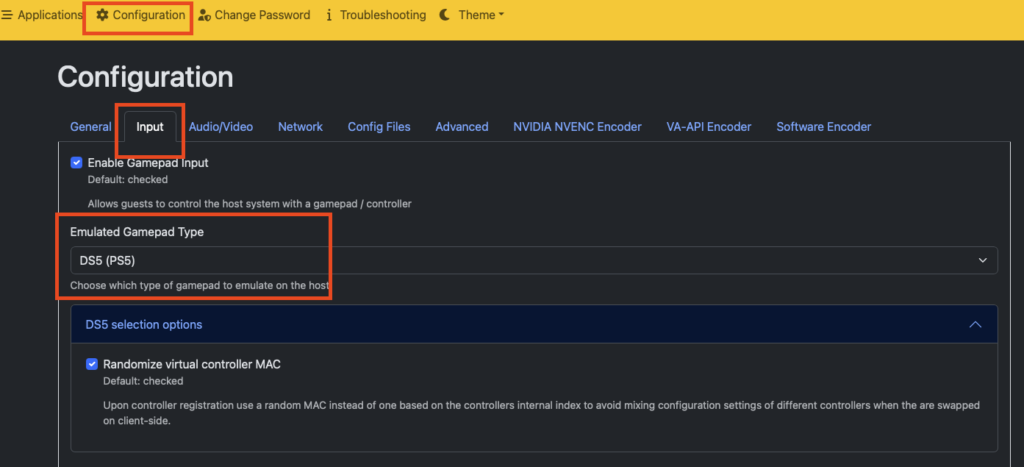
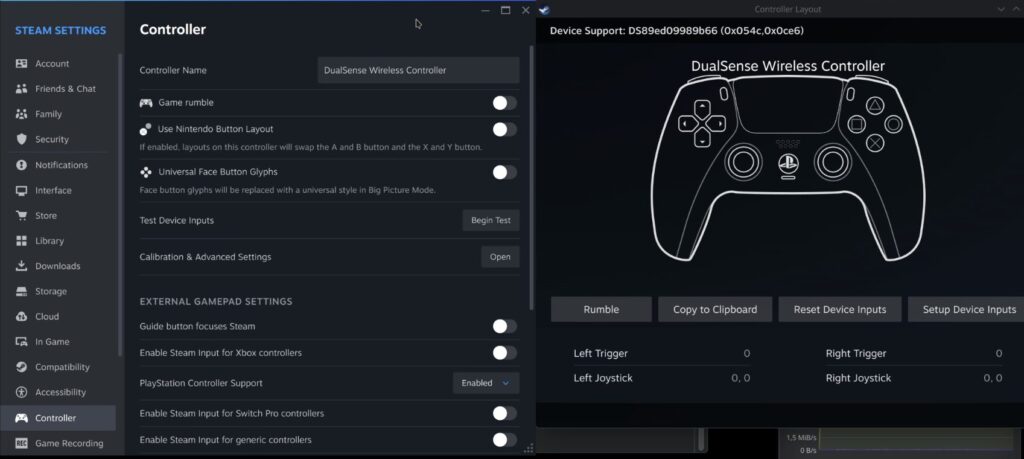
Now restart Sunshine or do a full reboot. Test your controller, it should pop up in Steam now as well:
Happy Gaming! Hopefully, this saves you the hours of troubleshooting it took me. Now, back to Azeroth.
Bonus:
By the way, World of Warcraft with controller still has a long way to go, however I find that Questing, Farming and Delving are some activities one can easily do with a controller. I would not recommend Tanking, I am a main Guardian Druid and while really enticing due to “not that many buttons” tanking is too dynamic for controllers. PVP is extremely hectic, people will run through you to get behind you and you wont be able to turn that fast.
All in all, I guess you can get used to anything, theoretically you also have potential to win the lottery or become a rockstar, but usually a regular job is a more stable income – as is mouse and keyboard for WoW. This was a weird analogy. It’s late here 🙁