Pre-Astro: How I Got My WordPress Cache Above 90%
The caching setup I used before Astro: anonymous HTML at Cloudflare, an origin page cache, Redis limits and tests for private-content bypass.

In this story
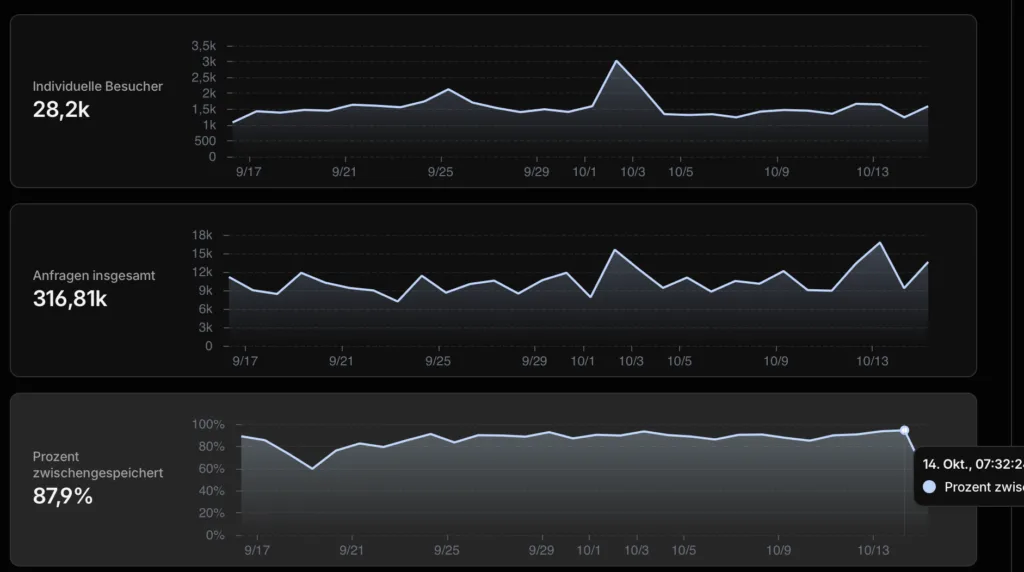
I obsess over caching. My brain occasionally asks, “What if the blog suddenly gets a million concurrent readers?” Apparently the sensible response is to optimize the home server, rather than question the likelihood of that happening. 😁
When I first wrote these notes, the blog was seeing about 1,500 readers a day. Thank you, by the way. ❤️ That is rather fewer than a million simultaneous visitors, but it was enough to make me look properly at how much traffic reached my home connection.
Cloudflare’s cache hit rate was around 13.9%. After changing the anonymous-page caching setup, I observed periods above 90%. That was the result for my traffic and measurement window, not a number two rules will magically reproduce on every WordPress installation.
One important update before the configuration: Karl.Fail now uses Astro and Cloudflare Pages. WordPress is the private editor. This is the story of the public WordPress setup that came before it, for anyone still serving WordPress directly.
Update, 16 October 2026: The WordPress history below is preserved. Jump to what I do now with Astro and Cloudflare Pages for the current caching strategy, exact rules and tested limits.
The Goal Was Less Work for My Home Server
The page was already reasonably quick. What bothered me was repeatedly sending anonymous requests home for content that had not changed.
The old setup had three useful layers:
| Layer | What it helped with |
|---|---|
| Cloudflare edge cache | Serving eligible public responses without contacting the origin |
| Origin page cache | Serving generated HTML when an edge request missed |
| Redis object cache | Reusing WordPress objects during requests that still ran WordPress |

Those are different caches. A high Redis hit ratio does not mean Cloudflare is serving your HTML, and a high edge request hit ratio does not necessarily mean the same percentage of bytes or visitors avoided the origin.
That was my first cleanup: actually read the metric I was trying to improve.

Anonymous HTML Is the Interesting Part
Static assets were easy. HTML needed care because WordPress also serves logged-in, preview and personalized pages.
A broad cache rule with a few exclusions is not a complete policy for every WordPress site. A shop, membership area, language cookie or session plugin can change the response without putting the relevant state in one of the cookies you remembered to exclude.
For a plain blog, a conservative eligibility expression can start with something like this:
http.request.method eq "GET"
and http.request.uri.query eq ""
and not starts_with(http.request.uri.path, "/wp-admin")
and not starts_with(http.request.uri.path, "/wp-login")
and not starts_with(http.request.uri.path, "/wp-json")
and not starts_with(http.request.uri.path, "/wp-cron")
and not starts_with(http.request.uri.path, "/wp-comments-post")
and not starts_with(http.request.uri.path, "/xmlrpc.php")
and not (http.cookie contains "wordpress_logged_in")
and not (http.cookie contains "wordpress_sec_")
and not (http.cookie contains "wp-settings-")
and not (http.cookie contains "comment_author_")
This is an example to adapt, not a certification that the matching response is public. Inspect the plugins, cookies, response headers and routes on your own site. Keep explicit bypass rules for private content, and avoid an Edge TTL override that defeats origin privacy directives.
Cloudflare’s Cache Rules documentation covers eligibility, TTL and rule behavior. Review all matching rules: another rule can change the result after the expression you are currently admiring.
“Respect Origin” does not imply a one-year HTML lifetime. The actual origin headers and cache settings determine the policy.
Updating Content Needs an Invalidation Plan
A cache that serves the wrong version very quickly is still serving the wrong version.
Publishing or editing a post can affect its own URL, the homepage, archives and feeds. Unpublishing needs checking too. The page-cache integration should invalidate the affected pages, and you should verify that against the public domain.
For media, changing the URL when the bytes change is cleaner than hoping a shorter TTL will make a reused filename refresh everywhere at once. Our static frontend now uses content-hashed derivatives. In the old WordPress setup, I used a shorter media TTL as a compromise.
The origin page cache was another useful layer, but its delivery mode matters. Some modes serve static files before WordPress boots; others invoke PHP. Do not copy a WP_CACHE setting from someone else’s installation without checking the plugin’s documented mode and drop-ins.
Redis Needed a Memory Budget
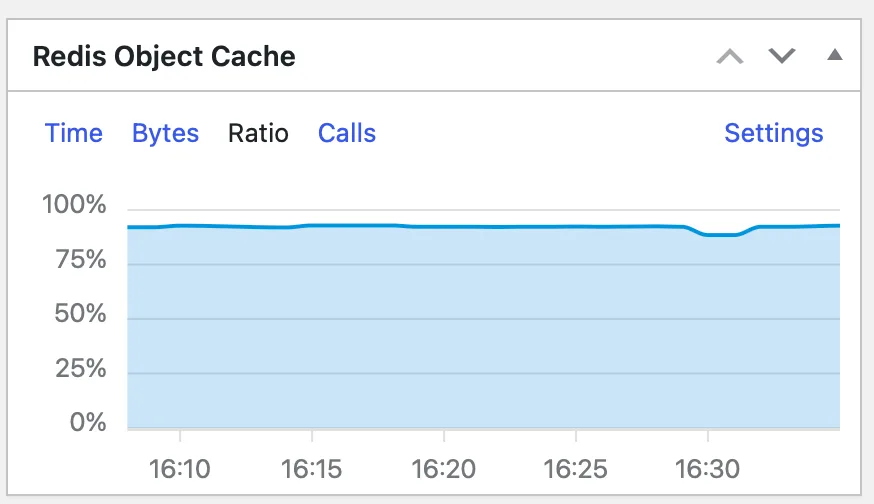
My Redis cache originally had maxmemory 0, meaning no configured Redis memory ceiling. The important correction is that noeviction does not mean “crash when full.” With a configured memory limit, it causes writes that need more memory to fail rather than evict keys. The OS can still run out of memory if the process is left unbounded.
For a Redis instance used only as a disposable WordPress cache, I chose a limit and an eviction policy appropriate to that role:
maxmemory 134217728
maxmemory-policy allkeys-lru
That is 128 MiB. It was my budget, not a universal WordPress requirement. allkeys-lru evicts approximately least-recently-used keys; it is not a strict oldest-first queue. The Redis eviction documentation explains the differences.
Do not apply that policy to an instance also holding important persistent application data. A cache can regenerate missing entries. A queue or datastore may have a very different opinion about you evicting its keys.
Test the Responses, Then Test the Content
I used GET requests to inspect what an ordinary visitor received:
curl --silent --show-error --dump-header - \
  https://blog.example.com/ --output /dev/null
Repeat the request and inspect CF-Cache-Status, Age, Cache-Control and any relevant cookies. A cold miss can be normal. It is not proof that the policy failed.
A synthetic WordPress cookie can check whether your bypass expression matches:
curl --silent --show-error --dump-header - \
  --header 'Cookie: wordpress_logged_in_example=test' \
  https://blog.example.com/ --output /dev/null
That fake cookie does not authenticate a user. Also test a real logged-in session privately, preview URLs, any personalized routes, a fresh edit and an unpublished post. Compare response bodies as well as headers. Seeing MISS once is not proof that a response can never be cached.
Keep session cookies out of shell history and screenshots. I want to show that the cache works, not give somebody an unexpectedly interactive demo of my account.
What the Improvement Actually Meant
The useful result was that far more eligible requests could be served away from my home server. The reported hit rate rose from roughly 13.9% to periods above 90% during that setup.
I am happy with that historical result. It does not guarantee instant pages, origin-outage survival or the same ratio for everyone. Those depend on the cached objects, traffic mix, cache state and the rest of the delivery setup.
Eventually I went further and removed public WordPress from the reading path entirely. The caching work still taught me something useful: before adding another performance plugin, check which requests actually need to reach your application.
And yes, my imaginary million readers remain extremely well provided for. ❤️
What I do now with Astro and Cloudflare Pages
The WordPress setup above did its job. Then I took WordPress off the public request path entirely. Rather than making PHP do less work for every reader, Astro builds the pages before anyone asks for them. WordPress is still my editor, but your browser does not need to wake it up to read this post.
I still want the same thing: as little repeated work as possible, with lots of traffic served from cache. What I have not established yet is that the new site has the same above-90% request hit rate as the old one. That needs a normal traffic window. A handful of warm requests is proof that those objects cache correctly, not proof of a site-wide percentage.
Long cache for files whose names change with their content
My build gives media content-derived filenames, Astro fingerprints its bundles, and Pagefind fingerprints its search data. Those files can have a long lifetime because updated bytes get a different URL.
| Content | Browser policy | Edge policy |
|---|---|---|
Hashed /media/ files and /_astro/ bundles |
One year, immutable | 30 days for successful 200 responses |
| Hashed Pagefind fragments, indexes and metadata | One year, immutable | 30 days for successful 200 responses |
| Article HTML, feeds, sitemap and mutable search files | no-store |
No forced long HTML cache |
The filename is the important bit. I do not give every PNG, JavaScript file or font a year just because of its extension. If I replace logo.svg without renaming it, immutable would be an excellent way to make my next logo somebody else’s problem for a year.
These are the immutable patterns in the generated Pages headers:
/media/*
  Cache-Control: public, max-age=31536000, immutable
/_astro/*
  Cache-Control: public, max-age=31536000, immutable
/pagefind/fragment/en_*.pf_fragment
  Cache-Control: public, max-age=31536000, immutable
/pagefind/index/en_*.pf_index
  Cache-Control: public, max-age=31536000, immutable
/pagefind/pagefind.en_*.pf_meta
  Cache-Control: public, max-age=31536000, immutable
That is safe here because the build controls those namespaces. It rejects HTML inside the asset directories and checks that search data names actually contain hashes. These are not patterns I would paste into an unrelated site without checking what it puts there.
The actual asset Cache Rule
This is the expression running on the karl.fail zone:
(http.host eq "karl.fail" and http.request.method in {"GET" "HEAD"} and (starts_with(http.request.uri.path, "/media/") or starts_with(http.request.uri.path, "/_astro/") or http.request.uri.path wildcard "/pagefind/fragment/en_*.pf_fragment" or http.request.uri.path wildcard "/pagefind/index/en_*.pf_index" or http.request.uri.path wildcard "/pagefind/pagefind.en_*.pf_meta"))The settings are:
- Cache eligibility: eligible for cache.
- Edge TTL: override the origin TTL with 2,592,000 seconds, or 30 days.
- Status-code TTL: store 200 responses for those 30 days; set 100–199 and 201–599 to -1, meaning no-store.
- Browser TTL: respect the response header, which supplies the one-year immutable lifetime.
- Query strings: keep the normal cache key. I have not enabled “ignore all query strings.”
A missing image must stay a missing image, rather than becoming a 30-day cached error. The rule also stays on the apex hostname; it does not silently change caching for other services in the zone.
The second Cache Rule handles names that Pagefind changes in place:
(http.host eq "karl.fail" and http.request.uri.path in {"/pagefind/pagefind.js" "/pagefind/pagefind-worker.js" "/pagefind/pagefind-entry.json" "/pagefind/wasm.en.pagefind" "/pagefind/wasm.unknown.pagefind"})That rule is eligible for cache but uses bypass_by_default for the edge TTL and respects the origin browser TTL. The responses now say no-store. Eligibility is not an instruction to force-cache them anyway. This also avoids the older zone browser-TTL minimum giving mutable search files four hours in a reader’s browser.
Do not mark the whole /pagefind/ directory immutable. pagefind-entry.json, the runtime, worker and WASM files are the moving parts that tell a fresh search session which hashed data belongs to the current build.
Why I did not just cache all the HTML for a week
Because deleting a post should do more than remove its link from the homepage.
During testing, an uploaded page could remain available from Pages after it had disappeared from the new build. A literal redirect for a removed route fixed ordinary URLs, but a warmed URL with an encoded slash or letter could still reach retained content. /some-post%2F was not necessarily treated like the /some-post/ redirect I thought covered it. That was a rather more useful discovery than another green cache chart.
Cloudflare documents both asset retention and the risks of custom caching on Pages. My current answer is a small generated Pages Function in advanced mode. It is still serving prebuilt content; it does not ask WordPress to render each request.
The build gives that Function a list of current routes. The Function normalizes percent encoding once, rejects ambiguous or malformed paths, and checks the result against that list. There is no “try the old public HTML URL anyway” fallback.
For HTML and the other mutable files, it fetches content-addressed backing files such as /_edge/<SHA256>.bin, verifies the bytes against the build’s SHA256, and sends the right content type with:
Cache-Control: no-store
Cloudflare-CDN-Cache-Control: no-store
Those backing URLs are not public routes. A missing or corrupt backing file produces an uncached 503 instead of an older article. A removed article ends at a real 404, including the encoded spellings tested. The history of old routes still supplies redirects for known removed aliases, but the current-route check is what closes the broader gap.
This is an actual Pages Function, so its request limits and failure behavior matter. Its route configuration covers everything:
{"version":1,"include":["/*"],"exclude":[]}Both production and preview are set to fail closed. If the Function cannot run, Pages must not bypass it and expose retained HTML. The Function also applies the security headers and legacy redirects explicitly; _headers and _redirects are not a substitute for handling Function responses correctly. Cloudflare’s advanced-mode documentation explains that responsibility.
Publishing has a rollout window
The publisher checks whether WordPress changed during the build and again before acknowledging the publication. It identifies a release by both its code and content, then checks the live apex and production pages.dev hostname twice before recording success.
That helps, but it is not a magic global switch. We caught one location still serving the previous Function after another location had the new one. I am keeping Pages and accepting that brief deployment rollout window. This setup does not promise that saving a post instantly changes every location worldwide.
Once the new deployment is active, the tests require the updated content or the correct 404. Already-open browser pages, historical deployment snapshots and old hash-named assets are a different matter; deleting a route is not secure erasure of every copy ever delivered.
What I actually tested
The useful evidence came from reading the responses and then checking the content:
- A temporary indexable post went through create, update, rename, draft, republish at the same URL and permanent deletion. There were 520 HTTP checks across both live hostnames, including encoded paths and the old renamed URL.
- Blog listings, the feed, sitemap and current search index followed each publication state. A normal browser reload stopped finding the removed test post.
- The full-site check verified 498 HTML and mutable-file responses against the builder: 497 were byte-for-byte matches; the remaining difference was Cloudflare upgrading one existing HTTP link to HTTPS.
- Eight hashed assets, each requested with a genuinely fresh query key, went from
MISStoHITwith identical SHA256 values. - Chrome reused seven article images with zero network transfer, avoiding 128,578 image body bytes on that reload.
- Range requests, HEAD and ETag responses did not damage the full cached object. Internal backing URLs did not expose the article.
For a quick check of a real asset, I use a full GET so I am testing more than an empty HEAD response:
asset='https://karl.fail/media/00461f9105457ada8a050b2a-160.webp'
curl -sS -D - -o /dev/null "$asset"
curl -sS -D - -o /dev/null "$asset"
Look for CF-Cache-Status: HIT once it is warm and the immutable browser header. Headers are case-insensitive, incidentally. A checker that only recognizes one spelling of cf-cache-status can manufacture a very convincing cache problem. Ask me how I know.
For an article, Cache-Control: no-store is the expected result. I do not expect the homepage to report the same cache status as an immutable image. Pages also has its own asset-serving cache, so a zone-level DYNAMIC label is not a measurement of how much work the private WordPress server did.
The migration tests themselves made the early statistics noisy: lots of one-off image requests, deliberate misses and missing-file tests. Query parameters also create separate cache entries. I want normal traffic to settle before comparing the new request hit rate with the old WordPress screenshot.
Closing Statements
Cacheing for WordPress is very easy, cacheing for Astrojs is actually a little harder since my architecture grew.
Security for Astrojs is a lot easier than for WordPress.
Are you the bestest of all my readers? YES! 🙌