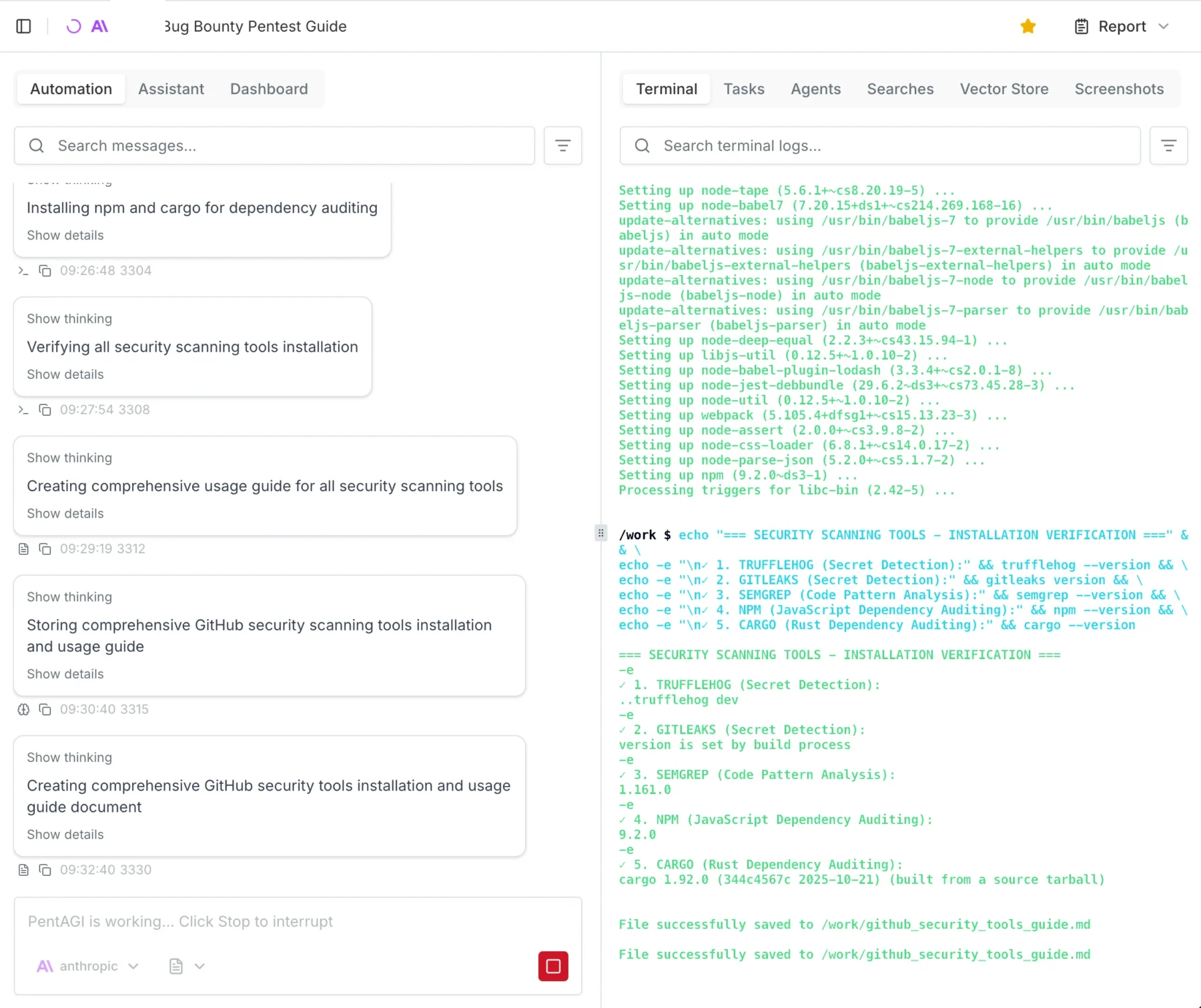
Category: tools

  • I Spent 250€ on AI Pentesting Agents (PentAGI, Strix, Xalgorix)

    I Spent 250€ on AI Pentesting Agents (PentAGI, Strix, Xalgorix)

    Everywhere you go right now, you will encounter AI and people writing about AI. Personally, I am kind of tired of it, but once in a while, I get a tingly feeling that maybe this could actually be useful.

    Since my main income is hacking and protecting people from getting hacked, I figured let’s see how far the “AI Hackers” really are. I fired up my Claude console, bought 250€ worth of API credits, and decided to do some real-world testing.

    When you google “AI Pentest Github,” you will inevitably come across three main open-source AI security agents: PentAGIStrix, and Xalgorix. Instead of relying on vendor promises, I wanted to see if these multi-agent workflows could actually find and exploit real vulnerabilities. In this post, I am breaking down my entire journey, the API costs, and why I think commercial scanners might be in serious trouble.

    The Setup: No Labs, Just Real-World Targets

    Pointing an AI pentester to a lab environment was kind of boring and a waste of credits, so I figured let’s do some real-world hackery (please don’t sue).

    My first target was my employer. (Take that, entity I am not allowed to name here! I am joking, I have written permission to do this.) After that, I pointed the agents at some public bug bounties to see if I could get my money’s worth.

    To set the scope, I basically copied the entire bug bounty page, because reading is for nerds, pasted it into Gemini, and told it to generate a highly specific scoping prompt for an AI pentest agent.

    For hardware I used my home server and spun up a Debian 13 LXC with Docker and Docker Compose installed, nothing fancy:

    • 4 Cores
    • 4GB RAM
    • 100GB Storage

    Meet the AI Pentesting Agents: PentAGI, Strix, and Xalgorix

    To give you the short version of how these tools compare:

    • Xalgorix: This tool underdelivered hard. On paper, it looks great with its massive toolset, but in practice, it kept looping. The UI was buggy, and I didn’t really get anything useful out of it.
    • Strix: Annoyingly, you always need the source code to run tests with Strix. Yes, whitebox testing can be super useful, but I wanted to take a pure blackbox approach.
    • PentAGI: This was exactly what I was looking for, and it actually delivered. Because it was the clear winner, it will be the main focus of this post.
    PentAGI Dashboard Overview
    Example of how to start a test with PentAGI

    Spinning up PentAGI

    Installing PentAGI was so easy I won’t really go into detail here. It is literally a 3-step process: run command, press enter, log in, go.

    Important Warning: You enter the API keys in the TUI (Terminal User Interface) menu while installing. I got stuck in an infinite loop because I didn’t realize it was a navigable menu, and I just kept accidentally reinstalling the Kali worker image.

    I spun up a Debian 13 LXC on my Proxmox server. The recommended specs are:

    • Docker and Docker Compose
    • Minimum 2 vCPU
    • Minimum 4GB RAM
    • 20GB free disk space

    However, I gave it 100GB of disk space, and I highly recommend you give it more resources too. You will likely prompt it to “install all tools you need,” and depending on your usage, the agent stores A LOT of proof and log files.
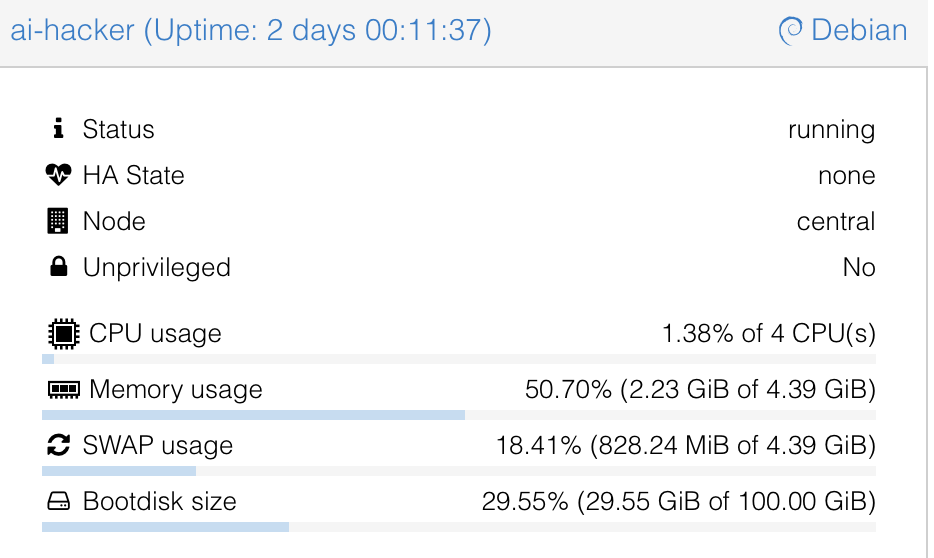
    Note that there are currently running 3 parallel tests on the system and that I ran 15 tests in total, just so you can get a feel for the system requirements.

    OpenAI vs. Claude: Which “Brain” Hacks Better?

    This is going to be a really short section. Claude wins. Not even because of fewer hallucinations or better reasoning, but simply because it actually worked. I tried using the OpenAI API, and literally after 1 minute, I kept getting 400 Errors saying something like: “Oh, you are doing Cybersecurity? Then you must sign up for trusted access. They kept blocking my requests, which was superbly annoying.

    Claude, on the other hand, just did it. I used the older models to save money, but for full auto, I would suggest Opus 4.7. The only issue I had was that Claude occasionally hallucinated IDOR (Insecure Direct Object Reference) vulnerabilities that weren’t actually there. A simple “Show me the proof” prompt helped get it back on track.

    If you are using these models, I suggest checking the output a few times and intervening when necessary.

    The Results: Hallucinations, Triumphs, and Fails

    When the dust settled and the credits were spent, what did PentAGI actually hand over?

    First, let’s talk about the deliverables. PentAGI outputs reports in either Markdown or PDF. My advice? Skip the PDF. It is not well formatted. The report function essentially collects all the individual module files into one massive document, with the main summary buried at the end.

    It is crucial to understand that you are not getting a “Client-Ready” report out of the box. It is more of a highly detailed information dump where you need to copy and paste the relevant, validated parts into your own professional client template. That said, PentAGI is highly configurable. Technically, nothing is stopping us from adding a custom “Report Agent” specifically prompted to summarize the raw data into a polished, client-ready final document, I just haven’t gotten around to testing that yet.

    Battling Hallucinations and Safety Filters

    As I mentioned earlier, you have to be mindful of AI hallucinations. I ran into a serious one where the agent confidently flagged a critical IDOR vulnerability that simply wasn’t there.

    Getting the AI to verify this was a bit of a battle. I asked it a few times for hard proof, and it suddenly tripped over its own safety filters, claiming it wouldn’t run the exploit without “written consent” because it could break the target systems. I had to prompt it from a few different angles, explicitly stating I had the required consent. Ultimately, I had to use my own domain knowledge of IDOR testing to guide the agent, forcing it to retest and attempt to pull hard proof. Once it actually tried, the hallucination was busted.

    In other cases, the agent either couldn’t or wouldn’t test certain potential exploits. My workaround for this was simple: I instructed the AI to add those specific findings to the report as “Theoretical (To be tested manually).”

    The Triumphs

    At the end of the day, this is an AI tool. Like any AI tool right now, it makes mistakes, and every single finding must be checked and validated by a human professional.

    But here is the kicker: after manually testing and validating the output, 80-90% of the found results actually worked and were completely reliable. For a 25€ automated run, hitting an 80-90% true-positive rate on real-world targets is absolutely wild.

    Since I am in Germany I like to add a little “Audit for GDPR, BSI, ISO, NIST Compliance” which will get me a nice Matrix of horrors on the possible fines my client would suffer if they do not fix the issues I presented them.

    The 250€ Bill: Breaking Down the API Costs

    By the time of writing, I am still running 3 tests in the background. Each full test costs about 20-30€ in API credits with the models I used.

    Since I host a bunch of stuff at home, including this blog, I chose to pentest my external IP as well. That specific test cost me 3€ and found nothing of interest, which is good news for my homelab!

    The cool thing about PentAGI is that it tells you exactly where you spent how many tokens and how much it costs so you can really measure and plan how much you will need:

    Token usage after 12 Tests

    Final Verdict: Are Autonomous Hackers Ready for Production?

    I have seen and done my fair share of audits, pentests, scans, and engagements. I have seen better, but I have also seen a lot worse.

    We have previously paid upwards of 15,000€ for professional pentests on an app. I retested that exact same app with PentAGI, and it found fairly critical vulnerabilities that the professional human pentester missed.

    Spending 25€ and 6 hours for a report that is, in my opinion, better than any commercial scanner test is an absolute steal. Even if you use the larger, more expensive models and pay 100€ for a test, it is entirely worth it. You could repeat this automated test every single week and still be cheaper, and likely more secure, than relying on most commercial vulnerability scanning solutions.

    As always, thanks for reading, love you bunches ❤️💅 byeeeeeee

  • BBOT: The Swiss Army Knife for Recon, Bug Bounties, and ASM

    Meet BBOT: Your New Favorite Recon Tool

    BBOT (short for Bee·bot) is a powerful, multipurpose Python-based scanner designed to automate recon, bug bounty hunting, and attack surface management (ASM). Inspired by tools like Spiderfoot but modernized for today’s needs, BBOT delivers speed, modularity, and scalability for cybersecurity professionals and hobbyists alike.

    With native support for multiple targets, extensive output options, and seamless integration with popular APIs, BBOT is more than a tool-it’s a full-fledged recon framework that adapts to your workflow.

    Why BBOT?

    Reconnaissance is the foundation of offensive security. BBOT streamlines this critical phase with:

    • Subdomain enumeration that consistently outperforms other tools
    • Web spidering and email harvesting
    • Light and aggressive web scanning presets
    • YAML-driven customization with modular architecture
    • Support for over a dozen output formats including Neo4j, CSV, JSON, and Splunk

    Installation Made Simple

    To get started with BBOT, simply run:

    pipx install bbot

    For the latest development version:

    pipx install --pip-args '--pre' bbot

    Docker images and advanced installation options are available via the official Getting Started guide.

    Core Features & Usage Examples

    Subdomain Enumeration

    Discover subdomains using passive APIs and brute-force techniques:

    bbot -t evilcorp.com -p subdomain-enum

    BBOT finds 20-50% more subdomains than other tools, especially on larger domains.

    Web Spidering

    Extract emails and files by crawling target websites:

    bbot -t evilcorp.com -p spider

    Email Harvesting

    Scrape email addresses from web content and APIs:

    bbot -t evilcorp.com -p email-enum

    Web Scanning

    Run lightweight or aggressive web scans:

    bbot -t www.evilcorp.com -p web-basic
    bbot -t www.evilcorp.com -p web-thorough

    Everything at Once

    For comprehensive recon in one go:

    bbot -t evilcorp.com -p kitchen-sink --allow-deadly

    Targets and Scope

    BBOT accepts a wide range of target types, including:

    • Domains (e.g. evilcorp.com)
    • IP ranges (e.g. 1.2.3.0/24)
    • URLs, emails, organizations, usernames
    • Even mobile app package names and file paths

    Define scope via command-line or config files to keep scans focused and efficient.

    Output Options

    BBOT can export scan data to:

    • Neo4j, Elasticsearch, and Splunk for advanced querying
    • Slack, Discord, and Microsoft Teams for real-time alerts
    • SQL databases and CSV/JSON files for storage and analysis

    Security and Dependencies

    BBOT supports API key configuration for services like Shodan, VirusTotal, and SecurityTrails. Keys can be added to your ~/.config/bbot/bbot.yml file or passed directly via the command line.

    All dependencies are auto-installed, and Ansible scripts are provided for streamlined environment setup.

    Python API for Developers

    Use BBOT as a library for custom applications. Both synchronous and asynchronous scanning are supported:

    from bbot.scanner import Scanner
    scan = Scanner("evilcorp.com", presets=["subdomain-enum"])

    Community & Contributions

    BBOT thrives on community contributions-from module ideas to code enhancements. Check out the developer docs to get involved.

    Final Thoughts

    BBOT isn’t just another recon tool. It’s a flexible, extensible framework built for modern offensive security workflows. Whether you’re working on bug bounties or managing enterprise attack surfaces, BBOT gives you the power to automate and innovate your reconnaissance efforts.

    Ready to scan smarter? Explore BBOT now.

  • Universal Radio Hacker (URH): Dive Into Wireless Protocol Hacking

    Unleashing the Power of Wireless Hacking with URH

    In the ever-evolving world of cybersecurity, wireless protocols remain one of the most fascinating frontiers. Enter Universal Radio Hacker (URH) – an all-in-one suite designed for investigating, analyzing, and attacking wireless communications. Whether you’re a seasoned pentester or a curious beginner, URH equips you with the tools to uncover what’s really going on over the airwaves.

    What Is URH and Why Should You Care?

    URH is a comprehensive application for decoding and reverse-engineering wireless protocols using Software Defined Radios (SDRs). It allows users to:

    • Demodulate radio signals with ease
    • Automatically detect modulation parameters
    • Decode even complex signal encodings like data whitening
    • Assign and identify protocol message types
    • Fuzz stateless protocols and simulate stateful attacks

    If you’re into IoT security, RF communications, or protocol hacking, URH is your new best friend.

    Real-World Use Cases

    URH has proven invaluable in a wide range of practical scenarios:

    These cases demonstrate URH’s potential to expose vulnerabilities in consumer and industrial wireless systems.

    Installation & Setup

    URH supports Windows, Linux, and macOS, and offers several installation options:

    Windows

    Download the installer and run it. If you encounter a missing DLL error, install KB2999226.

    Linux

    • Recommended: Install via pipx: pipx install urh
    • Or use your distro’s package manager (e.g., Arch, Fedora, openSUSE)
    • Don’t forget to install the necessary SDR -dev packages

    macOS

    • Use the DMG installer (macOS 13+ recommended)
    • Or install via Homebrew: brew install urh

    Docker

    An official Docker image is available on Docker Hub with native backends pre-included.

    Core Features

    • Signal Demodulation: Automatically extract digital data from radio waves
    • Modulation Analysis: Identifies the parameters used for encoding
    • Custom Decodings: Tackle advanced encodings like CC1101 whitening
    • Protocol Inference: Automatic and manual field mapping of wireless messages
    • Signal Fuzzing: Target stateless protocols with crafted transmissions
    • Stateful Simulation: Recreate communication states for complex attacks

    Getting Started Resources

    Need help diving in? Start with:

    Security Considerations

    While URH is powerful, it’s important to operate ethically and within legal boundaries. Always ensure you have permission before intercepting or manipulating wireless signals. URH relies on SDR hardware, so installing correct udev rules (on Linux) and necessary native drivers is crucial for functionality.

    Final Thoughts

    URH stands as a vital tool for researchers, hobbyists, and professionals in the cybersecurity space. Its sleek GUI, advanced capabilities, and cross-platform support make it a must-have for anyone exploring the RF spectrum. With URH, wireless protocol hacking becomes not just accessible-but exhilarating.

    Happy Hacking!

  • Bettercap: The Swiss Army Knife for Network Attacks and Reconnaissance

    Introduction

    If you’re a red teamer, pentester, or cybersecurity enthusiast looking for a powerful and portable tool for network-based reconnaissance and attacks, Bettercap should be on your radar. Written in Go, Bettercap is a flexible, all-in-one framework that empowers users to analyze, attack, and manipulate a variety of wired and wireless protocols with ease.

    With modules for WiFi, Bluetooth Low Energy (BLE), Ethernet, HID, and even CAN-bus networks, Bettercap stands out as a versatile toolkit for both offensive and defensive security operations.

    Purpose and Real-World Use Cases

    Bettercap is built to streamline the workflow of security researchers and red teamers. It enables users to:

    • Perform WiFi reconnaissance and client deauthentication attacks
    • Capture WPA/WPA2/WPA3 handshakes using PMKID and handshake-based methods
    • Scan and interact with BLE devices
    • Inject HID frames for MouseJacking-style attacks
    • Analyze and fuzz CAN-bus networks
    • Conduct MITM (Man-in-the-Middle) attacks on IPv4/IPv6 using ARP, DNS, NDP, and DHCPv6 spoofing
    • Sniff credentials and manipulate network traffic at multiple layers

    Whether you’re simulating attacks in a corporate red team engagement or experimenting in a lab environment, Bettercap provides a streamlined and scriptable platform for tactical operations.

    Installation and Setup

    Bettercap can be easily installed on most Linux distributions and macOS systems. Pre-built binaries and setup guides are available on the official website.

    Basic installation on Linux:

    sudo apt install bettercap

    To use Bettercap effectively, root privileges are typically required due to the nature of its low-level network operations.

    Core Features and Modules

    Bettercap boasts a robust set of modules and capabilities, including:

    • WiFi Attacks: Scan networks, perform deauth attacks, and capture handshakes.
    • BLE Recon: Scan, enumerate characteristics, and read/write to BLE devices.
    • MouseJacking: Inject over-the-air HID payloads with DuckyScript support.
    • CAN-bus Support: Decode, inject, and fuzz frames using DBC files.
    • MITM Toolset: ARP, DNS, NDP, and DHCPv6 spoofers for IPv4 and IPv6 attacks.
    • Proxy Support: Packet-level, TCP-level, and HTTP/HTTPS proxies with JavaScript plugin scripting.
    • Credential Sniffer: Harvest sensitive data and use as a network protocol fuzzer.
    • Port Scanner: Fast and efficient scanner for open ports and services.
    • REST API and Web UI: Automate workflows with a full-featured API and intuitive web interface.

    Security Considerations and Dependencies

    Bettercap is a powerful tool intended for ethical and legal use only. Due to its ability to perform active network attacks, users should:

    • Use Bettercap in controlled environments or with explicit permission
    • Run it with proper administrative privileges (e.g., root)
    • Ensure any custom scripts or plugins are verified and secure

    Its modular architecture and scriptable APIs mean that care should be taken when deploying Bettercap in production-like environments to avoid unintentional network disruption.

    Conclusion

    Bettercap is a cutting-edge toolkit that unifies multiple reconnaissance and attack vectors into a single, cohesive framework. With support for a wide range of protocols and devices, its flexibility is unmatched in the open-source cybersecurity ecosystem.

    Whether you’re performing wireless attacks, exploring BLE devices, fuzzing a CAN-bus, or orchestrating a full-scale MITM campaign, Bettercap provides the tools you need-all in a streamlined, scriptable, and powerful interface.

    Explore more and get started at bettercap.org.

  • Hackingtool: The All-in-One Toolkit for Ethical Hackers

    Introduction

    Looking for a one-stop toolkit that covers every phase of penetration testing and ethical hacking? Look no further than Hackingtool by Z4nzu – an all-in-one hacking framework designed to run on Linux distributions like Kali, Parrot OS, and even within Docker containers. Whether you’re a beginner or a seasoned pro, Hackingtool brings together a massive array of tools under one roof, making your workflow faster, easier, and more efficient.

    Purpose and Real-World Use Cases

    The goal of Hackingtool is to consolidate a wide variety of security tools into a single interface. It’s perfect for:

    • Bug bounty hunters automating reconnaissance and scanning
    • Security researchers needing payload creation and reverse engineering tools
    • CTF participants looking for wireless and web attack capabilities
    • Red teamers needing tools for post-exploitation, forensic analysis, and more

    It’s an ethical hacker’s toolbox – all accessible from one terminal.

    Installation and Setup

    Getting started with Hackingtool is simple. Here’s how to set it up on Linux:

    1. git clone https://github.com/Z4nzu/hackingtool.git
    2. chmod -R 755 hackingtool
    3. cd hackingtool
    4. sudo bash install.sh
    5. sudo hackingtool

    Prefer containers? Hackingtool supports Docker too:

    • Build: docker build -t hackingtool .
    • Run: docker-compose up -d
    • Access: docker exec -it hackingtool bash

    Core Features and Options

    Hackingtool offers a vast set of categorized modules:

    • Information Gathering: Tools like Nmap, RED HAWK, ReconSpider
    • Wireless Attacks: Fluxion, Wifite, EvilTwin, Bluetooth honeypots
    • Web Attacks: SQLMap, NoSQLMap, XSS Con, DalFox
    • Phishing Tools: HiddenEye, ShellPhish, Evilginx2
    • Payload Generators: TheFatRat, MSFvenom Creator, Pixload
    • RATs and Reverse Engineering: Stitch, Apk2Gold, JadX
    • Forensics: Wireshark, Volatility, Bulk Extractor
    • Extra Utilities: Wordlist generators, hash crackers, web crawlers, steganography tools

    The modular design allows users to quickly pick and launch tools without switching environments.

    Security Considerations

    While Hackingtool simplifies access to many powerful tools, it’s critical to use it responsibly:

    • Run the tool as root or with sudo, especially for OS-level tasks.
    • Always operate in controlled or authorized environments like test labs or CTF challenges.
    • Be aware of potential legal implications when using offensive tools.

    Some tools require internet access or additional dependencies, which are typically handled during installation.

    Why It Stands Out

    What makes Hackingtool unique is its breadth. Instead of managing dozens of scripts and platforms, this toolkit organizes them in one unified interface. With frequent updates and contributions from the community, it evolves continuously to meet modern security needs.

    The latest v1.2.0 update added modules for RATs, steganography, web crawling, and fixed various installation issues, making it even more robust.

    Community and Contribution

    Hackingtool is open-source and welcomes contributions. If your favorite tool isn’t included or if you’ve built something worth sharing, you can contribute via pull request or provide feedback using the feedback form.

    You can also follow the developer @_Zinzu07 on Twitter for updates and community engagement.

    Conclusion

    Hackingtool is a powerhouse for anyone serious about ethical hacking. From recon to exploitation to post-exploitation and analysis, it brings the essential capabilities of a full-blown pentesting lab to your terminal. It’s a perfect fit for Linux lovers, students, professionals, and red teamers alike.

    Give it a try, contribute back, and most importantly – use it responsibly. Happy hacking!

  • Hacker101: A Free Web Security Training Platform for Aspiring Hackers

    Introduction

    Whether you’re just getting started in cybersecurity or looking to sharpen your web security skills, Hacker101 is a free, community-driven training platform designed to help you learn ethical hacking and bug bounty techniques from the ground up. Developed by the team at HackerOne, Hacker101 provides a solid foundation for anyone serious about web application security.

    Purpose and Real-World Use Cases

    Hacker101 is perfect for:

    • Aspiring bug bounty hunters looking to land their first report or improve their skills.
    • Web developers who want to secure their applications and understand how attackers think.
    • Security professionals seeking structured, self-paced training material to stay sharp.

    The platform includes video lessons, writeups, CTF-style challenges, and labs that simulate real-world vulnerabilities found in web applications.

    Installation and Setup

    If you’d like to run the Hacker101 site locally or contribute to its content, follow these steps:

    Prerequisites:

    • Ruby – recommended to install via rbenv
    • Bundler – install with: gem install bundler

    Steps:

    1. Clone the repository:
      git clone https://github.com/Hacker0x01/hacker101.git
    2. Navigate to the project directory and install dependencies:
      bundle install
    3. Start the local server:
      bundle exec jekyll serve
    4. Visit http://localhost:4000 in your browser.

    Core Features and Structure

    Hacker101 offers:

    • Video lessons that cover topics like XSS, SQLi, authentication bypasses, and more.
    • Capture the Flag (CTF) challenges to test and apply your knowledge.
    • Writeups from the community and HackerOne staff to deepen your understanding of real-world bugs.
    • Open-source access so you can contribute new lessons or fix existing ones.

    It’s a complete package whether you’re preparing for bug bounty programs or just learning to secure your apps.

    Security Considerations

    Since the platform is educational and does not involve exploiting live systems, it’s perfectly safe to use in any environment. If you’re running the site locally, make sure:

    • You don’t expose it to the internet unintentionally.
    • You keep Ruby and dependencies up-to-date to avoid local vulnerabilities.

    Why Hacker101?

    Hacker101 stands out by being:

    • Beginner-friendly with clear, step-by-step lessons.
    • Accessible through its free and open-source content.
    • Practical with exercises that reflect real bug bounty scenarios.

    Backed by HackerOne, it also gives you the opportunity to practice with CTFs and potentially earn invites to private programs.

    Get Involved

    You can contribute to Hacker101 by submitting pull requests, fixing issues, or even creating new lessons. Community collaboration is encouraged and welcomed through GitHub.

    Conclusion

    Hacker101 is more than a course-it’s a stepping stone into the professional world of ethical hacking and web security. If you’re ready to learn how the internet can be broken (and how to fix it), this is your invitation to dive in.

    Start learning at https://www.hacker101.com.

  • Master Reverse Engineering with this Free, All-in-One Assembly Course

    Unlock the Power of Reverse Engineering

    If you’re fascinated by the inner workings of software, malware analysis, or just want to level up your cybersecurity game, the Reverse Engineering repository by mytechnotalent is your new best friend. This free and comprehensive resource covers a wide array of architectures including x86, x64, 32-bit/64-bit ARM, 8-bit AVR, and 32-bit RISC-V. It’s a goldmine for anyone passionate about diving deep into the low-level world of software and systems hacking.

    Who Is This For?

    This tool is perfect for:

    • Beginners eager to learn Assembly and low-level hacking
    • CTF players and security researchers looking to expand their toolkit
    • Advanced users wanting a consolidated resource for multiple architectures
    • Anyone pursuing a career in malware analysis, reverse engineering, or embedded systems

    How to Get Started

    Getting started is super easy. There’s no complex setup-just head to the official ebook site or download the PDF version and start reading. No registration, no paywalls-completely open and free!

    What’s Inside?

    The project includes an immense catalog of lessons and challenges. Here’s what you can expect:

    🔥 x86 Course (40+ Lessons)

    • Assembly basics and malware analysis
    • Memory management: stack, heap, registers
    • Binary and hexadecimal systems
    • Debugger deep dives using GDB
    • Hands-on hacking exercises

    ⚡ ARM-32 & ARM-64 Courses

    • Complete architectural breakdown
    • Hands-on programming, debugging, and hacking examples
    • Real projects for Raspberry Pi

    💻 x64 Course

    • Advanced concepts like boot sector analysis and calling conventions
    • Use of C++ alongside assembly for practical reverse engineering

    🔍 Special Topics

    • Neural network hacking
    • Reverse Engineering GPT
    • Windows API hacking
    • IoT firmware analysis

    Key Features

    • Multi-Architecture Coverage: Learn x86, x64, ARM (32/64), AVR, RISC-V
    • CTF Challenges: Sharpen your skills with real-world Capture The Flag exercises
    • Neural Network & AI Hacking: Dive into modern attack surfaces
    • Project-Based Learning: Apply your knowledge to hands-on embedded and OS-level challenges
    • Absolutely Free: Open-source and community-driven

    Security Considerations

    Always use caution when analyzing or running malware samples or low-level code, especially on production systems. A virtual machine or sandbox environment is highly recommended. While the course content is safe, some exercises involve live debugging and binary manipulation that can affect system stability if done improperly.

    Technical Terms Explained

    • Assembly Language: A low-level programming language that interacts directly with a computer’s hardware.
    • Reverse Engineering: The process of analyzing software to understand its structure, function, and operation.
    • GDB: The GNU Debugger, a tool to debug programs written in C, C++, and Assembly.
    • Registers: Small storage locations in the CPU used to quickly access data and instructions.

    Join the Community

    Need support or want to geek out with others? Join the DC540 Discord server where enthusiasts and professionals gather to share tips, tricks, and feedback.

    Final Thoughts

    The Reverse Engineering repo isn’t just a course-it’s a movement. With over 12,000 stars on GitHub, it’s become a go-to reference for cybersecurity professionals and hobbyists alike. Whether you want to understand malware, tweak embedded systems, or just become a better hacker, this resource has something powerful to offer.

    Don’t just learn hacking-understand how computers think.

    ➡️ Start learning now: GitHub Repository

  • OWASP Juice Shop: The Most Broken Secure App You’ll Ever Love

    Welcome to OWASP Juice Shop: The Buggiest Secure App Around

    Meet OWASP Juice Shop – the most modern and sophisticated intentionally insecure web application ever made. Designed for training, awareness, CTFs, and tool testing, Juice Shop is a security testing playground disguised as an online store. With vulnerabilities from the entire OWASP Top Ten and more, this app is your one-stop-shop for learning about web application security by doing.

    Why Juice Shop Is a Must-Have for Security Learners

    Whether you’re a student, ethical hacker, developer, or trainer, Juice Shop offers realistic hacking scenarios that mirror issues in real-world applications. You can:

    • Practice exploiting XSS, SQLi, CSRF, and many more vulnerabilities
    • Host Capture the Flag events with built-in scoring and challenges
    • Use it to test security scanners and automation tools
    • Teach secure coding through interactive, hands-on examples

    Installation & Setup

    Juice Shop runs virtually anywhere! Choose the method that fits your workflow best:

    1. From Source

    • Install Node.js (v18.x to v22.x recommended)
    • Clone the repo: git clone https://github.com/juice-shop/juice-shop.git --depth 1
    • cd juice-shop
    • npm install
    • npm start

    2. Packaged Distributions

    • Download the latest release for your platform
    • Unzip and run npm start

    3. Docker

    • Install Docker
    • docker pull bkimminich/juice-shop
    • docker run --rm -p 127.0.0.1:3000:3000 bkimminich/juice-shop

    4. Vagrant

    • Install Vagrant and VirtualBox
    • git clone https://github.com/juice-shop/juice-shop.git
    • cd vagrant && vagrant up

    Core Features

    • OWASP Top 10 Coverage: Every major web vulnerability is here
    • Gamified Learning: Complete challenges and track your score
    • CTF-Ready: Easily host security competitions with built-in support
    • Multiple Deployments: Supports Docker, Node.js, Vagrant, and cloud platforms
    • Custom Branding: Make it your own with rebranding support

    Security Concepts in Action

    OWASP Juice Shop isn’t just about theory. You’ll get to practice:

    • Injection attacks (SQL, NoSQL)
    • Cross-Site Scripting (XSS)
    • Broken authentication and access control
    • Security misconfigurations and more

    Each vulnerability is paired with a challenge – many with hints and full walkthroughs in the official companion guide.

    Support & Community

    Stuck? Check out the troubleshooting guide or hop on the Gitter Chat. Contributions, translations, and improvements are always welcome.

    Security Considerations

    Juice Shop is intentionally vulnerable. Do not deploy it on the public internet without proper containment (e.g., firewalls or VMs). Use it responsibly for ethical hacking and educational purposes only.

    Final Thoughts

    OWASP Juice Shop transforms the process of learning application security from boring lectures into an exciting, hands-on experience. With broad vulnerability coverage, multiple deployment options, and strong community support, it’s the ideal sandbox for anyone serious about web security.

    Ready to challenge yourself? Then Juice Shop is waiting.

  • Discover Hidden Web Paths with dirsearch: The Ultimate Web Path Brute-Forcer

    What is dirsearch?

    dirsearch is a powerful, open-source web path brute-forcing tool designed to help security professionals uncover hidden directories and files on web servers. Created and actively maintained by @maurosoria and @shelld3v, dirsearch is an essential utility for penetration testers, bug bounty hunters, and cybersecurity enthusiasts.

    Whether you’re looking to uncover admin panels, configuration files, or forgotten endpoints, dirsearch empowers you to automate the hunt-fast, reliably, and efficiently.

    Why Use dirsearch?

    • Discover unlinked directories or hidden files
    • Enhance reconnaissance in penetration testing
    • Boost bug bounty workflow
    • Bypass misconfigured security through crafted brute-forcing

    Installation & Setup

    dirsearch requires Python 3.9+ and can be installed in multiple ways:

    • Git (Recommended): git clone https://github.com/maurosoria/dirsearch.git --depth 1
    • PyPi: pip install dirsearch
    • Docker: docker build -t "dirsearch:v0.4.3" .
    • Kali Linux: sudo apt-get install dirsearch (Deprecated)

    Core Features & Examples

    Basic Usage

    Start a scan with:

    python3 dirsearch.py -u https://target

    Add extensions and wordlists:

    python3 dirsearch.py -u https://target -e php,html,js -w /path/to/wordlist.txt

    Recursion & Depth Control

    Enable recursive scanning with -r and set depth with:

    python3 dirsearch.py -u https://target -e php -r --max-recursion-depth 3

    Filters

    Exclude response sizes or unwanted text:

    --exclude-sizes 0B,4KB
    --exclude-text "403 Forbidden"

    Threads & Performance

    Boost speed with threads:

    -t 50

    Or switch to asynchronous mode:

    --async

    Prefixes & Suffixes

    Add common naming patterns:

    --prefixes .,admin
    --suffixes ~

    Wordlists

    Supports multiple and formatted wordlists. For example, generate:

    • adminadmin admin.php admin.html with --force-extensions
    • login.htmllogin.jsp with --overwrite-extensions

    Raw Requests

    Import HTTP raw requests:

    --raw request.txt --scheme https

    Reports

    Generate results in multiple formats:

    • HTML
    • JSON
    • CSV
    • SQLite
    • PostgreSQL/MySQL
    --format html -o results.html

    Security Considerations

    • High thread count or aggressive timing may trigger WAFs or rate-limiting.
    • Recursive scans can be heavy-always limit depth and size.
    • Use proxies and randomized User-Agents to reduce detectability.

    Advanced Usage Tips

    • Combine --prefixes . and --suffixes ~ to locate backup or config files
    • Use --remove-extensions to focus on directories only
    • Handle 429 rate limits with --skip-on-status 429
    • Speed up large scans using --timeout 3 --retries 1

    Docker Integration

    Build and run with Docker:

    docker build -t "dirsearch:v0.4.3" .
    docker run -it --rm "dirsearch:v0.4.3" -u https://target -e php,html,js

    Community & Contributions

    Join the conversation on the Discord server or contribute via GitHub. dirsearch is licensed under the GNU General Public License v2 and thrives on community feedback and support.

    Final Thoughts

    dirsearch is a must-have tool for any web application security testing toolkit. It offers an immense set of features, fine-grained control, and performance that rivals commercial tools-all wrapped in a clean, Python-powered package.

    If you’re serious about finding hidden web content, don’t miss out on dirsearch!

  • Mastering Web Application Security with the OWASP Web Security Testing Guide

    What Is the OWASP Web Security Testing Guide (WSTG)?

    The OWASP Web Security Testing Guide (WSTG) is a flagship project by the Open Web Application Security Project (OWASP), providing a comprehensive framework for testing the security of web applications and web services. Whether you’re a penetration tester, security analyst, developer, or IT manager, the WSTG helps standardize how you approach web application security testing.

    Created by a global team of security professionals and contributors, WSTG is a living document that’s constantly evolving to address modern threats. It’s widely used across the cybersecurity industry for ensuring thorough assessments and best practices.

    Why WSTG Matters

    Web applications are a primary target for attackers. The WSTG provides:

    • A structured approach to web application security testing
    • Best practice scenarios that cover everything from information gathering to business logic testing
    • Support for penetration testing teams, secure SDLC processes, and auditing standards
    • Globally recognized and regularly updated documentation

    Getting Started

    You can start using the WSTG right away by visiting the official project site. The most stable version is version 4.2, but version 5.0 is actively in development on GitHub.

    Each test scenario is assigned an identifier like WSTG-INFO-02. To ensure consistency across documents and tools, it’s recommended to use versioned identifiers like WSTG-v42-INFO-02.

    How to Use WSTG

    The WSTG is divided into categories, each representing a specific area of concern in web security, such as:

    • Information Gathering
    • Configuration and Deployment Management
    • Authentication and Session Management
    • Input Validation and Business Logic Testing
    • Error Handling and Cryptography

    Each section provides a step-by-step methodology and rationale, allowing testers to follow consistent practices. You can integrate WSTG into your test plans or use it as a standalone manual.

    Contribution and Community

    WSTG is powered by volunteers, and contributions are always welcome. You can help by:

    • Fixing typos and improving documentation
    • Translating the guide into different languages
    • Submitting new test scenarios or improvements via pull requests
    • Joining discussions in the OWASP Slack channel #testing-guide

    Check out the contribution guide to get started. First-time contributors will find helpful resources curated to make onboarding easier.

    Security Considerations

    While the WSTG is a documentation project, it underpins many security assessments. Following its methodology ensures consistent, thorough testing and improves your defense posture. Be sure to:

    • Reference versioned links to maintain consistency
    • Use it alongside automation tools where applicable
    • Stay updated with the latest version for new threats

    Translations

    The guide is available in multiple languages, including:

    • Portuguese (Brazil)
    • Russian
    • French
    • Persian (Farsi)

    This helps non-English-speaking professionals adopt industry best practices without language barriers.

    Final Thoughts

    The OWASP Web Security Testing Guide is more than just a handbook-it’s a foundation for anyone looking to perform in-depth, effective web application security assessments. Its structured approach, community-driven updates, and global reach make it one of the most trusted resources in cybersecurity today.

    Explore the WSTG and start building more secure applications today.