Everywhere you go right now, you will encounter AI and people writing about AI. Personally, I am kind of tired of it, but once in a while, I get a tingly feeling that maybe this could actually be useful.
Since my main income is hacking and protecting people from getting hacked, I figured let’s see how far the “AI Hackers” really are. I fired up my Claude console, bought 250€ worth of API credits, and decided to do some real-world testing.
When you google “AI Pentest Github,” you will inevitably come across three main open-source AI security agents: PentAGI, Strix, and Xalgorix. Instead of relying on vendor promises, I wanted to see if these multi-agent workflows could actually find and exploit real vulnerabilities. In this post, I am breaking down my entire journey, the API costs, and why I think commercial scanners might be in serious trouble.
The Setup: No Labs, Just Real-World Targets
Pointing an AI pentester to a lab environment was kind of boring and a waste of credits, so I figured let’s do some real-world hackery (please don’t sue).
My first target was my employer. (Take that, entity I am not allowed to name here! I am joking, I have written permission to do this.) After that, I pointed the agents at some public bug bounties to see if I could get my money’s worth.
To set the scope, I basically copied the entire bug bounty page, because reading is for nerds, pasted it into Gemini, and told it to generate a highly specific scoping prompt for an AI pentest agent.
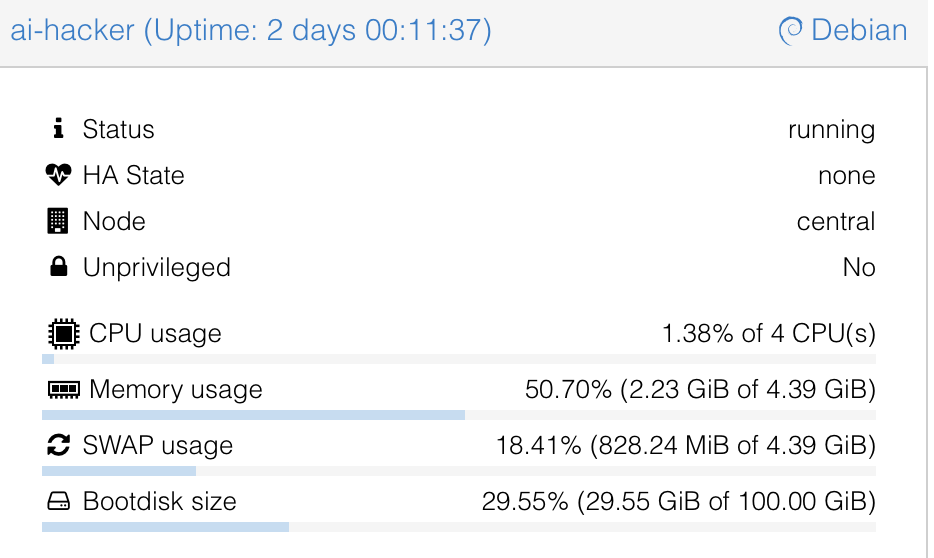
For hardware I used my home server and spun up a Debian 13 LXC with Docker and Docker Compose installed, nothing fancy:
4 Cores
4GB RAM
100GB Storage
Meet the AI Pentesting Agents: PentAGI, Strix, and Xalgorix
To give you the short version of how these tools compare:
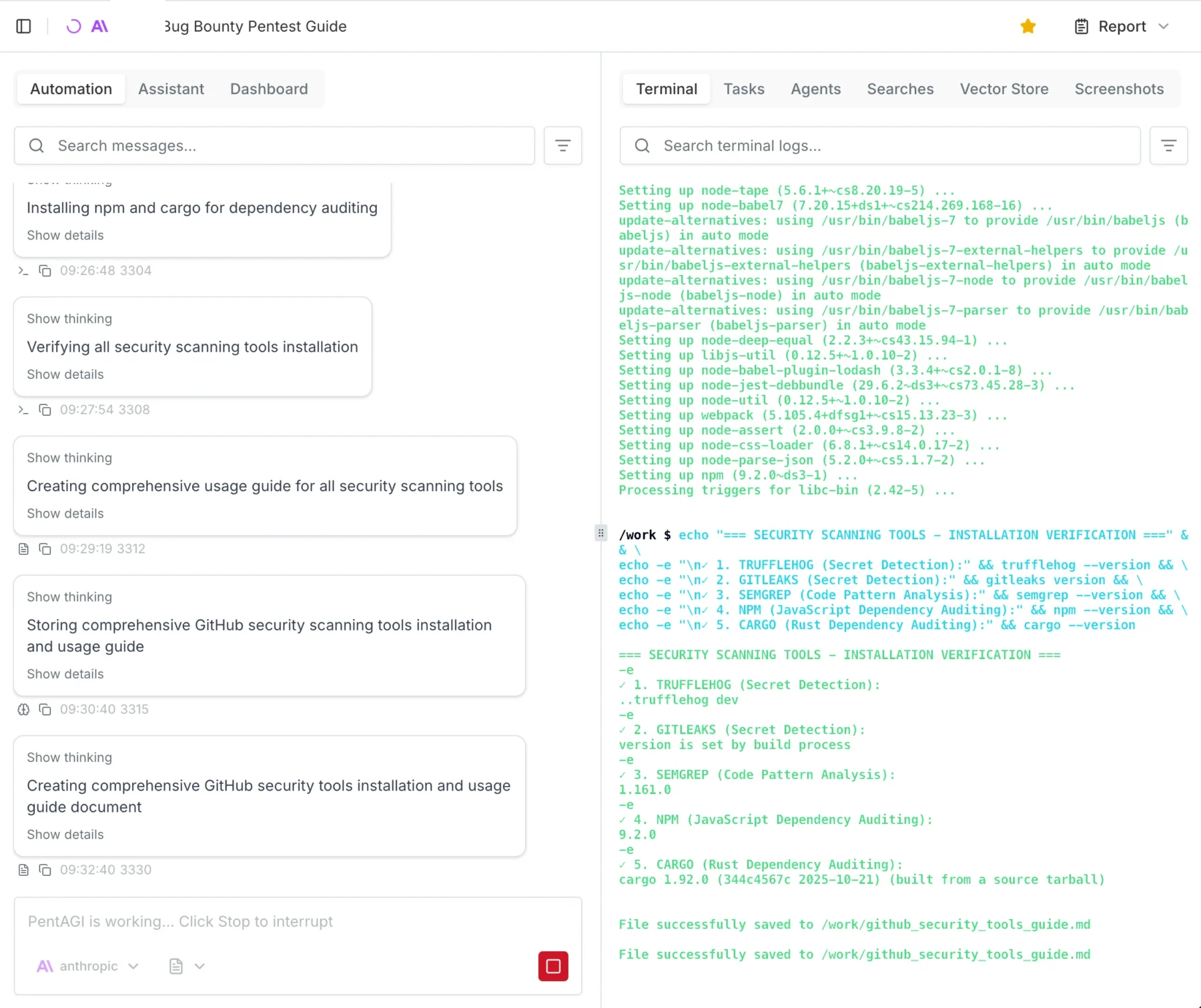
Xalgorix: This tool underdelivered hard. On paper, it looks great with its massive toolset, but in practice, it kept looping. The UI was buggy, and I didn’t really get anything useful out of it.
Strix: Annoyingly, you always need the source code to run tests with Strix. Yes, whitebox testing can be super useful, but I wanted to take a pure blackbox approach.
PentAGI: This was exactly what I was looking for, and it actually delivered. Because it was the clear winner, it will be the main focus of this post.
PentAGI Dashboard OverviewExample of how to start a test with PentAGI
Spinning up PentAGI
Installing PentAGI was so easy I won’t really go into detail here. It is literally a 3-step process: run command, press enter, log in, go.
Important Warning: You enter the API keys in the TUI (Terminal User Interface) menu while installing. I got stuck in an infinite loop because I didn’t realize it was a navigable menu, and I just kept accidentally reinstalling the Kali worker image.
I spun up a Debian 13 LXC on my Proxmox server. The recommended specs are:
Docker and Docker Compose
Minimum 2 vCPU
Minimum 4GB RAM
20GB free disk space
However, I gave it 100GB of disk space, and I highly recommend you give it more resources too. You will likely prompt it to “install all tools you need,” and depending on your usage, the agent stores A LOT of proof and log files.
Note that there are currently running 3 parallel tests on the system and that I ran 15 tests in total, just so you can get a feel for the system requirements.
OpenAI vs. Claude: Which “Brain” Hacks Better?
This is going to be a really short section. Claude wins. Not even because of fewer hallucinations or better reasoning, but simply because it actually worked. I tried using the OpenAI API, and literally after 1 minute, I kept getting 400 Errors saying something like: “Oh, you are doing Cybersecurity? Then you must sign up for trusted access.“ They kept blocking my requests, which was superbly annoying.
Claude, on the other hand, just did it. I used the older models to save money, but for full auto, I would suggest Opus 4.7. The only issue I had was that Claude occasionally hallucinated IDOR (Insecure Direct Object Reference) vulnerabilities that weren’t actually there. A simple “Show me the proof” prompt helped get it back on track.
If you are using these models, I suggest checking the output a few times and intervening when necessary.
The Results: Hallucinations, Triumphs, and Fails
When the dust settled and the credits were spent, what did PentAGI actually hand over?
First, let’s talk about the deliverables. PentAGI outputs reports in either Markdown or PDF. My advice? Skip the PDF. It is not well formatted. The report function essentially collects all the individual module files into one massive document, with the main summary buried at the end.
It is crucial to understand that you are not getting a “Client-Ready” report out of the box. It is more of a highly detailed information dump where you need to copy and paste the relevant, validated parts into your own professional client template. That said, PentAGI is highly configurable. Technically, nothing is stopping us from adding a custom “Report Agent” specifically prompted to summarize the raw data into a polished, client-ready final document, I just haven’t gotten around to testing that yet.
Battling Hallucinations and Safety Filters
As I mentioned earlier, you have to be mindful of AI hallucinations. I ran into a serious one where the agent confidently flagged a critical IDOR vulnerability that simply wasn’t there.
Getting the AI to verify this was a bit of a battle. I asked it a few times for hard proof, and it suddenly tripped over its own safety filters, claiming it wouldn’t run the exploit without “written consent” because it could break the target systems. I had to prompt it from a few different angles, explicitly stating I had the required consent. Ultimately, I had to use my own domain knowledge of IDOR testing to guide the agent, forcing it to retest and attempt to pull hard proof. Once it actually tried, the hallucination was busted.
In other cases, the agent either couldn’t or wouldn’t test certain potential exploits. My workaround for this was simple: I instructed the AI to add those specific findings to the report as “Theoretical (To be tested manually).”
The Triumphs
At the end of the day, this is an AI tool. Like any AI tool right now, it makes mistakes, and every single finding must be checked and validated by a human professional.
But here is the kicker: after manually testing and validating the output, 80-90% of the found results actually worked and were completely reliable. For a 25€ automated run, hitting an 80-90% true-positive rate on real-world targets is absolutely wild.
Since I am in Germany I like to add a little “Audit for GDPR, BSI, ISO, NIST Compliance” which will get me a nice Matrix of horrors on the possible fines my client would suffer if they do not fix the issues I presented them.
The 250€ Bill: Breaking Down the API Costs
By the time of writing, I am still running 3 tests in the background. Each full test costs about 20-30€ in API credits with the models I used.
Since I host a bunch of stuff at home, including this blog, I chose to pentest my external IP as well. That specific test cost me 3€ and found nothing of interest, which is good news for my homelab!
The cool thing about PentAGI is that it tells you exactly where you spent how many tokens and how much it costs so you can really measure and plan how much you will need:
Token usage after 12 Tests
Final Verdict: Are Autonomous Hackers Ready for Production?
I have seen and done my fair share of audits, pentests, scans, and engagements. I have seen better, but I have also seen a lot worse.
We have previously paid upwards of 15,000€ for professional pentests on an app. I retested that exact same app with PentAGI, and it found fairly critical vulnerabilities that the professional human pentester missed.
Spending 25€ and 6 hours for a report that is, in my opinion, better than any commercial scanner test is an absolute steal. Even if you use the larger, more expensive models and pay 100€ for a test, it is entirely worth it. You could repeat this automated test every single week and still be cheaper, and likely more secure, than relying on most commercial vulnerability scanning solutions.
As always, thanks for reading, love you bunches ❤️💅 byeeeeeee

For a long time, I was a loyal subscriber to ChatGPT Plus. I happily paid the €23.99/month to access the best AI models. But recently, my focus shifted. I’m currently optimizing my finances to invest more in index ETFs and aim for early retirement (FIRE). Every Euro counts.
That’s when I stumbled upon a massive opportunity: Gemini Advanced.
I managed to snag a promotional deal for Gemini Advanced at just €8.99/month. That is nearly 65% cheaper than ChatGPT Plus for a comparable, and in some ways superior, feature set. Multimodal capabilities, huge context windows, and deep Google integration for the price of a sandwich? That is an immediate win for my portfolio.
(Not using AI obviously is not an option anymore in 2026, sorry not sorry)
The Developer Nightmare: Scraping ChatGPT
As a developer, I love automating tasks. With ChatGPT, I built my own “API” to bypass the expensive official token costs. I wrote a script to automate the web interface, but it was a maintenance nightmare.
The ChatGPT website and app seemed to change weekly. Every time they tweaked a div class or a button ID, my script broke. I spent more time fixing my “money-saving” tool than actually using it. It was painful, annoying, and unreliable.
The Python Upgrade: Unlocking Gemini
When I switched to Gemini, I looked for a similar solution and found an open-source gem: Gemini-API by HanaokaYuzu.
This developer has built an incredible, stable Python wrapper for the Gemini Web interface. It pairs perfectly with my new subscription, allowing me to interact with Gemini Advanced programmatically through Python.
I am now paying significantly less money for a cutting-edge AI model that integrates seamlessly into my Python workflows. If you are looking to cut subscriptions without cutting capabilities, it’s time to look at Gemini.
The Setup Guide
How to Set Up Your Python Wrapper
If you want to use the HanaokaYuzu wrapper to mimic the web interface, you will need to grab your session cookies. This effectively “logs in” the script as you.
⚠️ Important Note: This method relies on your browser cookies. If you log out of Google or if the cookies expire, you will need to repeat these steps. For a permanent solution, use the official Gemini API and Google Cloud.
Step 1: Get Your Credentials
You don’t need a complex API key for this wrapper; you just need to prove you are a human. Here is how to find your __Secure-1PSID and __Secure-1PSIDTS tokens: Copy the long string of characters from the Value column for both.
Open your browser (Chrome, Firefox, or Edge) and navigate to gemini.google.com.
Ensure you are logged into the Google account you want to use.
Open the Developer Tools:
Windows/Linux: Press F12 or Ctrl + Shift + I.
Mac: Press Cmd + Option + I.
Navigate to the Application tab (in Chrome/Edge) or the Storage tab (in Firefox).
Ensure you are logged into the Google account you want to use.
On the left sidebar, expand the Cookies dropdown and select https://gemini.google.com.
Look for the following two rows in the list:
__Secure-1PSID
__Secure-1PSIDTS
Step 2: Save the Cookies
Add a .env to your coding workspace:
# Gemini API cookiesSECURE_1PSID=g.a00SECURE_1PSIDTS=sidts-CjE
Examples
Automating Image Generation
We have our cookies, we have our wrapper, and now we are going to build with Nano Banana. This script will hit the Gemini API, request a specific image, and save it locally, all without opening a browser tab.
Here is the optimized, async-ready Python script:
import asyncioimport osimport sysfrom pathlib import Path# Third-party importsfrom dotenv import load_dotenvfrom gemini_webapi import GeminiClient, set_log_levelfrom gemini_webapi.constants import Model# Load environment variablesload_dotenv()Secure_1PSID = os.getenv("SECURE_1PSID")Secure_1PSIDTS = os.getenv("SECURE_1PSIDTS")# Enable logging for debuggingset_log_level("INFO")defget_client():"""Initialize the client with our cookies."""return GeminiClient(Secure_1PSID, Secure_1PSIDTS, proxy=None)asyncdefgen_and_edit():# Setup paths temp_dir = Path("temp") temp_dir.mkdir(exist_ok=True)# Import our local watermark remover (see next section)# We add '.' to sys.path to ensure Python finds the file sys.path.append('.')try:from watermark_remover import remove_watermarkexceptImportError:print("Warning: Watermark remover module not found. Skipping cleanup.") remove_watermark =None client = get_client()await client.init() prompt ="Generate a photorealistic picture of a ragdoll cat dressed as a baker inside of a bakery shop"print(f"🎨 Sending prompt: {prompt}") response =await client.generate_content(prompt)for i, image inenumerate(response.images): filename =f"cat_{i}.png" img_path = temp_dir / filename# Save the raw image from Geminiawait image.save(path="temp/", filename=filename, verbose=True)# If we have the remover script, clean the image immediatelyif remove_watermark:print(f"✨ Polishing image: {img_path}") cleaned = remove_watermark(img_path) cleaned.save(img_path)print(f"✅ Done! Saved to: {img_path}")if__name__=="__main__": asyncio.run(gen_and_edit())
If you have ever tried running a high-quality image generator (like Flux or SDXL) on your own laptop, you know the pain. You need massive amounts of VRAM, a beefy GPU, and patience. Using Gemini offloads that heavy lifting to Google’s supercomputers, saving your hardware.
But there is a “tax” for this free cloud compute: The Watermark.
Gemini stamps a semi-transparent logo on the bottom right of every image. While Google also uses SynthID (an invisible watermark for AI detection), the visible logo ruins the aesthetic for professional use.
The Fix: Mathematical Cleaning
You might think you need another AI to “paint over” the watermark, but that is overkill. Since the watermark is always the same logo applied with the same transparency, we can use Reverse Alpha Blending.
I found an excellent Python implementation by journey-ad (ported to Python here) that subtracts the known watermark values from the pixels to reveal the original colors underneath.
⚠️ Important Requirement: To run the script below, you must download the alpha map files (bg_48.png and bg_96.png) from the original repository and place them in the same folder as your script.
Here is the cleaning module:
#!/usr/bin/env python3"""Gemini Watermark Remover - Python ImplementationPorted from journey-ad/gemini-watermark-remover"""import sysfrom pathlib import PathfromPILimport Imageimport numpy as npfrom io import BytesIO# Ensure bg_48.png and bg_96.png are in this folder!ASSETS_DIR= Path(__file__).parentdefload_alpha_map(size):"""Load and calculate alpha map from the background assets.""" bg_path =ASSETS_DIR/f"bg_{size}.png"ifnot bg_path.exists():raiseFileNotFoundError(f"Missing asset: {bg_path} - Please download from repo.") bg_img = Image.open(bg_path).convert('RGB') bg_array = np.array(bg_img, dtype=np.float32)# Normalize to [0, 1]return np.max(bg_array, axis=2) /255.0# Cache the maps so we don't reload them every time_ALPHA_MAPS= {}defget_alpha_map(size):if size notin_ALPHA_MAPS:_ALPHA_MAPS[size] = load_alpha_map(size)return_ALPHA_MAPS[size]defdetect_watermark_config(width, height):""" Gemini uses a 96px logo for images > 1024px, and a 48px logo for everything else. """if width >1024and height >1024:return {"logo_size": 96, "margin": 64}else:return {"logo_size": 48, "margin": 32}defremove_watermark(image, verbose=False):""" The Magic: Reverses the blending formula: original = (watermarked - alpha * logo) / (1 - alpha) """# Load image and convert to RGBifisinstance(image, (str, Path)): img = Image.open(image).convert('RGB')elifisinstance(image, bytes): img = Image.open(BytesIO(image)).convert('RGB')else: img = image.convert('RGB') width, height = img.size config = detect_watermark_config(width, height) logo_size = config["logo_size"] margin = config["margin"]# Calculate position (Bottom Right) x = width - margin - logo_size y = height - margin - logo_sizeif x <0or y <0:return img # Image too small# Get the math ready alpha_map = get_alpha_map(logo_size) img_array = np.array(img, dtype=np.float32)LOGO_VALUE=255.0# The watermark is whiteMAX_ALPHA=0.99# Prevent division by zero# Process only the watermark areafor row inrange(logo_size):for col inrange(logo_size): alpha = alpha_map[row, col]# Skip noiseif alpha <0.002: continue alpha =min(alpha, MAX_ALPHA)# Apply the reverse blend to R, G, B channelsfor c inrange(3): pixel_val = img_array[y + row, x + col, c] restored = (pixel_val - alpha *LOGO_VALUE) / (1.0- alpha) img_array[y + row, x + col, c] =max(0, min(255, round(restored)))return Image.fromarray(img_array.astype(np.uint8), 'RGB')# Main block for CLI usageif__name__=="__main__":iflen(sys.argv) <2:print("Usage: python remover.py <image_path>") sys.exit(1) img_path = Path(sys.argv[1]) result = remove_watermark(img_path, verbose=True) output = img_path.parent /f"{img_path.stem}_clean{img_path.suffix}" result.save(output)print(f"Saved cleaned image to: {output}")
You could now build som etching with FastAPI on top of this and have your own image API! Yay.
The “LinkedIn Auto-Pilot” (With Memory)
⚠️ The Danger Zone (Read This First)
Before we look at the code, we need to address the elephant in the room. What we are doing here is technically against the Terms of Service.
When you use a wrapper to automate your personal Google account:
Session Conflicts: You cannot easily use the Gemini web interface and this Python script simultaneously. They fight for the session state.
Chat History: This script will flood your Gemini sidebar with hundreds of “New Chat” entries.
Risk: There is always a non-zero risk of Google flagging the account. Do not use your primary Google account for this.
Now that we are all adults here… let’s build something cool.
The Architecture: Why “Human-in-the-Loop” Matters
I’ve tried fully automating social media before. It always ends badly. AI hallucinates, it gets the tone wrong, or it sounds like a robot.
That is why I built a Staging Environment. My script doesn’t post to LinkedIn. It posts to Flatnotes (my self-hosted note-taking app).
The Workflow:
Python Script wakes up.
Loads Memory: Checks memory.json to see what we talked about last week (so we don’t repeat topics).
Generates Content: Uses a heavy-duty system prompt to create a viral post.
Staging: Pushes the draft to Flatnotes via API.
Human Review: I wake up, read the note, tweak one sentence, and hit “Post.”
The Code: The “Viral Generator”
This script uses asyncio to handle the network requests and maintains a local JSON database of past topics.
Key Features:
JSON Enforcement: It forces Gemini to output structured data, making it easy to parse.
Topic Avoidance: It reads previous entries to ensure fresh content.
Psychological Prompting: The prompt explicitly asks for “Fear & Gap” and “Thumb-Stoppers” marketing psychology baked into the code.
from random import randintimport timeimport aiohttpimport datetimeimport jsonimport osimport asynciofrom gemini_webapi import GeminiClient, set_log_levelfrom dotenv import load_dotenvload_dotenv()# Set log level for debuggingset_log_level("INFO")MEMORY_PATH= os.path.join(os.path.dirname(__file__), "memory.json")HISTORY_PATH= os.path.join(os.path.dirname(__file__), "history.json")FLATNOTES_API_URL="https://flatnotes.notarealdomain.de/api/notes/LinkedIn"FLATNOTES_USERNAME= os.getenv("FLATNOTES_USERNAME")FLATNOTES_PASSWORD= os.getenv("FLATNOTES_PASSWORD")Secure_1PSID = os.getenv("SECURE_1PSID")Secure_1PSIDTS = os.getenv("SECURE_1PSIDTS")asyncdefpost_to_flatnotes(new_post):""" Fetches the current note, prepends the new post, and updates the note using Flatnotes API with basic auth. """ifnotFLATNOTES_USERNAMEornotFLATNOTES_PASSWORD:print("[ERROR] FLATNOTES_USERNAME or FLATNOTES_PASSWORD is not set in .env. Skipping Flatnotes update." )return token_url ="https://notes.karlcloud.de/api/token"asyncwith aiohttp.ClientSession() as session:# 1. Get bearer token token_payload = {"username": FLATNOTES_USERNAME, "password": FLATNOTES_PASSWORD}asyncwith session.post(token_url, json=token_payload) as token_resp:if token_resp.status !=200:print(f"[ERROR] Failed to get token: {token_resp.status}")return token_data =await token_resp.json() access_token = token_data.get("access_token")ifnot access_token:print("[ERROR] No access_token in token response.")return headers = {"Authorization": f"Bearer {access_token}"}# 2. Get current note contentasyncwith session.get(FLATNOTES_API_URL, headers=headers) as resp:if resp.status ==200:try: data =await resp.json() current_content = data.get("content", "")except aiohttp.ContentTypeError:# Fallback: treat as plain text current_content =await resp.text()else: current_content =""# Prepend new post updated_content =f"{new_post}\n\n---\n\n"+ current_content patch_payload = {"newContent": updated_content}asyncwith session.patch(FLATNOTES_API_URL, json=patch_payload, headers=headers ) as resp:if resp.status notin (200, 204):print(f"[ERROR] Failed to update Flatnotes: {resp.status}")else:print("[INFO] Flatnotes updated successfully.")defsave_history(new_json): arr = []if os.path.exists(HISTORY_PATH):try:withopen(HISTORY_PATH, "r", encoding="utf-8") as f: arr = json.load(f)ifnotisinstance(arr, list): arr = []exceptException: arr = [] arr.append(new_json)withopen(HISTORY_PATH, "w", encoding="utf-8") as f: json.dump(arr, f, ensure_ascii=False, indent=2)return arrdefload_memory():ifnot os.path.exists(MEMORY_PATH):return []try:withopen(MEMORY_PATH, "r", encoding="utf-8") as f: data = json.load(f)ifisinstance(data, list):return datareturn []exceptException:return []defsave_memory(new_json): arr = load_memory() arr.append(new_json) arr = arr[-3:] # Keep only last 3withopen(MEMORY_PATH, "w", encoding="utf-8") as f: json.dump(arr, f, ensure_ascii=False, indent=2)return arrdefget_client():return GeminiClient(Secure_1PSID, Secure_1PSIDTS, proxy=None)defget_current_date():return datetime.datetime.now().strftime("%d. %B %Y")asyncdefexample_generate_content(): client = get_client()await client.init() chat = client.start_chat(model="gemini-3.0-pro") memory_entries = load_memory() memory_str =""if memory_entries: memory_str ="\n\n---\nVergangene LinkedIn-Posts (letzte 3):\n"+"\n".join( [ json.dumps(entry, ensure_ascii=False, indent=2)for entry in memory_entries ] ) prompt = (""" **Role:** Du bist ein weltklasse LinkedIn-Strategist (Top 1% Creator) und Verhaltenspsychologe. **Mission:** Erstelle einen viralen LinkedIn-Post, kurz knapp auf den punkt, denn leute lesen nur wenig und kurz, der mich als die unangefochtene Autorität für Cybersecurity & AI Governance in der DACH-Region etabliert. **Ziel:** Maximale Reichweite (100k Follower Strategie) + direkte Lead-Generierung für "https://karlcom.de" (High-Ticket Consulting). **Output Format:** Ausschließlich valides JSON. **Datum:** Heute ist der """+str(get_current_date())+""" nutze nur brand aktuelle Themen. **PHASE 1: Deep Intelligence (Google Search)** Nutze Google Search. Suche nach "Trending News Cybersecurity AI Cloud EU Sovereignty last 24h". Finde den "Elephant in the room" – das Thema, das C-Level Manager (CISO, CTO, CEO) gerade nachts wach hält, über das aber noch keiner Tacheles redet. * *Fokus:* Große Schwachstellen, Hackerangriffe, Datenleaks, AI, Cybersecurity, NIS2-Versäumnisse, Shadow-AI Datenlecks, Cloud-Exit-Szenarien. * *Anforderung:* Es muss ein Thema mit finanziellem oder strafrechtlichem Risiko sein. **PHASE 2: Die "Viral Architecture" (Konstruktion)** Schreibe den Post auf DEUTSCH. Befolge strikt diese 5-Stufen-Matrix für Viralität: **1. The "Thumb-Stopper" (Der Hook - Zeile 1-2):** * Keine Fragen ("Wussten Sie...?"). * Keine Nachrichten ("Heute wurde Gesetz X verabschiedet"). * **SONDERN:** Ein harter Kontrarian-Standpunkt oder eine unbequeme Wahrheit. * *Stil:* "Ihr aktueller Sicherheitsplan ist nicht nur falsch. Er ist fahrlässig." * *Ziel:* Der Leser spürt einen körperlichen Impuls, weiterzulesen. **2. The "Fear & Gap" (Die Agitation):** * Erkläre die Konsequenz der News aus Phase 1. * Nutze "Loss Aversion": Zeige auf, was sie verlieren (Geld, Reputation, Job), wenn sie das ignorieren. * Nutze kurze, rhythmische Sätze (Staccato-Stil). Das erhöht die Lesegeschwindigkeit massiv. **3. The "Authority Bridge" (Die Wende):** * Wechsle von Panik zu Kompetenz. * Zeige auf, dass blinder Aktionismus jetzt falsch ist. Man braucht Strategie. * Hier etablierst du deinen Status: Du bist der Fels in der Brandung. **4. The "Soft Pitch" (Die Lösung):** * Biete **Karlcom.de** als exklusive Lösung an. Nicht betteln ("Wir bieten an..."), sondern feststellen: * *Wording:* "Das ist der Standard, den wir bei Karlcom.de implementieren." oder "Deshalb rufen uns Vorstände an, wenn es brennt." **5. The "Engagement Trap" (Der Schluss):** * Stelle eine Frage, die man nicht mit "Ja/Nein" beantworten kann, sondern die eine Meinung provoziert. (Treibt den Algorithmus). * Beende mit einem imperativen CTA wie zum Beispiel: "Sichern wir Ihre Assets." **PHASE 3: Anti-AI & Status Checks** * **Verbotene Wörter (Sofortiges Disqualifikations-Kriterium):** "entfesseln", "tauchen wir ein", "nahtlos", "Gamechanger", "In der heutigen Welt", "Synergie", "Leuchtturm". * **Verbotene Formatierung:** Keine **fetten** Sätze (wirkt werblich). Keine Hashtag-Blöcke > 3 Tags. * **Emojis:** Maximal 2. Nur "Status-Emojis" (📉, 🛑, 🔒, ⚠️). KEINE Raketen 🚀. **PHASE 4: JSON Output** Erstelle das JSON. Der `post` String muss `\n` für Zeilenumbrüche nutzen. **Output Schema:** ```json { "analyse": "Kurze Erklärung, warum dieses Thema heute viral gehen wird (Psychologischer Hintergrund).", "thema": "Titel des Themas", "source": "Quelle", "post": "Zeile 1 (Thumb-Stopper)\n\nZeile 2 (Gap)\n\nAbsatz (Agitation)...\n\n(Authority Bridge)...\n\n(Pitch Karlcom.de)...\n\n(Engagement Trap)" } **Context für vergangene Posts, diese Themen solltest du erstmal vermeiden:**\n\n"""+ memory_str ) response =await chat.send_message(prompt.strip()) previous_session = chat.metadata max_attempts =3 newest_post_str =Nonedefformat_flatnotes_post(json_obj): heading =f"# {json_obj.get('thema', '').strip()}\n" analyse = json_obj.get('analyse', '').strip() analyse_block =f"\n```psychology\n{analyse}\n```\n"if analyse else"" post = json_obj.get('post', '').strip() source = json_obj.get('source', '').strip() source_block =f"\nQuelle: {source}"if source else""returnf"{heading}{analyse_block}\n{post}{source_block}"for attempt inrange(max_attempts):try: text = response.text.strip()if text.startswith("```json"): text = text[7:].lstrip()if text.endswith("```"): text = text[:-3].rstrip() json_obj = json.loads(text) save_memory(json_obj) save_history(json_obj) newest_post_str = format_flatnotes_post(json_obj)breakexceptException:print(response.text)print("- output was not valid json, retrying...")if attempt < max_attempts -1: previous_chat = client.start_chat(metadata=previous_session) response =await previous_chat.send_message(f"ENSURE PROPER JSON OUTPUT!\n\n{prompt}" )else:print("[ERROR] Failed to get valid JSON response after 3 attempts.")# Post to Flatnotes if we have a valid postif newest_post_str:await post_to_flatnotes(newest_post_str)asyncdefmain():await example_generate_content()if__name__=="__main__":for i inrange(50): asyncio.run(main()) time.sleep(randint(60, 300)) # Wait between 1 to 5 minutes before next run
The Result (Case Study)
Real-World Example: The “Ethics & Liability” Angle
To prove this isn’t just generating generic corporate fluff, let’s look at a raw output from a simulation run.
I set the internal date to January 31, 2026 (a future scenario regarding EU regulations) and asked the AI to find the “Elephant in the room” regarding Cybersecurity.
The AI didn’t choose a technical topic like “Firewalls.” It chose Personal Liability. It identified that C-Level executives are terrified of going to jail or losing personal assets due to negligence.
Here is the raw JSON output from the script. Pay attention to the analyse field, this is the AI “thinking” before it writes.
{"analyse": "Psychologischer Hebel: 'Personal Accountability' & 'Optimism Bias'. C-Level-Führungskräfte leben oft in der Illusion, Cyber-Risiken durch die Einstellung eines CISO vollständig an diesen delegiert zu haben (Moral Hazard). Der 'Elephant in the room' am 31.01.2026 ist das Ende der Schonfrist für die NIS2-Umsetzung...","thema": "Der CISO-Irrtum: Warum Delegation Sie jetzt ins Gefängnis bringt","source": "EU NIS2 Enforcement Reports Q1 2026 / Handelsblatt","post": "Ihr CISO ist nicht Ihre Versicherung.\nEr ist Ihr potenzieller Belastungszeuge.\n\nDer Irrglaube vieler Vorstände hat im Januar 2026 ein jähes Ende gefunden.\n\nDie erste Welle der NIS2-Prüfungen rollt durch die DACH-Region.\nUnd die Aufsichtsbehörden suchen nicht nach technischen Fehlern.\nSie suchen nach 'Organisationsverschulden'.\n\nDas Szenario:\nEin Ransomware-Angriff legt die Produktion lahm.\nDer CEO sagt: 'Ich habe doch einen Top-CISO eingestellt. Das war sein Job.'\n\nDer Richter sagt: 'Nein. Die Überwachungspflicht ist nicht delegierbar.'\n\nWenn Sie Cyber-Resilienz als reine IT-Aufgabe behandeln, handeln Sie grob fahrlässig.\nDer CISO liefert die Technik.\nAber *Sie* liefern die Governance.\n\nWenn Sie das Risikoprofil Ihrer eigenen Supply Chain nicht ohne PowerPoint erklären können, haften Sie.\nNicht die GmbH.\nSie persönlich.\nMit Ihrem Privatvermögen.\n\n[...]\n\nSichern wir Ihre Assets. ⚖️"}
Why This Post Works (The Anatomy)
This output demonstrates exactly why we use the “Human-in-the-Loop” architecture with Flatnotes. The AI followed the 5-step viral matrix perfectly:
The Hook:“Ihr CISO ist nicht Ihre Versicherung. Er ist Ihr potenzieller Belastungszeuge.”
It attacks a common belief immediately. It’s controversial and scary.
The Agitation: It creates a specific scenario (Courtroom, Judge vs. CEO). It uses the psychological trigger of Loss Aversion (“Mit Ihrem Privatvermögen” / “With your private assets”).
The Authority Bridge: It stops the panic by introducing a clear concept: “Executive-Shield Standard.”
The Tone: It avoids typical AI words like “Synergy” or “Landscape.” It is short, punchy, and uses a staccato rhythm.
Summary
By combining Gemini’s 2M Context Window (to read news) with Python Automation (to handle the logic) and Flatnotes (for human review), we have built a content engine that doesn’t just “write posts”—it thinks strategically.
It costs me pennies in electricity, saves me hours of brainstorming, and produces content that is arguably better than 90% of the generic posts on LinkedIn today.
The Verdict
From Consumer to Commander
We started this journey with a simple goal: Save €15 a month by cancelling ChatGPT Plus. But we ended up with something much more valuable.
By switching to Gemini Advanced and wrapping it in Python, we moved from being passive consumers of AI to active commanders.
We built a Nano Banana Image Generator that bypasses the browser and cleans up its own mess (watermarks).
We engineered a LinkedIn Strategist that remembers our past posts, researches the news, and writes with psychological depth, all while we sleep.
Is This Setup for You?
This workflow is not for everyone. It is “hacky.” It relies on browser cookies that expire. It dances on the edge of Terms of Service.
Stick to ChatGPT Plus if: …can’t think of a reason, it is sub-par in every way
Switch to Gemini & Python if: You are a builder. You want to save money and you want to build custom workflows that no off-the-shelf product can offer (for free 😉).
The Final Word on “Human-in-the-Loop”
The most important lesson from our LinkedIn experiment wasn’t the code, it was the workflow. The AI generates the draft, but the Human (you) makes the decision.
Whether you are removing watermarks from a cat picture or approving a post about Cyber-Liability, the magic happens when you use AI to do the heavy lifting, leaving you free to do the creative directing.
If you’re anything like me, you’ve probably had one of those random late-night thoughts:
What if I built a scalable cluster of ClamAV instances, loaded it up with 35,000 YARA rules, and used it to really figure out what a file is capable of , whether it’s actually a virus or just acting suspicious?
It’s the kind of idea that starts as a “wouldn’t it be cool” moment and then slowly turns into “well… now I have to build it.“
And if that thought has never crossed your mind, that’s fine – because I’m going to walk you through it anyway.
How it Started
Like many of my projects, this one was born out of pure anger.
I was told, with a straight face, that scaling our ClamAV cluster into something actually usable would take multiple people, several days, extra resources, and probably outside help.
I told them I would do this in an afternoon, fully working, with REST API and Frontend
They laughed.
That same afternoon, I shipped the app.
How It’s Going
Step one: You upload a file.
The scanner gets to work and you wait for it to finish:
Once it’s done, you can dive straight into the results:
That first result was pretty boring.
So, I decided to spice things up by testing the Windows 11 Download Helper tool, straight from Microsoft’s own website.
You can see it’s clean , but it does have a few “invasive” features.
Most of these are perfectly normal for installer tools.
This isn’t a sandbox in the traditional sense. YARA rules simply scan the text inside files, looking for certain patterns or combinations, and then infer possible capabilities. A lot of the time, that’s enough to give you interesting insights, but it’s not a replacement for a full sandbox if you really want to see what the file can do in action.
The Setup
Here’s what you need to get this running:
HAProxy: for TLS-based load balancing
2 ClamAV instances: plus a third dedicated to updating definitions
Malcontent: YARA Scanner
Database: to store scan results
You’ll also need a frontend and an API… but we’ll get to that part soon.
defanalyze_capabilities(filepath: Path) -> dict[str, Any]: path = Path(filepath).resolve()ifnot path.exists() ornot path.is_file():raiseFileNotFoundError(f"File not found: {filepath}") cmd = ["docker","run","--rm","-v",f"{path.parent}:/scan","cgr.dev/chainguard/malcontent:latest","--format=json","analyze",f"/scan/{path.name}", ]try: result = subprocess.run(cmd, capture_output=True, text=True, check=True)return json.loads(result.stdout)except subprocess.CalledProcessError as e:raiseRuntimeError(f"malcontent failed: {e.stderr.strip()}") from eexcept json.JSONDecodeError as e:raiseValueError(f"Invalid JSON output from malcontent: {e}") from e
I’m not going to get into the whole frontend, it just talks to the API and makes things look nice.
For status updates, I use long polling instead of WebSockets. Other than that, it’s all pretty straightforward.
Final Thoughts
I wanted something that could handle large files too and so far, this setup delivers, since files are saved locally. For a production deployment, I’d recommend using something like Kata Containers, which is my go-to for running sketchy, untrusted workloads safely.
Always handle malicious files with caution. In this setup, you’re not executing anything, so you should mostly be safe, but remember, AV systems themselves can be exploited, so stay careful.
As for detection, I don’t think ClamAV alone is enough for solid malware protection. It’s better than nothing, but its signatures aren’t updated as frequently as I’d like. For a truly production-grade solution, I’d probably buy a personal AV product, build my own cluster and CLI tool for it, and plug that in. Most licenses let you use multiple devices, so you could easily scale to 10 workers for about €1.50 a month (just grab a license from your preferred software key site).
Of course, this probably violates license terms. I’m not a lawyer 😬
Anyway, I just wanted to show you something I built, so I built it, and now I’m showing it.
One day, this will be part of my Sandkiste tool suite. I’m also working on a post about another piece of Sandkiste I call “Data Loss Containment”, but that one’s long and technical, so it might take a while.
The information provided on this blog is for educational purposes only. The use of hacking tools discussed here is at your own risk. Read it have a laugh and never do this.
After that, some companies reached out to me asking where to even get started. There are thousands of possible variations of certain domains, so it can feel overwhelming. Most people begin with dnstwist, a really handy script that generates hundreds or thousands of lookalike domains using statistics. Dnstwist also checks if they are already pointing to a server via DNS, which helps you identify if someone is already trying to abuse a typosquatted domain.
While this is great for finding typosquatter domains that already exist, it doesn’t necessarily help you find and register them before someone else does (at least, not in a targeted way).
On a few pentests where I demonstrated the risks of typosquatting, I registered a domain, set up a catch-all rule to redirect emails to my address—intercepting very sensitive information—and hosted a simple web server to collect API tokens from automated requests. To streamline this process, I built a small script to help me (and now you) get started with defensive domain registration.
Wow, there are still a lot of typo domains available for my business website 😅.
While longer domains naturally have a higher risk of typos, I don’t have enough traffic to justify the cost of defensively registering them. Plus, my customers don’t send me sensitive information via email—I use a dedicated server for secure uploads and file transfers. (Yes, it’s Nextcloud 😉).
typosquatterpy is a Python script that generates common typo domain variations of a given base domain (on a QWERTZ keyboard) using OpenAI’s API and checks their availability on Strato. This tool helps in identifying potential typo-squatted domains that could be registered to protect a brand or business.
⚠️ Disclaimer: This project is not affiliated with Strato, nor is it their official API. Use this tool at your own risk!
🛠️ Installation
To use typosquatterpy, you need Python and the requests library installed. You can install it via pip:
pip install requests
📖 Usage
Run the script with the following steps:
Set your base domain (e.g., example) and TLD (e.g., .de).
Replace api_key="sk-proj-XXXXXX" with your actual OpenAI API key.
Run the script, and it will:
Generate the top 10 most common typo domains.
Check their availability using Strato’s unofficial API.
Example Code Snippet
base_domain="karlcom"tld=".de"typo_response=fetch_typo_domains_openai(base_domain,api_key="sk-proj-XXXXXX")typo_domains_base=extract_domains_from_text(typo_response)typo_domains= [domain.split(".")[0].rstrip(".") + tld for domain in typo_domains_base]is_domain_available(typo_domains)
Output Example
✅karicom.de❌karlcomm.de✅krlcom.de
⚠️ Legal Notice
typosquatterpy is not affiliated with Strato and does not use an official Strato API.
The tool scrapes publicly available information, and its use is at your own discretion.
Ensure you comply with any legal and ethical considerations when using this tool.
Conclusion
If you’re wondering what to do next and how to start defensively registering typo domains, here’s a straightforward approach:
Generate Typo Domains – Use my tool to create common misspellings of your domain, or do it manually (with or without ChatGPT).
Register the Domains – Most companies already have an account with a registrar where their main domain is managed. Just add the typo variations there.
Monitor Traffic – Keep an eye on incoming and outgoing typo requests and emails to detect misuse.
Route & Block Traffic – Redirect typo requests to the correct destination while blocking outgoing ones. Most commercial email solutions offer rulesets for this. Using dnstwist can help identify a broad range of typo domains.
Block Outgoing Requests – Ideally, use a central web proxy. If that’s not possible, add a blocklist to browser plugins like uBlock, assuming your company manages it centrally. If neither option works, set up AdGuard for central DNS filtering and block typo domains there. (I wrote a guide on setting up AdGuard!)
The journey to bringing you this guide was paved with rage and hardship. Before we go any further, let me be clear: local AI is nowhere near as good as ChatGPT or similar online tools. Without solid prompt engineering, you’ll mostly get weird, useless responses.
That said, DeepSeek-R1 (32B) is hands down the best local model I’ve ever used—but even then, it’s nowhere near the level of ChatGPT-4o in the cloud. To match that, you’d need the DeepSeek-R1 671B model, which is a mind-blowing 404GB. Running that locally? Yeah, that would be absolute madness.
Disclaimer: This post has some strong opinions about Linux distributions and hardware that some people may find disturbing or hurtful. Please don’t take it too serious.
Rant about AMD
Skip it, or read my raw unfiltered anger.
The image of this post perfectly reflects my mood.
A while ago, I decided to build an AI server at home to run models locally. My plan was to get an NVIDIA 4090, which at the time cost around 2000€. But then, my friend—who runs Arch as his daily driver (I should’ve seen the red flag)—was using an AMD RX 7900 XTX, which was only 900€ at the time. He hyped it up, saying, “Oh yeah, get this one! Same VRAM, super easy to set up, everything works flawlessly!”
I was intrigued.
As fate would have it, another friend echoed the same thing, insisting that for 24GB of VRAM, I wouldn’t find anything cheaper. And, well, that was actually true.
However, everything I read online told me that AMD GPUs lag far behind NVIDIA in every way, and worst of all, you’d always have to hack things together just to make them work. Still, on Black Friday, I caved and bought the AMD GPU.
I regret it every single day since putting it in. I hate it. It absolutely sucks.
So far, it has worked on Windows 11—but even there, it was a pain. And seriously, how do you even mess up Windows 11 support??
Then I switched to Ubuntu as my main OS (☹️). After two days of struggle (and reinstalling the entire OS three times), I somehow got it to work. I still don’t know what I did. Every guide on the internet gives different commands, different settings, and different advice. Most are for older AMD GPUs, almost none work for the newer models, and—just for fun—most of the essential tools don’t support the “new” AMD cards either.
I hate it. I hate it so much.
My mood
I will never buy an AMD GPU ever again. Even if they came with 100GB of VRAM and cost just 5€, I do not care.
Looking back, I would rather pay 2000€ for a GPU that just works than spend endless hours hacking together the most basic functionality. The sheer frustration of dealing with this mess infuriates me beyond words.
This post serves as both a rant and a personal reminder: Never. Ever. Ever. Buy. AMD. Hardware. Again.
To be honest, I’m just as disappointed in AMD CPUs. Their hardware transcoding is absolute trash.
From now on, it’s Intel and NVIDIA, forever and always.
Prerequisite
32GB RAM (with ComfyUI, bump that up to 40GB)
250GB SSD Storage
Debian 12 LXC
If you are more curious about my exact setup you’ll find a detailed list where you can check if yours is similar here: My Home Server: “PrettyLittleKitten” – A Personal Tech Haven. At the very least, your GPU should match (AMD RX 7900 XTX) to follow the tutorial step by step. If it doesn’t, chances are it’ll fail.
You need to install the kernel drivers on the host for passthrough to an LXC:
It’s important to note that the LXC must be privileged. I know there are guides for setting up an unprivileged one, but literally none of them worked—which only fueled my rage to unbearable levels.
You are free to install docker without using the convenience script.
GPU Passthrough
This heavily depends on your hardware and software.
If, like me, you have an AMD RX 7900 XTX and Proxmox 8.3.3, then you can just follow along. Otherwise—based on my own painful experience—you’ll likely need to find another guide.
Inside the LXC, run:
cat/etc/group|grep-w'render\|\video'
This will display the GIDs you need for passthrough in a second—so make sure to note them down:
In my case, “renderD128” is the part I need. To find yours, match the ID from the first command (e.g., 03:00.0) with the ID from the second command (e.g., 0000:03:00.0). Once they match, you’ll know which renderD* device corresponds to your GPU (the other one is the iGPU of the CPU, don’t use that).
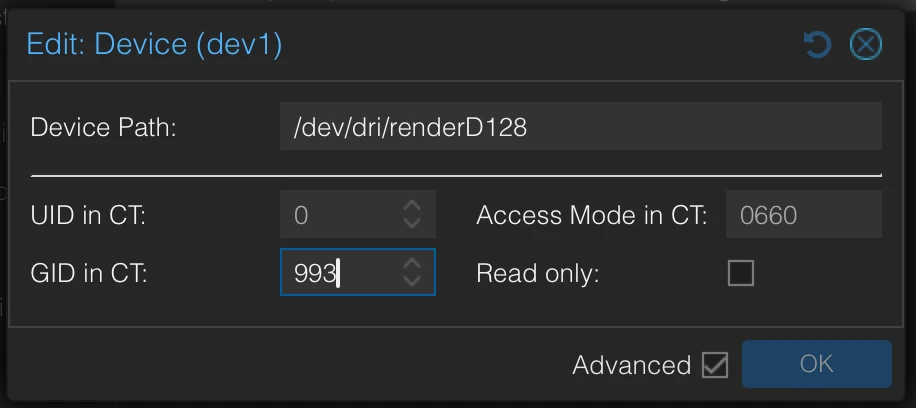
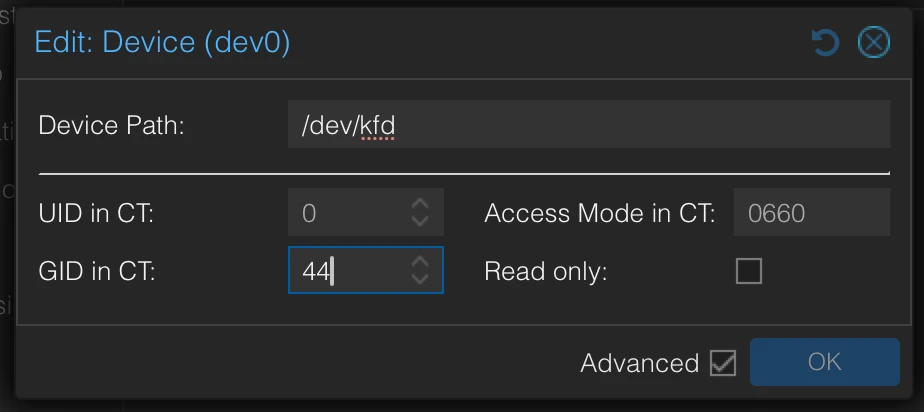
In the Proxmox GUI, go to your LXC container’s “Resources” tab and click “Add” → “Device Passthrough“. Now, add the “video” and “render” devices using the GIDs you noted earlier:
Render device: Use the path for your graphics card and the GID from the LXC output.
Video device: Use /dev/kfd and the GID for “video” from the LXC output.
This is what your settings should look like (you may need to restart the LXC first).
After a restart of the container check to see if permission are correct:
Make sure that “root render” is the GPU and “root video” the Kernel Fusion Driver (kfd).
Kernel Fusion Driver
If you want to run ROCm-based GPU compute workloads, such as machine learning, OpenCL, or scientific computing, on your AMD GPU within Proxmox. It acts as the interface between the AMD GPU driver and user-space applications, enabling GPU acceleration for parallel computing tasks.
– ChatGPT-4o
Install AMD Software
We need to install some tools inside of our Debian LXC:
You can also refer to the official guide: Quick Start Installation Guide – ROCm (at the very least, check if the links are still valid by the time you’re reading this).
The download might take a while. Since I have a new AMD RX 7900 XTX, I need to use:
Since curl is not installed by default in the Debian LXC we’re using, we’ll need to install it first (if you filled this guide, you have it already). Then, we’ll run the install script from the Ollama website. Be patient—the download takes a while since it pulls about 30GB of data.
By the way, I love the Ollama website. The simple black-and-white design with rounded borders? 🤌 I’m a sucker for minimalistic aesthetics. (I hope you like my blog’s design too! 🕺)
Next Step: Testing with a Smaller Model
Before downloading the DeepSeek 32B model, we’ll first test with a smaller DeepSeek version. If your GPU matches mine, the larger model should work fine.
Now, run this command—it’s going to download a 1.5GB file, so the wait time depends on your internet speed:
ollamapulldeepseek-r1:1.5b
You can then test:
curl-XPOSThttp://localhost:11434/api/generate-d'{ "model": "deepseek-r1:1.5b", "prompt": "Tell me a funny story about my best friend Karl. 300 characters maximum.", "stream": false}'|jq.
Once upon a time, in the quiet town of Pawsley, there was Karl, a beloved kind cat who adored his three feline friends: Sam, Max, and Lily. Karl always had a warm smile and a habit of aiding others, often finding humor in unexpected places.
One crisp autumn afternoon, Karl spotted a bag of marbles on the park’s bench. Curious, he decided to play with them. To everyone’s surprise, a man walked by, holding a jar full of coins instead of marbles. “Hey, it’s you!” Karl exclaimed. The man, initially unimpressed, asked for his change. Karl suggested taking one marble in exchange and gave him the coins.
“Thank you,” the man thanked. Karl offered him a glass of water, knowing the jar was empty. “That’ll keep me happy,” he said. But as the water filled the glass, a strange ripple appeared on the floor. The man ran over to check but found nothing—no coins, just a tiny, pink spot.
“Wait, is it my pet?!” Karl pointed. The man laughed, looking suspiciously at Karl. “You saw that marble in there.” He handed Karl a piece of paper and said,”I need your help.”
Karl rolled on his back and rolled into the street. From behind him, he saw Sam, Max, and Lily with their usual spotlights on. Karl placed a paw on Sam’s paw, suggesting they might be related.
“Hey!” Max excitedly exclaimed. “My little sister is getting sick! Can you help me find her?”
Karl hesitated but followed Max to the neighbor’s yard. His friend found Lily, who was hiding somewhere. Karl helped Lily bring her back home, while Sam and Max watched in laughter. Karl’s kind words were met with cheers.
In the end, Karl became a beloved companion among Pawsley’s residents, not just for his love of marbles but also for his warmth and kindness.
Never interrupt an AI artist in the middle of their masterpiece. 🎨🤖 But yeah, the 300-Character-Limit was ignored.
Cleanup
Let’s get rid of the old files. But first, double-check before running these commands—they’ll wipe out all .sh and .deb files in /tmp.
ls-lh/tmp/*.sh/tmp/*.deb
The command above shows you what the command below will delete. Proceed if the displayed files are trash. The deleted files are irreversibly gone after this command:
rm-f/tmp/*.sh/tmp/*.debaptautoremove
Testing OpenWebUI with DeepSeek-R1 32B
The prompt I gave DeepSeek was “Give me a 10 word super short story about a cat named Paul.” – which is the name of my actual cat.
Well, not quite 10 words, but close enough. This was a cold start, meaning the model wasn’t loaded into VRAM yet—so yeah, it took a bit longer.
DeepSeek really put in some serious effort here, like it was deep in thought, sweating over every word. 😂 Considering all that, the result is absolutely hilarious:
Okay, so I need to come up with a 10-word super short story about a cat named Paul. Hmm, let’s see… The user gave an example: “Paul the cat climbed the fence, chasing a bird, then napped in the sun.” That’s pretty straightforward but conveys a little action and a bit of character.
I should think about what elements make a good 10-word story. It needs to have a clear subject (Paul), some action or activity, maybe an obstacle or goal, and perhaps a resolution or consequence. Since it’s so short, each word counts, so I need to be concise but still vivid.
Let me brainstorm some ideas about Paul the cat. Maybe he’s curious, playful, adventurous, or lazy. The example has him chasing a bird and then napping. Perhaps another activity? Maybe exploring somewhere, finding something, or having an interaction with another animal or person.
I should think of a simple structure: subject (Paul), action verb, some context, maybe an obstacle or additional detail, and a resolution. For example, “Paul pounced on the mouse but it escaped.” That’s 8 words. Maybe add more details to make it 10.
Or perhaps something like “Paul sat by the window watching birds chirp.” That’s also 8 words. Maybe include movement: “Paul raced through the garden chasing a butterfly.”
Wait, the user provided an example that starts with Paul doing an action (climbed), then another action (chasing), and ends with resting (napped). So perhaps following a similar structure would work well.
Let me try: “Paul explored the attic, found a toy, and took a nap.” That’s 9 words. Maybe add more detail or action. Or “Paul climbed the tree, met another cat, then curled up to sleep.”
Wait, that’s 10 words. Hmm, but it feels a bit flat. Maybe make the interaction more engaging: “Paul chased a squirrel around the yard and finally rested.” That’s 9 words. Could add something like “in the shade” at the end for 10.
Alternatively, maybe include some emotion or consequence: “Paul pounced on the ball, rolled over, and fell asleep.”
Wait, let me check word count. Each idea needs to be exactly 10 words. Let’s see:
Paul the cat climbed the fence, chasing a bird, then napped in the sun. (10 words)
So that’s the example given. I can try something similar but different.
Maybe focus on a different activity: “Paul discovered a sunny spot, curled up, and purred softly.” That’s 9 words. Maybe add more action or detail to make it 10.
Alternatively: “Paul leaped onto the counter, knocked over a bowl, then ate the leftovers.” That’s 10 words but maybe a bit long in description.
Another angle: “Paul wandered through the park, met a dog, and they played together.” That’s 9 words. Add something like “all day” at the end for 10.
Wait, perhaps include some obstacle or challenge: “Paul tried to catch a fish in the pond but got wet.” That’s 10 words. It includes an attempt, action, consequence.
Or maybe something more peaceful: “Paul stretched lazily on the rug, yawned, and drifted off.” 9 words. Add “to sleep” for 10.
I think I need to ensure each word adds value without being redundant. Let me try another approach:
Paul chased a butterfly in the garden until it flew away. (That’s 8 words. Maybe add “then rested” at the end: 10 words.)
Wait, but that might be too similar to the example.
Alternatively, focus on something unique about Paul: “Paul, the curious cat, explored every nook and cranny.” That’s 9 words. Maybe add “all day long” for 12; that’s too many.
Perhaps include an interaction with another animal or a person: “Paul meowed at the door, demanding attention, then curled up.” 9 words. Add “by the fire” for 10.
Wait, perhaps combine actions and consequences more effectively. Let me think of a scenario where Paul does something that leads to a natural conclusion in just 10 words.
How about: “Paul sneaked into the kitchen, stole a treat, then hid under the bed.” That’s 9 words. Maybe add “to digest” for 10.
Or maybe something more adventurous: “Paul climbed a tall tree, got stuck, and miaowed for help.” That’s 9 words. Add “from his owner” for 11; that’s too many.
Alternatively: “Paul caught a moth in the dark, played with it, then slept soundly.” 9 words. Maybe add “through the night” for 10.
I think I’m overcomplicating it. Let me go back to the example and see if I can structure something similar but different. The example has two actions (climbed, chasing) followed by a rest. So maybe another set of actions leading to a consequence or resolution.
Perhaps: “Paul chased his tail in circles until he panted.” That’s 8 words. Maybe add “then stopped to rest” for 10.
Alternatively: “Paul jumped on the sofa, knocked over a lamp, then slept.” But that’s 9 words; maybe add “peacefully” at the end for 10.
Wait, perhaps focus on Paul’s interaction with an object or another animal. Let me think of something unique but still within the 10-word limit.
Another idea: “Paul found a cozy spot under the stairs and napped.” That’s 8 words. Maybe add “after exploring all day” for 10.
Wait, that would be “Paul found a cozy spot under the stairs after exploring all day.” That’s 9 words. Hmm.
Alternatively: “Paul purred contentedly while basking in sunlight.” 7 words. Add some activity before that to make it 10.
I think I need to stick to a structure where Paul does something, then another action or consequence, and maybe ends with a state or rest.
Let me try again: “Paul climbed the fence, chased a butterfly, then napped in shade.” That’s 9 words. Maybe change “then” to “and” for flow: “climbed, chased, and napped” but that might not add up correctly.
Wait, let’s count the example given: “Paul the cat climbed the fence, chasing a bird, then napped in the sun.” That’s 10 words. So it includes his name, his action (climbed), context (the fence), another action (chasing), and the consequence (napped in the sun). I need to mirror that structure but with different actions.
So maybe: “Paul the cat explored the garden, found a mouse, then relaxed by the pond.” That’s 10 words. It follows a similar flow—action, context, additional action, consequence.
Alternatively: “Paul the cat pounced on a toy, rolled around, and fell asleep.” 9 words. Add “on the rug” for 10.
Wait, maybe make it more dynamic: “Paul the cat raced through the park, met a friend, then rested under a tree.” That’s 10 words. It shows activity, interaction, and rest.
I think that’s a good structure—action, context, another action or interaction, consequence. So putting it all together, I can create a concise story within the word limit.
– DeepSeek-R1:32B thoughts
Here you can see the electricity usage—a solid 450W for two minutes until things calmed down. Usually the server “idles” at around 50-53W, since I have a local SIEM and this website (along with a lot of other stuff) runs on it, it is never really really idle.
Both hardware and software went all in, pushing their limits… all for my short, 10-word cat story:
This does not prove that DeepSeek-R1 is a waste of electricity and ends up with a subpar result, rather that you probably do not need an advanced thinking model for such a super simple task.
Check out dolphin-mistral, also on a cold start only taking 4 seconds. The second message did not even take a second:
Bonus: ComfyUI
The Official Installation Guide: How to Install ComfyUI on Linux Alright, OpenWebUI now supports ComfyUI for image generation (still in beta at the time of writing). Here is the super quick start for ComfyUI, run these commands in your LXC:
Setting this up, especially with newer AMD GPUs, used to be a bit of a headache. I’m honestly glad I waited a bit—getting this to work wasn’t exactly painless, and I had to do a lot of digging through forums. But hey, it’s running now!
Next up, get some models from the Ollama page. If you have an AMD RX 7900 XTX, you should be able to run the 32B version of DeepSeek-R1 effortlessly. Technically, you can load models larger than your VRAM, but be warned—it’ll slow things down.
Also, don’t forget to secure your AI server and add valid SSL certificates, check out my post about it:
I set up firewall rules centrally on my Dream Machine, so my AI server can only communicate with the reverse proxy.
If your setup is different, you might want to handle this locally using UFW.
These Goodbye Message are Brought to you by AI
Aww, yaaaay! I totally loooove all your amazing readers <3 Wishing you guys the biiiggest luck with everything you dooove, okay? Dayyyyyybeeee~ 💕✨
– qwen2.5:32b
Love y’all, keep slaying in everything you do <3 Can’t wait to see what awesome things you have coming up. Bye for now! 👋🏼😉
– dolphin-mistral
Goodbye image I made with Flux Schnell and ComfyUI
EDIT 1 (04.02.2024)
I have downloaded and tested almost all popular models now and the only actually usable one for daily business like rewriting German emails or asking for expertise in German is qwen2.5 so far.
The uncensored Dolphin models are a lot of fun, but also kind of stink with German, which is of course because their underlying models aren’t good at German either.
The name Squidward comes from TAD → Threat Modelling, Attack Surface and Data. “Tadl” is the German nickname for Squidward from SpongeBob, so I figured—since it’s kind of a data kraken—why not use that name?
It’s a continuous observation and monitoring script that notifies you about changes in your internet-facing infrastructure. Think Shodan Monitor, but self-hosted.
Technology Stack
certspotter: Keeps an eye on targets for new certificates and sneaky subdomains.
Discord: The command center—control the bot, add targets, and get real-time alerts.
At this point, I gotta give a massive shoutout to ProjectDiscovery for open-sourcing some of the best recon tools out there—completely free! Seriously, a huge chunk of my projects rely on these tools. Go check them out, contribute, and support them. They deserve it!
(Not getting paid to say this—just genuinely impressed.)
How it works
I had to rewrite certspotter a little bit in order to accomodate a different input and output scheme, the rest is fairly simple.
Setting Up Directories
The script ensures required directories exist before running:
$HOME/squidward/data for storing results.
Subdirectories for logs: onlynew, allfound, alldedupe, backlog.
Running Subdomain Enumeration
squidward (certspotter) fetches SSL certificates to discover new subdomains.
subfinder further identifies subdomains from multiple sources.
Results are stored in logs and sent as notifications (to a Discord webhook).
DNS Resolution
dnsx takes the discovered subdomains and resolves:
A/AAAA (IPv4/IPv6 records)
CNAME (Canonical names)
NS (Name servers)
TXT, PTR, MX, SOA records
HTTP Probing
httpx analyzes the discovered subdomains by sending HTTP requests, extracting:
Status codes, content lengths, content types.
Hash values (SHA256).
Headers like server, title, location, etc.
Probing for WebSocket, CDN, and methods.
Vulnerability Scanning
nuclei scans for known vulnerabilities on discovered targets.
The scan focuses on high, critical, and unknown severity issues.
Port Scanning
rustscan finds open ports for each discovered subdomain.
If open ports exist, additional HTTP probing and vulnerability scanning are performed.
Automation and Notifications
Discord notifications are sent after each stage.
The script prevents multiple simultaneous runs by checking if another instance is active (ps -ef | grep “squiddy.sh”).
Randomization (shuf) is used to shuffle the scan order.
Main Execution
If another squiddy.sh instance is running, the script waits instead of starting.
If no duplicate instance exists:
Squidward (certspotter) runs first.
The main scanning pipeline (what_i_want_what_i_really_really_want()) executes in a structured sequence:
The Code
I wrote this about six years ago and just laid eyes on it again for the first time. I have absolutely no clue what past me was thinking 😂, but hey—here you go:
#!/bin/bash############################################### Single script usage:# echo "test.karl.fail" | ./httpx -sc -cl -ct -location -hash sha256 -rt -lc -wc -title -server -td -method -websocket -ip -cname -cdn -probe -x GET -silent# echo "test.karl.fail" | ./dnsx -a -aaaa -cname -ns -txt -ptr -mx -soa -resp -silent# echo "test.karl.fail" | ./subfinder -silent# echo "test.karl.fail" | ./nuclei -ni################################################## -----> globals <-----workdir="squidward"script_path=$HOME/$workdirdata_path=$HOME/$workdir/dataonly_new=$data_path/onlynewall_found=$data_path/allfoundall_dedupe=$data_path/alldedupebacklog=$data_path/backlog# -----------------------# -----> dir-setup <-----setup() {if [ !-d $backlog ]; thenmkdir $backlogfiif [ !-d $only_new ]; thenmkdir $only_newfiif [ !-d $all_found ]; thenmkdir $all_foundfiif [ !-d $all_dedupe ]; thenmkdir $all_dedupefiif [ !-d $script_path ]; thenmkdir $script_pathfiif [ !-d $data_path ]; thenmkdir $data_pathfi}# -----------------------# -----> subfinder <-----write_subfinder_log() {tee-a $all_found/subfinder.txt| $script_path/anew $all_dedupe/subfinder.txt|tee $only_new/subfinder.txt}run_subfinder() { $script_path/subfinder -dL $only_new/certspotter.txt-silent|write_subfinder_log; $script_path/notify -data $only_new/subfinder.txt-bulk-providerdiscord-idcrawl-silentsleep5}# -----------------------# -----> dnsx <-----write_dnsx_log() {tee-a $all_found/dnsx.txt| $script_path/anew $all_dedupe/dnsx.txt|tee $only_new/dnsx.txt}run_dnsx() { $script_path/dnsx -l $only_new/subfinder.txt-a-aaaa-cname-ns-txt-ptr-mx-soa-resp-silent|write_dnsx_log; $script_path/notify -data $only_new/dnsx.txt-bulk-providerdiscord-idcrawl-silentsleep5}# -----------------------# -----> httpx <-----write_httpx_log() {tee-a $all_found/httpx.txt| $script_path/anew $all_dedupe/httpx.txt|tee $only_new/httpx.txt}run_httpx() { $script_path/httpx -l $only_new/subfinder.txt-sc-cl-ct-location-hashsha256-rt-lc-wc-title\ -server-td-method-websocket-ip-cname-cdn-probe-xGET-silent|write_httpx_log; $script_path/notify -data $only_new/httpx.txt-bulk-providerdiscord-idcrawl-silentsleep5}# -----------------------# -----> nuclei <-----write_nuclei_log() {tee-a $all_found/nuclei.txt| $script_path/anew $all_dedupe/nuclei.txt|tee $only_new/nuclei.txt}run_nuclei() { $script_path/nuclei -ni-l $only_new/httpx.txt-shigh,critical,unknown-rl5-silent\|write_nuclei_log| $script_path/notify -providerdiscord-idvuln-silent}# -----------------------# -----> squidward <-----write_squidward_log() {tee-a $all_found/certspotter.txt| $script_path/anew $all_dedupe/certspotter.txt|tee-a $only_new/forscans.txt}run_squidward() {rm $script_path/config/certspotter/lock $script_path/squidward |write_squidward_log| $script_path/notify -providerdiscord-idcert-silentsleep3}# -----------------------send_certspotted() { $script_path/notify -data $only_new/certspotter.txt-bulk-providerdiscord-idcrawl-silentsleep5}send_starting() {echo"Hi! I am Squiddy!"| $script_path/notify -providerdiscord-idcrawl-silentecho"I am gonna start searching for new targets now :)"| $script_path/notify -providerdiscord-idcrawl-silent}dns_to_ip() {# TODO: give txt file of subdomains to get IPs from file $script_path/dnsx -a-l$1-resp-silent\|grep-oE"\b((25[0-5]|2[0-4][0-9]|[01]?[0-9][0-9]?)\.){3}(25[0-5]|2[0-4][0-9]|[01]?[0-9][0-9]?)\b"\|sort--unique}run_rustcan() {local input=""if [[ -p /dev/stdin ]]; then input="$(cat -)"else input="${@}"fiif [[ -z"${input}" ]]; thenreturn1fi# ${input/ /,} -> join space to comma# -> loop because otherwise rustscan will take forever to scan all IPs and only save results at the end# we could do this to scan all at once instead: $script_path/rustscan -b 100 -g --scan-order random -a ${input/ /,}for ip in ${input}do $script_path/rustscan -b500-g--scan-orderrandom-a $ipdone}write_rustscan_log() {tee-a $all_found/rustscan.txt| $script_path/anew $all_dedupe/rustscan.txt|tee $only_new/rustscan.txt}what_i_want_what_i_really_really_want() {# shuffle certspotter file cause why notcat $only_new/forscans.txt|shuf-o $only_new/forscans.txt $script_path/subfinder -silent-dL $only_new/forscans.txt|write_subfinder_log $script_path/notify -silent-data $only_new/subfinder.txt-bulk-providerdiscord-idsubfinder# -> empty forscans.txt> $only_new/forscans.txt# shuffle subfinder file cause why notcat $only_new/subfinder.txt|shuf-o $only_new/subfinder.txt $script_path/dnsx -l $only_new/subfinder.txt-silent-a-aaaa-cname-ns-txt-ptr-mx-soa-resp|write_dnsx_log $script_path/notify -data $only_new/dnsx.txt-bulk-providerdiscord-iddnsx-silent# shuffle dns file before iter to randomize scans a little bitcat $only_new/dnsx.txt|shuf-o $only_new/dnsx.txtsleep1cat $only_new/dnsx.txt|shuf-o $only_new/dnsx.txtwhile IFS=read-rlinedo dns_name=$(echo$line|cut-d ' ' -f1) ip=$(echo ${line} \|grep-E "\[(\b((25[0-5]|2[0-4][0-9]|[01]?[0-9][0-9]?)\.){3}(25[0-5]|2[0-4][0-9]|[01]?[0-9][0-9]?)\b)\]" \|grep-oE "(\b((25[0-5]|2[0-4][0-9]|[01]?[0-9][0-9]?)\.){3}(25[0-5]|2[0-4][0-9]|[01]?[0-9][0-9]?)\b)") match=$(echo$ip|run_rustcan)if [ !-z"$match" ]then ports_unformat=$(echo ${match} |grep-Po '\[\K[^]]*') ports=${ports_unformat//,/ }echo"$dns_name - $ip - $ports"|write_rustscan_log $script_path/notify -silent-data $only_new/rustscan.txt-bulk-providerdiscord-idportscanfor port in ${ports}doecho"$dns_name:$port"| $script_path/httpx -silent-sc-cl-ct-location\-hashsha256-rt-lc-wc-title-server-td-method-websocket\-ip-cname-cdn-probe-xGET|write_httpx_log|grep"\[SUCCESS\]"|cut-d' '-f1\| $script_path/nuclei -silent-ni-shigh,critical,unknown-rl10\|write_nuclei_log| $script_path/notify -providerdiscord-idnuclei-silent $script_path/notify -silent-data $only_new/httpx.txt-bulk-providerdiscord-idhttpxdonefidone<"$only_new/dnsx.txt"}main() { dupe_script=$(ps-ef|grep "squiddy.sh" |grep-v grep |wc-l|xargs)if [ ${dupe_script} -gt2 ]; thenecho"Hey friends! Squiddy is already running, I am gonna try again later."| $script_path/notify -providerdiscord-idcrawl-silentelsesend_startingecho"Running Squidward"run_squidwardecho"Running the entire rest"what_i_want_what_i_really_really_want# -> leaving it in for now but replace with above function#echo "Running Subfinder"#run_subfinder#echo "Running DNSX"#run_dnsx#echo "Running HTTPX"#run_httpx#echo "Running Nuclei"#run_nucleifi}setupdupe_script=$(ps-ef|grep "squiddy.sh" |grep-v grep |wc-l|xargs)if [ ${dupe_script} -gt2 ]; thenecho"Hey friends! Squiddy is already running, I am gonna try again later."| $script_path/notify -providerdiscord-idcrawl-silentelse#send_startingecho"Running Squidward"run_squidwardfi
There’s also a Python-based Discord bot that goes with this, but I’ll spare you that code—it did work back in the day 😬.
Conclusion
Back when I was a Red Teamer, this setup was a game-changer—not just during engagements, but even before them. Sometimes, during client sales calls, they’d expect you to be some kind of all-knowing security wizard who already understands their infrastructure better than they do.
So, I’d sit in these calls, quietly feeding their possible targets into Squidward and within seconds, I’d have real-time recon data. Then, I’d casually drop something like, “Well, how about I start with server XYZ? I can already see it’s vulnerable to CVE-Blah.” Most customers loved that level of preparedness.
I haven’t touched this setup in ages, and honestly, I have no clue how I’d even get it running again. I would probably go about it using Node-RED like in this post.
These days, I work for big corporate, using commercial tools for the same tasks. But writing about this definitely brought back some good memories.
Anyway, time for bed! It’s late, and you’ve got work tomorrow. Sweet dreams! 🥰😴
Have another scary squid man monster that didn’t make featured, buh-byeee 👋
We’ve all been there—no exceptions, literally all of us. You’re at a party, chatting up a total cutie, the vibes are immaculate, and then she hits you with the: “Show me your GitHub contributions chart.” She wants to see if you’re really about that open-source life.
Panic. You know you are mid at best, when it comes to coding. Your chart is weak and you know it.
You hesitate but show her anyway, hoping she’ll appreciate you for your personality instead. Wrong! She doesn’t care about your personality, dude—only your commits. She takes one look, laughs, and walks away.
Defeated, you grab a pizza on the way home (I’m actually starving writing this—if my Chinese food doesn’t arrive soon, I’m gonna lose it).
Anyway! The responsible thing to do would be to start contributing heavily to open-source projects. This is not that kind of blog though. Here, we like to dabble in the darker arts of IT. Not sure how much educational value this has, but here we go with the disclaimer:
Disclaimer:
The information provided on this blog is for educational purposes only. The use of hacking tools discussed here is at your own risk. Read it have a laugh and never do this.
Quick note: This trick works on any gender you’re into. When I say “her” just mentally swap it out for whoever you’re trying to impress. I’m only writing it this way because, that’s who I would personally want to impress.
Intro
I came across a LinkedIn post where someone claimed they landed a $500K developer job—without an interview—just by writing a tool that fakes GitHub contributions. Supposedly, employers actually check these charts and your public code.
Now, I knew this was classic LinkedIn exaggeration, but it still got me thinking… does this actually work? I mean, imagine flexing on your friends with an elite contribution chart—instant jealousy.
Of course, the golden era of half-a-mil, no-interview dev jobs is long gone (RIP), but who knows? Maybe it’ll make a comeback. Or maybe AI will just replace us all before that happens.
I actually like Copilot, but it still cracks me up. If you’re not a programmer, just know that roasting your own code is part of the culture—it’s how we cope, but never roast my code, because I will cry and you will feel bad. We both will.
The Setup
Like most things in life, step one is getting a server to run a small script and a cronjob on. I’m using a local LXC container in my Proxmox, but you can use a Raspberry Pi, an old laptop, or whatever junk you have lying around.
Oh, and obviously, you’ll need a GitHub account—but if you didn’t already have one, you wouldn’t be here.
Preparation
First, you need to install a few packages on your machine. I’m gonna assume you’re using Debian—because it’s my favorite (though I have to admit, Alpine is growing on me fast):
You’re almost done prepping. Now, you just need to clone one of your repositories. Whether it’s public or private is up to you—just check your GitHub profile settings:
If you have private contributions enabled, you can commit to a private repo.
f not, just use a public repo—or go wild and do both.
The Code
Let us test our setup before we continue:
gitclonehttps://github.com/YourActualGithubUser/YOUR_REPO_OF_CHOICEgitaddcounter.pygitcommit-m"add a counter"gitpush
Make sure to replace your username and repo in the command—don’t just copy-paste like a bot. If everything went smoothly, you should now have an empty counter.py file sitting in your repository.
Of course, if you’d rather keep things tidy, you can create a brand new repo for this. But either way, this should have worked.
The commit message will vary.
Now the code of the shell script:
gh_champ.sh
#!/bin/bash# Define the directory where the repository is located# this is the repo we got earlier from git cloneREPO_DIR="/root/YOUR_REPO_OF_CHOICE"# random delay to not always commit at exact timeRANDOM_DELAY=$((RANDOM %20+1))DELAY_IN_SECONDS=$((RANDOM_DELAY *60))sleep"$DELAY_IN_SECONDS"cd"$REPO_DIR"||exit# get current time and overwrite fileecho"print(\"$(date)\")">counter.py# Generate a random string for the commit messageCOMMIT_MSG=$(tr-dc A-Za-z0-9 </dev/urandom |head-c16)# Stage the changes, commit, and pushgitaddcounter.py>/dev/null2>&1gitcommit-m"$COMMIT_MSG">/dev/null2>&1gitpushoriginmaster>/dev/null2>&1
Next, you’ll want to automate this by setting it up as a cronjob:
1710-20/2***/root/gh_champ.sh
I personally like usingcrontab.guru to craft more complex cron schedules—it makes life easier.
This one runs at minute 17 past every 2nd hour from 10 through 20, plus a random 1-20 minute delay from our script to keep things looking natural.
And that’s it. Now you just sit back and wait 😁.
Bonus: Cronjob Monitoring
I like keeping an eye on my cronjobs in case they randomly decide to fail. If you want to set up Healthchecks.io for this, check out my blog post.
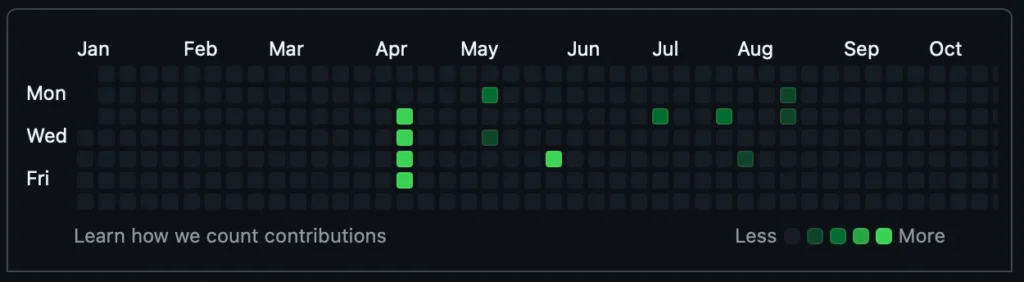
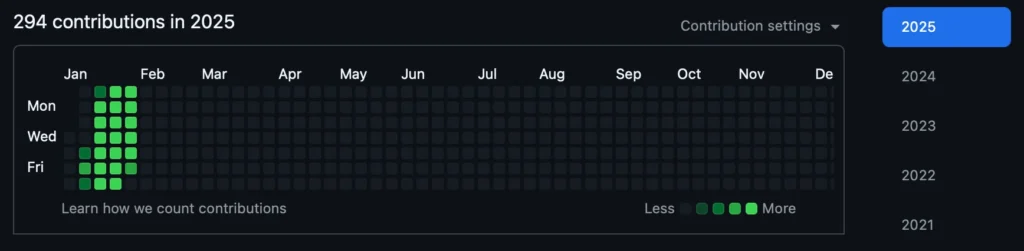
Looks bonita 👍 ! With a chart like this, the cuties will flock towards you instead of running away.
Jokes aside, the whole “fake it till you make it” philosophy isn’t all sunshine and promotions. Sure, research suggests that acting confident can actually boost performance and even trick your brain into developing real competence (hello, impostor syndrome workaround!). But there’s a fine line between strategic bluffing and setting yourself up for disaster.
Let’s say you manage to snag that sweet developer job with nothing but swagger and a well-rehearsed GitHub portfolio. Fast forward to your 40s—while you’re still Googling “how to center a div” a younger, hungrier, and actually skilled dev swoops in, leaving you scrambling. By that age, faking it again isn’t just risky; it’s like trying to pass off a flip phone as the latest iPhone.
And yeah, if we’re being honest, lying your way into a job is probably illegal (definitely unethical), but hey, let’s assume you throw caution to the wind. If you do manage to land the gig, your best bet is to learn like your livelihood depends on it—because, well, it does. Fake it for a minute, but make sure you’re building real skills before the curtain drops.
Got real serious there for a second 🥶, gotta go play Witcher 3 now, byeeeeeeeeee 😍

EDIT
There has been some development in this space. I have found a script that let’s you commit messages with dates attached so you do not have to wait an entire year to show off: https://github.com/davidjan3/githistory
Seven to five years ago, I was absolutely obsessed with the idea of beating the stock market. I dove headfirst into the world of investing, devouring books, blogs, and whatever information I could get my hands on. I was like a sponge, soaking up everything. After countless hours of research, I came to one clear conclusion:
To consistently beat the market, I needed a unique edge—some kind of knowledge advantage that others didn’t have.
It’s like insider trading, but, you know, without the illegal part. My plans to uncover obscure data and resources online that only a select few were using. That way, I’d have a significant edge over the average trader. In hindsight, I’m pretty sure that’s what big hedge funds, especially the short-selling ones, are doing—just with a ton more money and resources than I had. But I’ve always thought, “If someone else can do it, so can I.” At the end of the day, those hedge fund managers are just people too, right?
Around that time, I was really into the movie War Dogs. It had this fascinating angle that got me thinking about analyzing the weapons trade, aka the “defense” sector.
Here’s the interesting part: The United States is surprisingly transparent when it comes to defense spending. They even publicly list their contracts online (check out the U.S. Department of Defense Contracts page). The EU, on the other hand, is a completely different story. Getting similar information was like pulling teeth. You’d basically need to lawyer up and start writing formal letters to access anything remotely useful.
The Idea
Quite simply: Build a tool that scrapes the Department of Defense contracts website and checks if any of the publicly traded companies involved had landed massive new contracts or reported significantly higher income compared to the previous quarter.
Based on the findings, I’d trade CALL or PUT options. If the company performed poorly in the quarter or year, I’d go for a PUT option. If they performed exceptionally well, I’d opt for a CALL, banking on the assumption that these contracts would positively influence the next earnings report.
Theoretically, this seemed like one of those obvious, no-brainer strategies that had to work. Kind of like skipping carbs at a buffet and only loading up on meat to get your money’s worth.
Technologie
At first, I did everything manually with Excel. Eventually, I wrote a Python Selenium script to automate the process.
Here’s the main script I used to test the scraping:
// Search -> KEYWORD// https://www.defense.gov/Newsroom/Contracts/Search/KEYWORD/// -------// Example:// https://www.defense.gov/Newsroom/Contracts/Search/Boeing/// ------------------------------------------------------------// All Contracts -> PAGE (momentan bis 136)// https://www.defense.gov/Newsroom/Contracts/?Page=PAGE// -------// Example:// https://www.defense.gov/Newsroom/Contracts/?Page=1// https://www.defense.gov/Newsroom/Contracts/?Page=136// -------------------------------------------------------// Contract -> DATE// https://www.defense.gov/Newsroom/Contracts/Contract/Article/DATE// -------// https://www.defense.gov/Newsroom/Contracts/Contract/Article/2041268/// ---------------------------------------------------------------------// Select Text from Article Page// document.querySelector(".body")// get current link// window.location.href// ---> Save Company with money for each day in db// https://www.defense.gov/Newsroom/Contracts/Contract/Article/1954307/varCOMPANY_NAME="The Boeing Co.";var comp_money =0;var interesting_div = document.querySelector('.body')var all_contracts = interesting_div.querySelectorAll("p"),i;var text_or_heading;var heading;var text;var name_regex =/^([^,]+)/gm;var price_regex =/\$([0-9]{1,3},*)+/gm;var price_contract_regex =/\$([0-9]{1,3},*)+ (?<=)([^\s]+)/gm;var company_name;var company_article;for (i =0; i < all_contracts.length; ++i) { text_or_heading = all_contracts[i];if (text_or_heading.getAttribute('id') !="skip-target-holder") {if (text_or_heading.getAttribute('style')) { heading = text_or_heading.innerText; } else { text = text_or_heading.innerText; company_name = text.match(name_regex) contract_price = text.match(price_regex) contract_type = text.match(price_contract_regex)try { contract_type = contract_type[0]; clean_type = contract_type.split(' '); contract_type = clean_type[1]; } catch(e) { contract_type ="null"; }try { company_article = company_name[0]; } catch(e) { company_article ="null"; }try { contract_amount = contract_price[0];if (company_article ==COMPANY_NAME){ contract_amount = contract_amount.replace("$","") contract_amount = contract_amount.replace(",","") contract_amount = contract_amount.replace(",","") contract_amount = contract_amount.replace(",","") contract_amount =parseInt(contract_amount, 10) comp_money = contract_amount + comp_money } } catch(e) { contract_amount ="$0"; } console.log("Heading : "+ heading); console.log("Text : "+ text); console.log("Company Name : "+ company_article); console.log("Awarded : "+ contract_amount) console.log("Contract Type: "+ contract_type); } }}console.log(COMPANY_NAME);console.log(new Intl.NumberFormat('en-EN', { style: 'currency', currency: 'USD' }).format(comp_money));// --> Save all Links to Table in Databasefor (var i =1; i >=136; i++) {var url ="https://www.defense.gov/Newsroom/Contracts/?Page="+ ivar page_links = document.querySelector("#alist > div.alist-inner.alist-more-here")var all_links = page_links.querySelectorAll("a.title") all_links.forEach(page_link=> {var contract_date =Date(Date.parse(page_link.innerText))var contracvt_link = page_link.href });}
The main code is part of another project I called “Wallabe“.
The stack was the usual:
Python: The backbone of the project, handling the scraping logic and data processing efficiently.
Django: Used for creating the web framework and managing the backend, including the database and API integrations.
Selenium & BeautifulSoup: Selenium was used for dynamic interactions with web pages, while BeautifulSoup handled the parsing and extraction of relevant data from the HTML.
PWA (“mobile app”): Designed as a mobile-only Progressive Web App to deliver a seamless, app-like experience without requiring actual app store deployment.
I wanted the feel of a mobile app without the hassle of actual app development.
One of the challenges I faced was parsing and categorizing the HTML by U.S. military branches. There are a lot, and I’m sure I didn’t get them all, but here’s the list I was working with seven years ago (thanks, JROTC):
I tried to revive this old project, but unfortunately, I can’t show you what the DoD data looked like anymore since the scraper broke after some HTML changes on their contracts website. On the bright side, I can still share some of the awesome UI designs I created for it seven years ago:
Imagine a clean, simple table with a list of companies on one side and a number next to each one showing how much they made in the current quarter.
How it works
Every day, I scrape the Department of Defense contracts and calculate how much money publicly traded companies received from the U.S. government. This gives me a snapshot of their revenue before quarterly earnings are released. If the numbers are up, I buy CALL options; if they’re down, I buy PUT options.
The hardest part of this process is dealing with the sheer volume of updates. They don’t just release new contracts—there are tons of adjustments, cancellations, and modifications. Accounting for these is tricky because the contracts aren’t exactly easy to parse. Still, I decided it was worth giving it a shot.
Now, here’s an important note: U.S. defense companies also make a lot of money from other countries, not just the U.S. military. In fact, the U.S. isn’t even always their biggest contributor. Unfortunately, as I mentioned earlier, other countries are far less transparent about their military spending. This lack of data is disappointing and limits the scope of the analysis.
Despite these challenges, I figured I’d test the idea on paper and backtest it to see how it performed.

Conclusion
TL;DR: Did not work.
The correlation I found between these contracts and earnings just wasn’t there. Even when the numbers matched and I got the part right that “Company made great profit,” the market would still turn around and say, “Yeah, but it’s 2% short of what we expected. We wanted +100%, and a measly +98% is disappointing… SELLLL!”
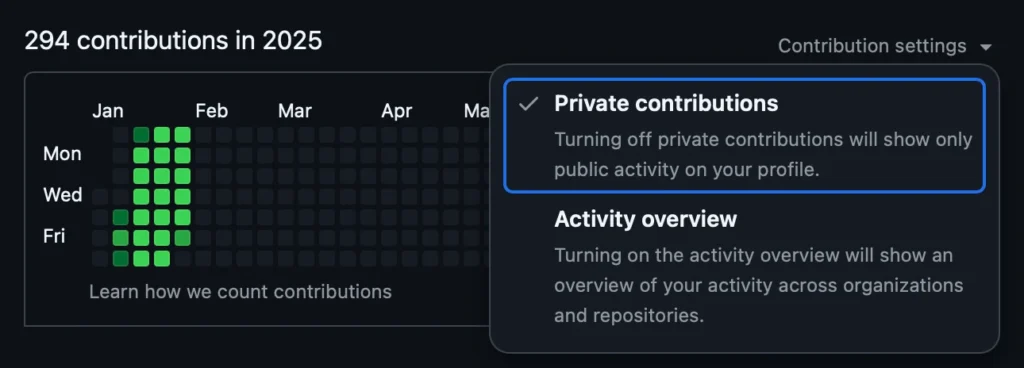
The only “free money glitch” I’ve ever come across is what I’m doing with Bearbot, plus some tiny bond tricks that can get you super small monthly profits (like 0.10% to 0.30% a month).
That said, this analysis still made me question whether everything is truly priced in or if there are still knowledge gaps to exploit. The truth is, you never really know if something will work until you try. Sure, you can backtest, but that’s more for peace of mind. Historical data can’t predict the future. A drought killing 80% of cocoa beans next year is just as possible as a record harvest. Heck, what’s stopping someone from flying to Brazil and burning down half the coffee fields to drive up coffee bean prices? It’s all just as unpredictable as them not doing that (probably, please don’t).
What I’m saying is, a strategy that’s worked for 10 years can break tomorrow or keep working. Unless you have insider info that others don’t, it’s largely luck. Sometimes your strategy seems brilliant just because it got lucky a few times—not because you cracked the Wall Street code.
I firmly believe there are market conditions that can be exploited for profit, especially in complex derivatives trading. A lot of people trade these, but few really understand how they work, which leads to weird price discrepancies—especially with less liquid stocks. I also believe I’ve found one of these “issues” in the market: a specific set of conditions where certain instruments, in certain environments, are ripe for profit with minimal probability if risk (which means: high risk that almost never materializes). That’s Bearbot.
Anyway, long story short, this whole experiment is part of what got Bearbot started. Thanks for reading, diamond hands 💎🙌 to the moon, and love ya ❤️✌️! Byeeeee!
Five years ago, a younger and more optimistic Karl, with dreams of cracking the European equivalent of the Powerball, formed a bold thesis:
“Surely the Eurojackpot isn’t truly random anymore. It must be calculated by a machine! And since machines are only capable of generating pseudorandom numbers, I could theoretically simulate the system long enough to identify patterns or at least tilt the odds in my favor by avoiding the least random combinations.“
This idea took root after I learned an intriguing fact about computers: they can’t generate true randomness. Being deterministic machines, they rely on algorithms to create pseudorandom numbers, which only appear random but are entirely predictable if you know the initial value (seed). True randomness, on the other hand, requires inputs from inherently unpredictable sources, like atmospheric noise or quantum phenomena—things computers don’t have by default.
Python: The backbone of the project. Python’s versatility and extensive library support made it the ideal choice for building the bot. It handled everything from script automation to data parsing. You can learn more about Python at python.org.
Selenium: Selenium was crucial for automating browser interactions. It allowed the bot to navigate Lotto24 and fill out the lottery forms. If you’re interested in web automation, check out Selenium’s documentation here.
I was storing the numbers in an SQLite database, don’t ask me why, I think I just felt like playing with SQL.
The Plan
The plan was simple. I researched Eurojackpot strategies and created a small program to generate lottery numbers based on historical data and “winning tactics.” The idea? Simulate the lottery process 50 billion times and identify the numbers that were “randomly” picked most often. Then, I’d play the top X combinations that showed up consistently.
At the time, I was part of a lottery pool with a group of friends, which gave us a collective budget of nearly €1,000 per run. To streamline the process (and save my sanity), I wrote a helper script that automatically entered the selected numbers on the lottery’s online platform.
If you’re curious about the code, you can check it out here. It’s not overly complicated:
In the end, I didn’t win the Eurojackpot (yet 😉). But for a while, I thought I was onto something because I kept winning—kind of. My script wasn’t a groundbreaking success; I was simply winning small amounts frequently because I was playing so many combinations. It gave me the illusion of success, but the truth was far less impressive.
A friend later explained the flaw in my thinking. I had fallen for a common misunderstanding about probability and randomness. Here’s the key takeaway: every possible combination of numbers in a lottery—no matter how “patterned” or “random” it seems—has the exact same chance of being drawn.
For example, the combination 1-2-3-4-5 feels unnatural or “unlikely” because it looks ordered and predictable, while 7-23-41-56-88 appears random. But both have the same probability of being selected in a random draw. The fallacy lies in equating “how random something looks” with “how random it actually is.”
Humans are naturally biased to see patterns and avoid things that don’t look random, even when randomness doesn’t work that way. In a lottery like Eurojackpot, where the numbers are drawn independently, no combination is more or less likely than another. The randomness of the draw is entirely impartial to how we perceive the numbers.
So while my script made me feel like I was gaming the system, all I was really doing was casting a wider net—more tickets meant more chances to win small prizes, but it didn’t change the underlying odds of hitting the jackpot. In the end, the only real lesson I gained was a better understanding of randomness (and a lighter wallet).
This little experiment wasn’t meant to encourage cheating—far from it. It actually began as a casual conversation with a colleague about just how “cheatable” online tests can be. Curiosity got the better of me, and one thing led to another.
If you’ve come across my earlier post, “Get an A on Moodle Without Breaking a Sweat!” you already know that exploring the boundaries of these platforms isn’t exactly new territory for me. I’ve been down this road before, always driven by curiosity and a love for tinkering with systems (not to mention learning how they work from the inside out).
This specific tool, the LinkedIn-Skillbot, is a project I played with a few years ago. While the bot is now three years old and might not be functional anymore, I did test it back in the day using a throwaway LinkedIn account. And yes, it worked like a charm. If you’re curious about the original repository, it was hosted here: https://github.com/Ebazhanov/linkedin-skill-assessments-quizzes. (Just a heads-up: the repo has since moved.)
Important Disclaimer: I do not condone cheating, and this tool was never intended for use in real-world scenarios. It was purely an experiment to explore system vulnerabilities and to understand how online assessments can be gamed. Please, don’t use this as an excuse to cut corners in life. There’s no substitute for honest effort and genuine skill development.
Technologies
This project wouldn’t have been possible without the following tools and platforms:
Python: The backbone of the project. Python’s versatility and extensive library support made it the ideal choice for building the bot. It handled everything from script automation to data parsing. You can learn more about Python at python.org.
Selenium: Selenium was crucial for automating browser interactions. It allowed the bot to navigate LinkedIn, answer quiz questions, and simulate user actions in a seamless way. If you’re interested in web automation, check out Selenium’s documentation here.
LinkedIn (kind of): While LinkedIn itself wasn’t a direct tool, its skill assessment feature was the target of this experiment. This project interacted with LinkedIn’s platform via automated scripts to complete the quizzes.
How it works
To get the LinkedIn-Skillbot up and running, I had to tackle a couple of major challenges. First, I needed to parse the Markdown answers from the assessment-quiz repository. Then, I built a web driver (essentially a scraper) that could navigate LinkedIn without getting blocked—which, as you can imagine, was easier said than done.
Testing was a nightmare. LinkedIn’s blocks kicked in frequently, and I had to endure a lot of waiting periods. Plus, the repository’s answers weren’t a perfect match to LinkedIn’s questions. Minor discrepancies like typos or extra spaces were no big deal for a human, but they threw the bot off completely. For example:
"Is earth round?" ≠ "Is earth round ?"
That one tiny space could break everything. To overcome this, I implemented a fuzzy matching system using Levenshtein Distance.
Levenshtein Distance measures the number of small edits (insertions, deletions, or substitutions) needed to transform one string into another. Here’s a breakdown:
Insertions: Adding a letter.
Deletions: Removing a letter.
Substitutions: Replacing one letter with another.
For example, to turn “kitten” into “sitting”:
Replace “k” with “s” → 1 edit.
Replace “e” with “i” → 1 edit.
Add “g” → 1 edit.
Total edits: 3. So, the Levenshtein Distance is 3.
Using this technique, I was able to identify the closest match for each question or answer in the repository. This eliminated mismatches entirely and ensured the bot performed accurately.
Here’s the code I used to implement this fuzzy matching system:
I also added a failsafe mode that searches for an answer in all documents possible. If it can’t be found, the bot quits the question and lets you answer it manually.
Conclusion
This project was made to show how easy it is to cheat on online tests such as the LinkedIn skill assessments. I am not sure if things have changed in the last 3 years, but back then it was easily possible to finish almost all of them in the top ranks.
I have not pursued the cheating of online exams any further as I found my time to be used better on other projects. However, it did teach me a lot about fuzzy matching of strings and, back then, web scraping as well as getting around bot detection mechanisms. These are skills that have helped me a lot in my cybersecurity career thus far.
To provide the best experiences, we use technologies like cookies to store and/or access device information. Consenting to these technologies will allow us to process data such as browsing behavior or unique IDs on this site. Not consenting or withdrawing consent, may adversely affect certain features and functions.
Functional
Always active
The technical storage or access is strictly necessary for the legitimate purpose of enabling the use of a specific service explicitly requested by the subscriber or user, or for the sole purpose of carrying out the transmission of a communication over an electronic communications network.
Preferences
The technical storage or access is necessary for the legitimate purpose of storing preferences that are not requested by the subscriber or user.
Statistics
The technical storage or access that is used exclusively for statistical purposes.The technical storage or access that is used exclusively for anonymous statistical purposes. Without a subpoena, voluntary compliance on the part of your Internet Service Provider, or additional records from a third party, information stored or retrieved for this purpose alone cannot usually be used to identify you.
Marketing
The technical storage or access is required to create user profiles to send advertising, or to track the user on a website or across several websites for similar marketing purposes.