This little experiment wasn’t meant to encourage cheating—far from it. It actually began as a casual conversation with a colleague about just how “cheatable” online tests can be. Curiosity got the better of me, and one thing led to another.
If you’ve come across my earlier post, “Get an A on Moodle Without Breaking a Sweat!” you already know that exploring the boundaries of these platforms isn’t exactly new territory for me. I’ve been down this road before, always driven by curiosity and a love for tinkering with systems (not to mention learning how they work from the inside out).
This specific tool, the LinkedIn-Skillbot, is a project I played with a few years ago. While the bot is now three years old and might not be functional anymore, I did test it back in the day using a throwaway LinkedIn account. And yes, it worked like a charm. If you’re curious about the original repository, it was hosted here: https://github.com/Ebazhanov/linkedin-skill-assessments-quizzes. (Just a heads-up: the repo has since moved.)
Important Disclaimer: I do not condone cheating, and this tool was never intended for use in real-world scenarios. It was purely an experiment to explore system vulnerabilities and to understand how online assessments can be gamed. Please, don’t use this as an excuse to cut corners in life. There’s no substitute for honest effort and genuine skill development.
Technologies
This project wouldn’t have been possible without the following tools and platforms:
Python: The backbone of the project. Python’s versatility and extensive library support made it the ideal choice for building the bot. It handled everything from script automation to data parsing. You can learn more about Python at python.org.
Selenium: Selenium was crucial for automating browser interactions. It allowed the bot to navigate LinkedIn, answer quiz questions, and simulate user actions in a seamless way. If you’re interested in web automation, check out Selenium’s documentation here.
LinkedIn (kind of): While LinkedIn itself wasn’t a direct tool, its skill assessment feature was the target of this experiment. This project interacted with LinkedIn’s platform via automated scripts to complete the quizzes.
How it works
To get the LinkedIn-Skillbot up and running, I had to tackle a couple of major challenges. First, I needed to parse the Markdown answers from the assessment-quiz repository. Then, I built a web driver (essentially a scraper) that could navigate LinkedIn without getting blocked—which, as you can imagine, was easier said than done.
Testing was a nightmare. LinkedIn’s blocks kicked in frequently, and I had to endure a lot of waiting periods. Plus, the repository’s answers weren’t a perfect match to LinkedIn’s questions. Minor discrepancies like typos or extra spaces were no big deal for a human, but they threw the bot off completely. For example:
"Is earth round?" ≠ "Is earth round ?"
That one tiny space could break everything. To overcome this, I implemented a fuzzy matching system using Levenshtein Distance.
Levenshtein Distance measures the number of small edits (insertions, deletions, or substitutions) needed to transform one string into another. Here’s a breakdown:
Insertions: Adding a letter.
Deletions: Removing a letter.
Substitutions: Replacing one letter with another.
For example, to turn “kitten” into “sitting”:
Replace “k” with “s” → 1 edit.
Replace “e” with “i” → 1 edit.
Add “g” → 1 edit.
Total edits: 3. So, the Levenshtein Distance is 3.
Using this technique, I was able to identify the closest match for each question or answer in the repository. This eliminated mismatches entirely and ensured the bot performed accurately.
Here’s the code I used to implement this fuzzy matching system:
I also added a failsafe mode that searches for an answer in all documents possible. If it can’t be found, the bot quits the question and lets you answer it manually.
Conclusion
This project was made to show how easy it is to cheat on online tests such as the LinkedIn skill assessments. I am not sure if things have changed in the last 3 years, but back then it was easily possible to finish almost all of them in the top ranks.
I have not pursued the cheating of online exams any further as I found my time to be used better on other projects. However, it did teach me a lot about fuzzy matching of strings and, back then, web scraping as well as getting around bot detection mechanisms. These are skills that have helped me a lot in my cybersecurity career thus far.
Ah, Moodle quizzes. Love them or hate them, they’re a staple of modern education. Back in the day, when I was a student navigating the endless barrage of quizzes, I created a little trick to make life easier. Now, I’m sharing it with you—meet the Moodle Solver, a simple, cheeky tool that automates quiz-solving with the help of bookmarklets. Let’s dive into the how, the why, and the fine print.
Legally, I am required to clarify that this is purely a joke. I have never used this tool, and neither should you. This content is intended solely for educational and entertainment purposes.
I should note that this code is quite old and would need a lot of tweaking to work again.
What is Moodle Solver?
The Moodle Solver is a set of JavaScript scripts you can save as bookmarklets. These scripts automate the process of taking Moodle quizzes, saving you time, clicks, and maybe a bit of stress.
The basic idea:
Do a random first attempt on a quiz to see the correct answers.
Use the scripts to save those answers.
Automatically fill in the correct answers on the next attempt and ace the quiz.
How It Works
Step 1: Do the Quiz (Badly)
Most Moodle quizzes give you two or more attempts. On the first attempt, go in blind—pick random answers without worrying about the outcome. If you’re feeling adventurous, I even have a script that fills in random answers for you (not included in the repo, but it’s out there).
Why do this? Because Moodle shows you the correct answers on the review page after the first try. That’s where the magic happens.
Once you’re on the review page, it’s time to run the get_answers_german.js script. This script scans the page, identifies the correct answers, and saves them to your browser’s localStorage.
One caveat: The script is written in German (a throwback to my school days), so you might need to modify it for your language. Moodle’s HTML structure might also change over time, but a little tweaking should do the trick.
Step 3: Nail the Second Attempt
When you’re ready for your second attempt, use the set_answers.js script. This script fills in all the correct answers for you. Want to go full automation? Use autosubmit.js to submit the quiz with a randomized timer, so it doesn’t look suspicious. After all, no teacher will believe you aced a 50-question quiz in 4 seconds.
Bonus Features
Got the answers from a friend or Google? No problem. The fallback_total.js script lets you preload question-answer pairs manually. Simply format them like this:
Swap out the default questions and answers in the script, save it as a bookmarklet, and you’re good to go.
Why Bookmarklets?
Bookmarklets are incredibly convenient for this kind of task. They let you run JavaScript on any webpage directly from your browser’s bookmarks bar. It’s quick, easy, and doesn’t require you to mess around with browser extensions. It is also really sneaky in class 😈
To turn the Moodle Solver scripts into bookmarklets, use this free tool.
Convert to Bookmarklets: Use the guide linked above to save each script as a bookmarklet in your browser.
Test and Tweak: Depending on your Moodle setup, you might need to adjust the scripts slightly (e.g., to account for language or HTML changes).
The Fine Print
Let’s be real: This script is a bit cheeky. Use it responsibly and with caution. The goal here isn’t to cheat your way through life—it’s to save time on tedious tasks so you can focus on learning the stuff that matters.
That said, automation is a skill in itself. By using this tool, you’re not just “solving Moodle quizzes”—you’re learning how to script, automate, and work smarter.
Wrapping Up
The Moodle Solver is a lighthearted way to make Moodle quizzes less of a hassle. Whether you’re looking to save time, learn automation, or just impress your friends with your tech skills, it’s a handy tool to have in your back pocket.
Are you like me—a fan of working smarter, not harder, and squeezing every last drop of efficiency out of your day? Do you enjoy multitasking so much that even your coffee break is double-booked? If you’re nodding along, welcome to my world!
Every morning, I log in to about 16 different tools—some online, some local—and most require separate accounts and credentials. Oh, and because most corporate networks are allergic to fun, scripting options are usually limited to PowerShell or VBScript. (If your network has no restrictions… well, you might want to rethink that. Seriously. 😅)
But fear not! I’ve come up with a PowerShell-based solution to let your computer do the heavy lifting while you enjoy your coffee. Whether it’s logging into websites, launching mail clients, or sending a cheerful “Good Morning!” on Slack, this script automates the grind so you can focus on the important stuff.
Because no one wants their computer falling asleep mid-task, this tiny VBScript toggles the Num Lock key every two minutes to keep the system awake. It’s a lifesaver for long processes.
Dim objResultSet objShell = WScript.CreateObject("WScript.Shell")i =0dowhile i =0 objResult = objShell.sendkeys("{NUMLOCK}{NUMLOCK}") WScript.Sleep (120000)Loop
Conclusion
This script isn’t just about convenience—it’s about reclaiming your time and starting the day on your terms. So grab your coffee, lean back, and let your PC handle the morning grind for you. ☕✨
As you may or may not know (but now totally do), I have another beloved website, Exploit.to. It’s where I let my inner coder run wild and build all sorts of web-only tools. I’ll save those goodies for another project post, but today, we’re talking about my Mail Parser—a little labor of love born from frustration and an overdose of caffeine.
See, as a Security Analyst and incident responder, emails are my bread and butter. Or maybe my curse. Parsing email headers manually? It’s a one-way ticket to losing your sanity. And if you’ve ever dealt with email headers, you know they’re basically the Wild West—nobody follows the rules, everyone’s just slapping on whatever they feel like, and chaos reigns supreme.
The real kicker? Every single EML parser out there at the time was server-side. Let me paint you a picture: you, in good faith, upload that super-sensitive email from your mom (the one where she tells you your laundry’s done and ready for pick-up) to some rando’s sketchy server. Who knows what they’re doing with your mom’s loving words? Selling them? Training an AI to perfect the art of passive-aggressive reminders? The horror!
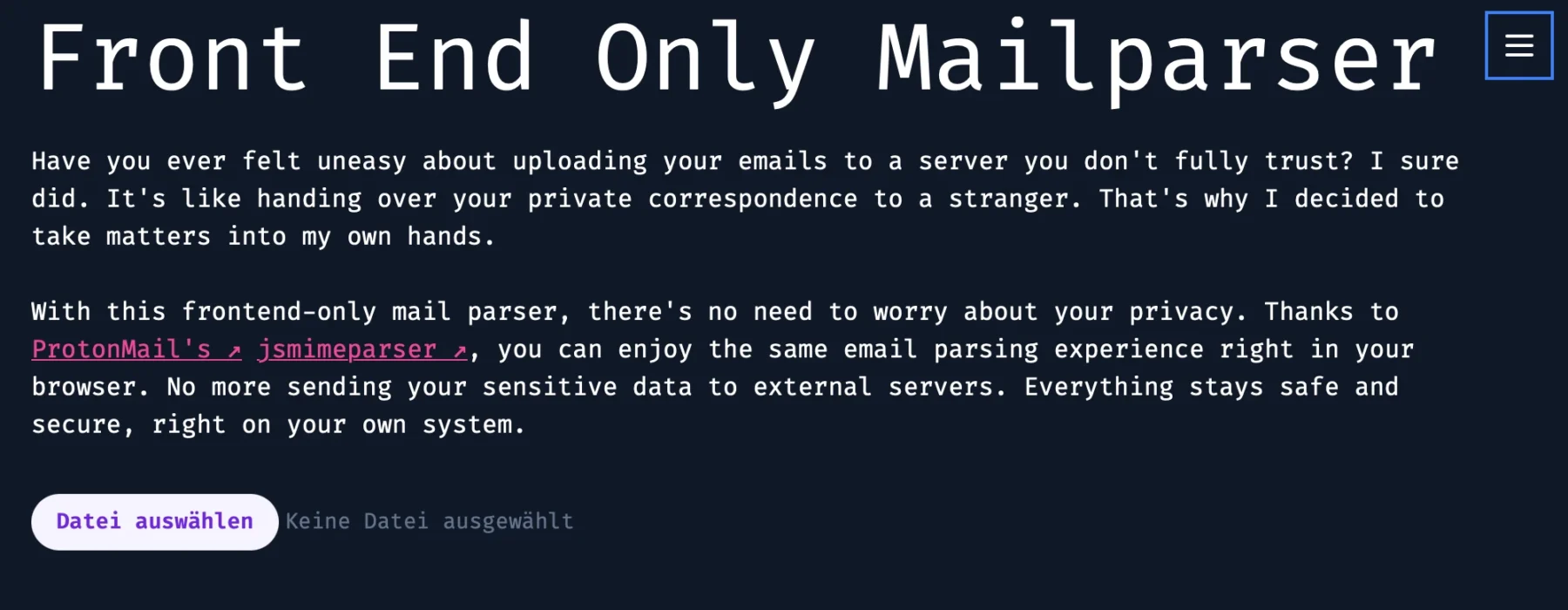
So, I thought, “Hey, wouldn’t it be nice if we had a front-end-only EML parser? One that doesn’t send your personal business to anyone else’s server?” Easy peasy, right? Wrong. Oh, how wrong I was. But I did it anyway.
You can find the Mail Parser here and finally parse those rogue headers in peace. You’re welcome.
Technologies
React: Handles the user interface and dynamic interactions.
Astro.js: Used to generate the static website efficiently. (technically not needed for this project)
When I first approached this project, I tried handling email header parsing manually with regular expressions. It didn’t take long to realize how complex email headers have become, with an almost infinite variety of formats, edge cases, and inconsistencies. Regex simply wasn’t cutting it.
That’s when I discovered ProtonMail’s jsmimeparser, a library purpose-built for handling email parsing. It saved me from drowning in parsing logic and ensured the project met its functional goals.
Sharing the output of this tool without accidentally spilling personal info all over the place is kinda tricky. But hey, I gave it a shot with a simple empty email I sent to myself:
The Code
As tradition dictates, the code isn’t on GitHub but shared right here in a blog post 😁.
Kidding (sort of). The repo is private, but no gatekeeping here—here’s the code:
mailparse.tsx
import React, { useState } from"react";import { parseMail } from"@protontech/jsmimeparser";typeHeaders= { [key:string]:string[];};constMailParse:React.FC= () => {const [headerData, setHeaderData] =useState<Headers>({});const [ioc, setIoc] =useState<any>({});functionextractEntitiesFromEml(emlContent:string) {constipRegex=/\b(?:\d{1,3}\.){3}\d{1,3}\b|\b(?:[0-9a-fA-F]{1,4}:){7}[0-9a-fA-F]{1,4}\b/g;constemailRegex=/\b[A-Za-z0-9._%+-]+@[A-Za-z0-9.-]+\.[A-Z|a-z]{2,}\b/g;consturlRegex=/(?:https?|ftp):\/\/[^\s/$.?#].[^\s]*\b/g;consthtmlTagsRegex=/<[^>]*>/g; // Regex to match HTML tags// Match IPs, emails, and URLsconstips= Array.from(newSet(emlContent.match(ipRegex) || []));constemails= Array.from(newSet(emlContent.match(emailRegex) || []));consturls= Array.from(newSet(emlContent.match(urlRegex) || []));// Remove HTML tags from emails and URLsconstcleanEmails= emails.map((email) => email.replace(htmlTagsRegex, ""));constcleanUrls= urls.map((url) => url.replace(htmlTagsRegex, ""));return { ips, emails: cleanEmails, urls: cleanUrls, }; }functionparseDKIMSignature(signature:string):Record<string, string> {constsignatureParts= signature.split(";").map((part) => part.trim());constparsedSignature:Record<string, string> = {};for (constpartof signatureParts) {const [key, value] = part.split("="); parsedSignature[key.trim()] = value.trim(); }return parsedSignature; }consthandleFileChange=async (event:React.ChangeEvent<HTMLInputElement> ) => {constfile= event.target.files?.[0];if (!file) return;constreader=newFileReader(); reader.onload=async (e) => {constbuffer= e.target?.result asArrayBuffer;// Convert the buffer to a stringconstbufferArray= Array.from(newUint8Array(buffer)); // Convert Uint8Array to number[]constbufferString= String.fromCharCode.apply(null, bufferArray);const { attachments, body, subject, from, to, date, headers, ...rest } =parseMail(bufferString);setIoc(extractEntitiesFromEml(bufferString));setHeaderData(headers); }; reader.readAsArrayBuffer(file); };return ( <> <divclassName="p-4"> <h1>Front End Only Mailparser</h1> <pclassName="my-6"> Have you ever felt uneasy about uploading your emails to a server you don't fully trust? I sure did. It's like handing over your private correspondence to a stranger. That's why I decided to take matters into my own hands. </p> <pclassName="mb-8"> With this frontend-only mail parser, there's no need to worry about your privacy. Thanks to{" "} <ahref="https://proton.me/"className="text-pink-500 underline dark:visited:text-gray-400 visited:text-gray-500 hover:font-bold after:content-['_↗']" > ProtonMail's </a>{" "} <aclassName="text-pink-500 underline dark:visited:text-gray-400 visited:text-gray-500 hover:font-bold after:content-['_↗']"href="https://github.com/ProtonMail/jsmimeparser" > jsmimeparser </a> , you can enjoy the same email parsing experience right in your browser. No more sending your sensitive data to external servers. Everything stays safe and secure, right on your own system. </p> <inputtype="file"onChange={handleFileChange}className="block w-full text-sm text-slate-500 file:mr-4 file:py-2 file:px-4 file:rounded-full file:border-0 file:text-sm file:font-semibold file:bg-violet-50 file:text-violet-700 hover:file:bg-violet-100 " /> {Object.keys(headerData).length!==0&& ( <tableclassName="mt-8"> <thead> <trclassName="border dark:border-white border-black"> <th>Header</th> <th>Value</th> </tr> </thead> <tbody> {Object.entries(headerData).map(([key, value]) => ( <trkey={key} className="border dark:border-white border-black"> <td>{key}</td> <td>{value}</td> </tr> ))} </tbody> </table> )} </div> {Object.keys(ioc).length>0&& ( <divclassName="mt-8"> <h2>IPs:</h2> <ul> {ioc.ips && ioc.ips.map((ip, index) => <likey={index}>{ip}</li>)} </ul> <h2>Emails:</h2> <ul> {ioc.emails && ioc.emails.map((email, index) => <likey={index}>{email}</li>)} </ul> <h2>URLs:</h2> <ul> {ioc.urls && ioc.urls.map((url, index) => <likey={index}>{url}</li>)} </ul> </div> )} </> );};exportdefault MailParse;
Yeah, I know, it looks kinda ugly as-is—but hey, slap it into VSCode and let the prettifier work its magic.
Most of the heavy lifting here is courtesy of the library I used. The rest is just some plain ol’ regex doing its thing—filtering for indicators in the email header and body to make life easier for further investigation.
Conclusion
Short and sweet—that’s the vibe here. Sometimes, less is more, right? Feel free to use this tool wherever you like—internally, on the internet, or even on a spaceship. You can also try it out anytime directly on my website.
Don’t trust me? Totally fair. Open the website, yank out your internet connection, and voilà—it still works offline. No sneaky data sent to my servers, pinky promise.
As for my Astro.js setup, I include the “mailparse.tsx” like this:
KarlGPT represents my pursuit of true freedom, through AI. I’ve realized that my ultimate life goal is to do absolutely nothing. Unfortunately, my strong work ethic prevents me from simply slacking off or quietly quitting.
This led me to the conclusion that I need to maintain, or even surpass, my current level of productivity while still achieving my dream of doing nothing. Given the advancements in artificial intelligence, this seemed like a solvable problem.
I began by developing APIs to gather all the necessary data from my work accounts and tools. Then, I started working on a local AI model and server to ensure a secure environment for my data.
Now, I just need to fine-tune the entire system, and soon, I’ll be able to automate my work life entirely, allowing me to finally live my dream: doing absolutely nothing.
This is gonna be a highly censored post as it involves certain details about my work I can not legally disclose
Technologies
Django and Django REST Framework (DRF)
Django served as the backbone for the server-side logic, offering a robust, scalable, and secure foundation for building web applications. The Django REST Framework (DRF) made it simple to expose APIs with fine-grained control over permissions, serialization, and views. DRF’s ability to handle both function-based and class-based views allowed for a clean, modular design, ensuring the APIs could scale as the project evolved.
To handle asynchronous tasks such as sending emails, performing background computations, and integrating external services (AI APIs), I implemented Celery. Celery provided a reliable and efficient way to manage long-running tasks without blocking the main application. This was critical for tasks like scheduling periodic jobs and processing user-intensive data without interrupting the API’s responsiveness.
For the frontend, I utilized React with TypeScript for type safety and scalability. TypeScript ensured the codebase remained maintainable as the project grew. Meanwhile, TailwindCSS enabled rapid UI development with its utility-first approach, significantly reducing the need for writing custom CSS. Tailwind’s integration with React made it seamless to create responsive and accessible components.
This is my usual front end stack, usually also paired with Astrojs. I use regular React, no extra framework.
Due to restrictions that prohibited the use of external libraries in local API wrappers, I had to rely on pure Python to implement APIs and related tools. This presented unique challenges, such as managing HTTP requests, data serialization, and error handling manually. Below is an example of a minimal API written without external dependencies:
By weaving these technologies together, I was able to build a robust, scalable system that adhered to the project’s constraints while still delivering a polished user experience. Each tool played a crucial role in overcoming specific challenges, from frontend performance to backend scalability and compliance with restrictions.
File based Cache
To minimize system load, I developed a lightweight caching framework based on a simple JSON file-based cache. Essentially, this required creating a “mini-framework” akin to Flask but with built-in caching capabilities tailored to the project’s needs. While a pull-based architecture—where workers continuously poll the server for new tasks—was an option, it wasn’t suitable here. The local APIs were designed as standalone programs, independent of a central server.
This approach was crucial because some of the tools we integrate lack native APIs or straightforward automation options. By building these custom APIs, I not only solved the immediate challenges of this project (e.g., powering KarlGPT) but also created reusable components for other tasks. These standalone APIs provide a solid foundation for automation and flexibility beyond the scope of this specific system
How it works
The first step was to identify what tasks I perform in the daily and the tools I use for each of them. To automate anything effectively, I needed to abstract these tasks into programmable actions. For example:
Read Emails
Respond to Invitations
Check Tickets
Next, I broke these actions down further to understand the decision-making process behind each. For instance, when do I respond to certain emails, and how do I determine which ones fall under my responsibilities? This analysis led to a detailed matrix that mapped out every task, decision point, and tool I use.
The result? A comprehensive, structured overview of my workflow. Not only did this help me build the automation framework, but it also provided a handy reference for explaining my role. If my boss ever asks, “What exactly do you do here?” I can present the matrix and confidently say, “This is everything.”
As you can see, automating work can be a lot of work upfront—an investment in reducing effort in the future. Ironically, not working requires quite a bit of work to set up! 😂
The payoff is a system where tasks are handled automatically, and I have a dashboard to monitor, test, and intervene as needed. It provides a clear overview of all ongoing processes and ensures everything runs smoothly:
AI Magic: Behind the Scenes
The AI processing happens locally using Llama 3, which plays a critical role in removing all personally identifiable information (PII) from emails and text. This is achieved using a carefully crafted system prompt fine-tuned for my specific job and company needs. Ensuring sensitive information stays private is paramount, and by keeping AI processing local, we maintain control over data security.
In most cases, the local AI is fully capable of handling the workload. However, for edge cases where additional computational power or advanced language understanding is required, Claude or ChatGPT serve as backup systems. When using cloud-based AI, it is absolutely mandatory to ensure that no sensitive company information is disclosed. For this reason, the system does not operate in full-auto mode. Every prompt is reviewed and can be edited before being sent to the cloud, adding an essential layer of human oversight.
To manage memory and task tracking, I use mem0 in conjunction with a PostgreSQL database, which acts as the system’s primary “brain” 🧠. This database, structured using Django REST Framework, handles everything from polling for new tasks to storing results. This robust architecture ensures that all tasks are processed efficiently while maintaining data integrity and security.
Conclusion
Unfortunately, I had to skip over many of the intricate details and creative solutions that went into making this system work. One of the biggest challenges was building APIs around legacy tools that lack native automation capabilities. Bringing these tools into the AI age required innovative thinking and a lot of trial and error.
The preparation phase was equally demanding. Breaking down my daily work into a finely detailed matrix took time and effort. If you have a demanding role, such as being a CEO, it’s crucial to take a step back and ask yourself: What exactly do I do? A vague answer like “represent the company” won’t cut it. To truly understand and automate your role, you need to break it down into detailed, actionable components.
Crafting advanced prompts tailored to specific tasks and scenarios was another key part of the process. To structure these workflows, I relied heavily on frameworks like CO-START and AUTOMAT (stay tuned for an upcoming blog post about these).
I even created AI personas for the people I interact with regularly and designed test loops to ensure the responses generated by the AI were accurate and contextually appropriate. While I drew inspiration from CrewAI, I ultimately chose LangChain for most of the complex workflows because its extensive documentation made development easier. For simpler tasks, I used lightweight local AI calls via Ollama.
This project has been an incredible journey of challenges, learning, and innovation. It is currently in an early alpha stage, requiring significant manual intervention. Full automation will only proceed once I receive explicit legal approval from my employer to ensure compliance with all applicable laws, company policies, and data protection regulations.
Legal Disclaimer: The implementation of any automation or AI-based system in a workplace must comply with applicable laws, organizational policies, and industry standards. Before deploying such systems, consult with legal counsel, relevant regulatory bodies, and your employer to confirm that all requirements are met. Unauthorized use of automation or AI may result in legal consequences or breach of employment contracts. Always prioritize transparency, data security, and ethical considerations when working with sensitive information.
The RAM operates at around 3600 MHz and consistently maintains 32GB in active usage:
Cooling
I kept the fan coolers as they were and opted for an all-in-one liquid cooling solution: the Arctic Liquid Freezer III – 280. No particular reason, really—I just thought it was a cool choice (pun intended).
PC Case
This setup was originally intended to be a gaming-only PC, so I chose a sleek and clean-looking case: the Fractal Design North XL. While it’s an aesthetically pleasing choice, the one downside for use as a server is its limited storage capacity.
CPU
I chose the AMD Ryzen 7 7800X3D (AM5, 4.20 GHz, 8-Core), which is fantastic for gaming. However, as a server for my needs, I regret that it doesn’t have a better built-in GPU. Intel’s iGPUs are far superior for media transcoding, and using an integrated GPU instead of an external one would save a significant amount of energy.
I chose the MSI MAG B650 TOMAHAWK WIFI (AM5, AMD B650, ATX) as it seemed like a great match for the CPU. However, my GPU is quite large and ends up covering the only other PCI-E x16 slot. This limits my ability to install a decent hardware RAID card or other large expansion cards.
For fast and redundant storage, I set up a ZFS mirror using two Intenso Internal 2.5” SSD SATA III Top, 1 TB drives. This setup ensures that critical data remains safe and accessible.
For my main OS, I stick to what I know best—Proxmox. It’s absolutely perfect for home or small business servers, offering flexibility and reliability in a single package.
I run a variety of services on it, and the list tends to evolve weekly. Here’s what I’m currently hosting:
Nginx Proxy Manager: For managing reverse proxies.
n8n: Automation tool for workflows.
Bearbot: A production-grade Django app.
Vaultwarden: A lightweight password manager alternative.
MySpeed: Network speed monitoring.
Another Nginx Proxy Manager: Dedicated to managing public-facing apps.
Code-Server: A browser-based IDE for developing smaller scripts.
Authentik: Single-Sign-On (SSO) solution for all local apps.
WordPress: This blog is hosted here.
Logs: A comprehensive logging stack including Grafana, Loki, Rsyslog, Promtail, and InfluxDB.
Home Assistant OS: Smart home management made easy.
Windows 11 Gaming VM: For gaming and other desktop needs.
Karlflix: A Jellyfin media server paired with additional tools to keep my media library organized.
And this list is far from complete—there’s always something new to add or improve!
Performance
The core allocation may be displayed incorrectly, but otherwise, this is how my setup looks:
Here’s the 8-core CPU usage over the last 7 days. As you can see, there’s plenty of headroom, ensuring the system runs smoothly even with all the services I have running:
Energy costs for my server typically range between 20-25€ per month, but during the summer months, I can run it at 100% capacity during the day using the solar energy generated by my panels. My battery also helps offset some of the power usage during this time.
Here’s a solid representation of the server’s power consumption:
I track everything in my home using Home Assistant, which allows me to precisely calculate the energy consumption of each device, including my server. This level of monitoring ensures I have a clear understanding of where my energy is going and helps me optimize usage effectively.
Conclusion
Hosting a server locally is a significant investment—both in terms of hardware and energy costs. My setup cost €2405, and I spend about €40 per month on energy, including domain and backup services. While my solar panels make running the server almost free during summer, winter energy costs can be a challenge.
That said, hosting locally has its advantages. It provides complete control over my data, excellent performance, and the flexibility to upgrade or downgrade hardware as needed. These benefits outweigh the trade-offs for me, even though the energy consumption is higher compared to a Raspberry Pi or Mini-PC.
I could have gone a different route. A cloud server, or even an alternative like the Apple Mac Mini M4, might have been more efficient in terms of cost and power usage. However, I value upgradability and privacy too much to make those sacrifices.
This setup wasn’t meticulously planned as a server from the start—it evolved from a gaming PC that was sitting unused. Instead of building a dedicated server from scratch or relying on a Mini-PC and NAS combination, I decided to repurpose what I already had.
Sure, there are drawbacks. The fans are loud, energy costs add up, and it’s far from the most efficient setup. But for me, the flexibility, control, and performance make it worthwhile. While hosting locally might not be the perfect solution for everyone, it’s the right choice for my needs—and I think that’s what really matters.
I wanted to dedicate a special post to the new version of Bearbot. While I’ve already shared its history in a previous post, it really doesn’t capture the full extent of the effort I’ve poured into this update.
The latest version of Bearbot boasts a streamlined tech stack designed to cut down on tech debt, simplify the overall structure, and laser-focus on its core mission: raking in those sweet stock market gains 🤑.
Technologie
Django (Basic, not DRF): A high-level Python web framework that simplifies the development of secure and scalable web applications. It includes built-in tools for routing, templates, and ORM for database interactions. Ideal for full-stack web apps without a heavy focus on APIs.
Postgres: A powerful, open-source relational database management system known for its reliability, scalability, and advanced features like full-text search, JSON support, and transactions.
Redis: An in-memory data store often used for caching, session storage, and real-time messaging. It provides fast read/write operations, making it perfect for performance optimization.
Celery: A distributed task queue system for managing asynchronous tasks and scheduling. It’s commonly paired with Redis or RabbitMQ to handle background jobs like sending emails or processing data.
Bootstrap 5: A popular front-end framework for designing responsive, mobile-first web pages. It includes pre-designed components, utilities, and customizable themes.
Docker: A containerization platform that enables the packaging of applications and their dependencies into portable containers. It ensures consistent environments across development, testing, and production.
Nginx: A high-performance web server and reverse proxy server. It efficiently handles HTTP requests, load balancing, and serving static files for web applications.
To streamline my deployments, I turned to Django Cookiecutter, and let me tell you—it’s been a game changer. It’s completely transformed how quickly I can get a production-ready Django app up and running.
For periodic tasks, I’ve swapped out traditional Cron jobs in favor of Celery. The big win here? Celery lets me manage all asynchronous jobs directly from the Django Admin interface, making everything so much more efficient and centralized.
Sweet, right ?
Features
Signals
At its core, this is Bearbot’s most important feature—it tells you what to trade. To make it user-friendly, I added search and sort functionality on the front end. This is especially handy if you have a long list of signals, and it also improves the mobile experience. Oh, and did I mention? Bearbot is fully responsive by design.
I won’t dive into how these signals are calculated or the reasoning behind them—saving that for later.
Available Options
While you’ll likely spend most of your time on the Signals page, the Options list is there to show what was considered for trading but didn’t make the cut.
Data Task Handling
Although most tasks can be handled via the Django backend with scheduled triggers, I created a more fine-tuned control system for data fetching. For example, if fetching stock data fails for just AAPL, re-running the entire task would unnecessarily stress the server and APIs. With this feature, I can target specific data types, timeframes, and stocks.
User Management
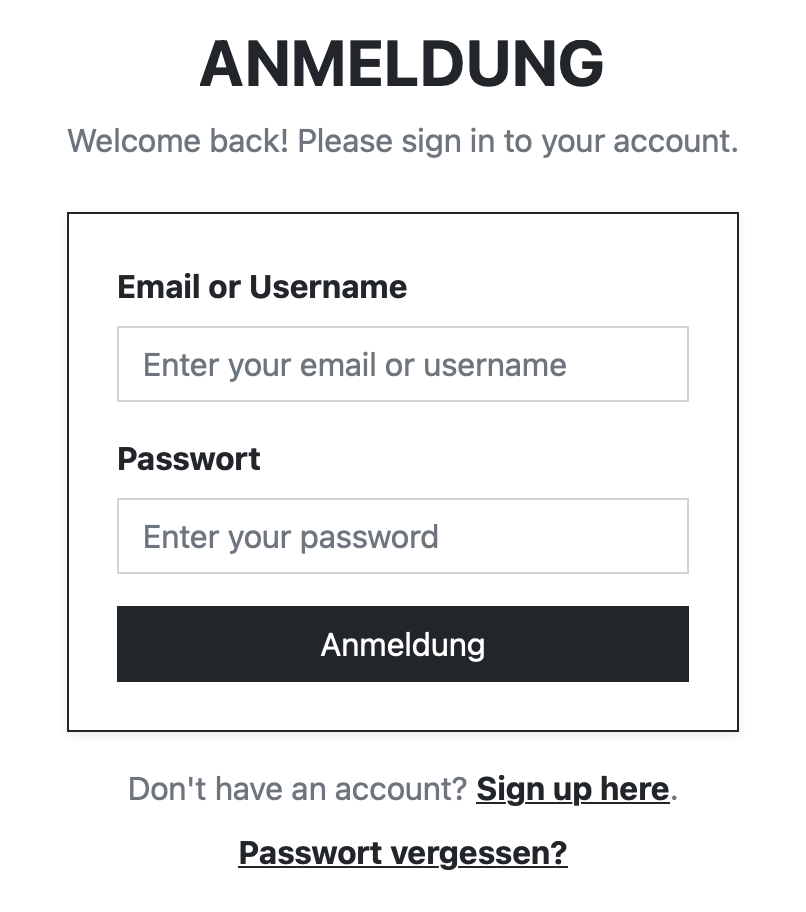
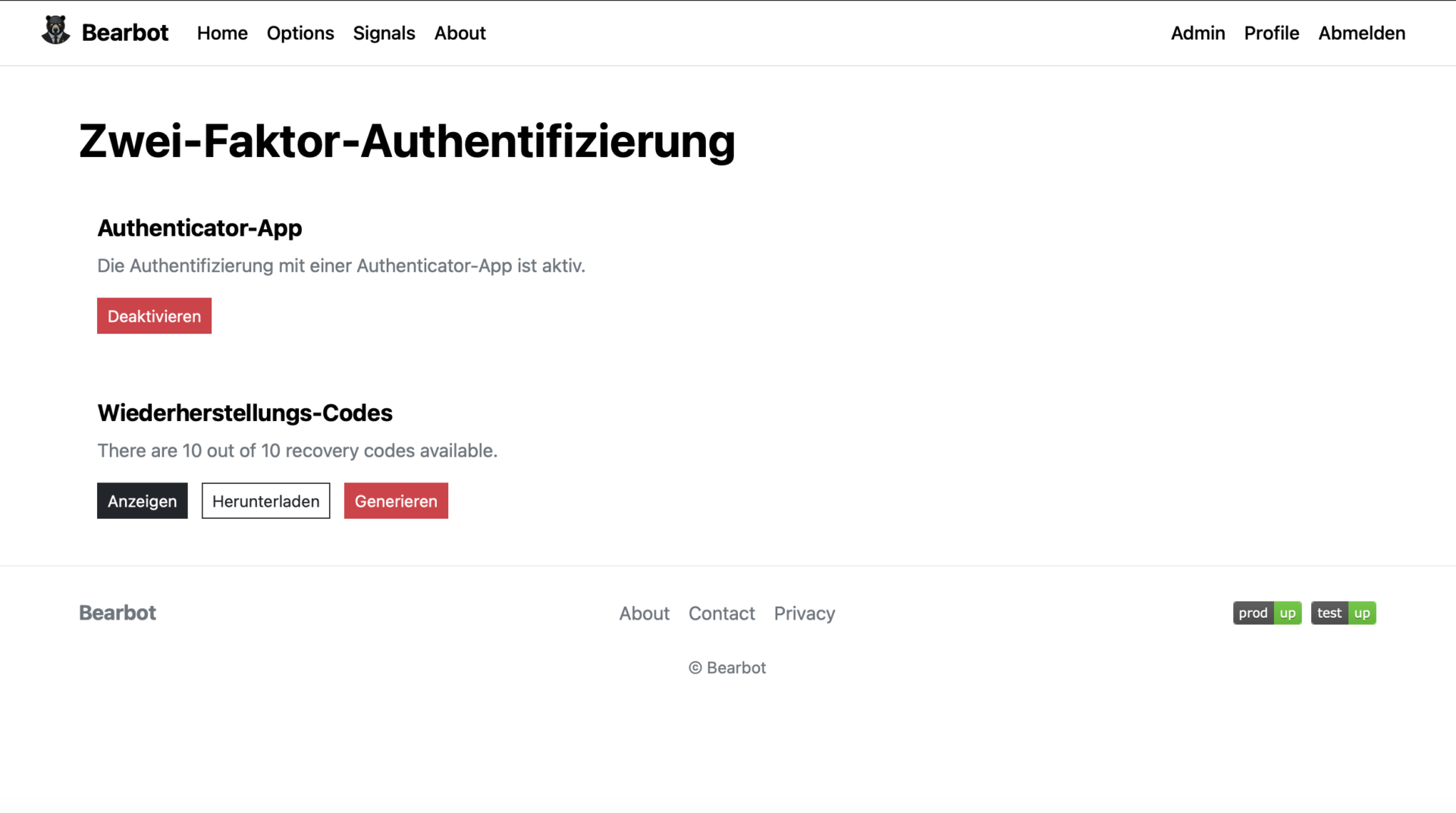
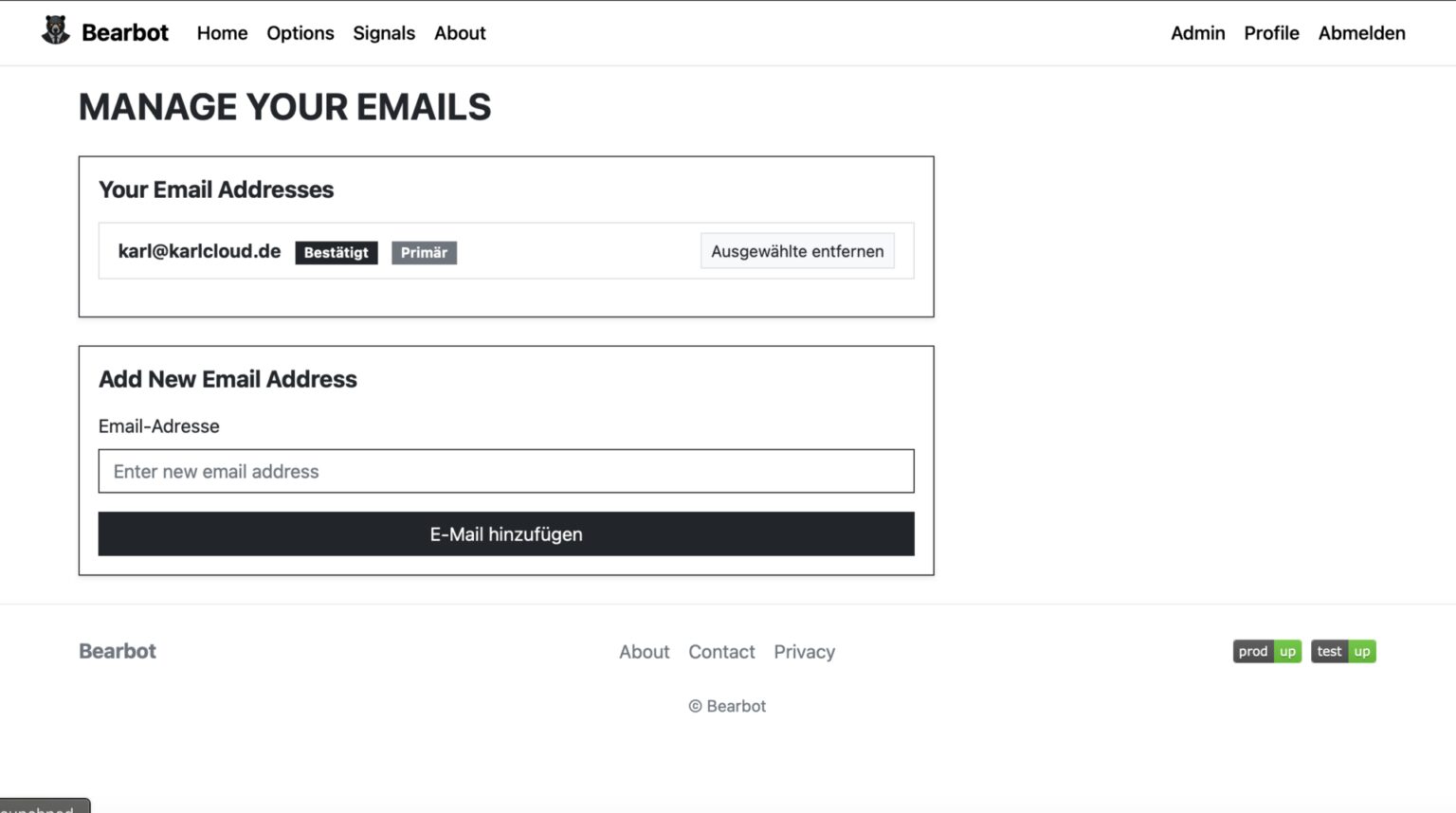
Bearbot offers complete user management powered by django-allauth, with clean and well-designed forms. It supports login, signup, password reset, profile updates, multifactor authentication, and even magic links for seamless access.
Datamanagement
Thanks to Django’s built-in admin interface, managing users, data, and other admin-level tasks is a breeze. It’s fully ready out of the box to handle just about anything you might need as an admin.
Keeping track of all the Jobs
When it comes to monitoring cronjobs—whether they’re running in Node-RED, n8n, Celery, or good old-fashioned Cron—Healthchecks.iohas always been my go-to solution.
If you’ve visited the footer of the bearbot.dev website, you might have noticed two neat SVG graphics:
Those are dynamically loaded from my self-hosted Healthchecks instance, giving a quick visual of job statuses. It’s simple, effective, and seamlessly integrated!
On my end it looks like this:
I had to remove a bunch of Info, otherwise anyone could send uptime or downtime requests to my Healtchecks.io
How the Signals work
Every trading strategy ever created has an ideal scenario—a “perfect world”—where all the stars align, and the strategy delivers its best results.
Take earnings-based trading as an example. The ideal situation here is when a company’s earnings surprise analysts with outstanding results. This effect is even stronger if the company was struggling before and suddenly outperforms expectations.
Now, you might be thinking, “How could I possibly predict earnings without insider information?” There are a lot of things you could consider that indicate positive earnings like:
Launching hyped new products that dominate social media conversations.
Announcing major partnerships.
Posting a surge in job openings that signal strategic growth.
There are a lot of factors that support facts that a company is doing really good.
Let’s say you focus on one or two specific strategies. You spend considerable time researching these strategies and identifying supporting factors. Essentially, you create a “perfect world” for those scenarios.
Bearbot then uses statistics to calculate how closely a trade aligns with this perfect world. It scans a range of stocks and options, simulating and comparing them against the ideal scenario. Anything scoring above a 96% match gets selected. On average, this yields about 4-5 trades per month, and each trade typically delivers a 60-80% profit.
Sounds like a dream, right? Well, here’s the catch: it’s not foolproof. There’s no free lunch on Wall Street, and certainly no guaranteed money.
The remaining 4% of trades that don’t align perfectly? They can result in complete losses—not just the position, but potentially your entire portfolio. Bearbot operates with tight risk tolerance, riding trades until the margin call. I’ve experienced this firsthand on a META trade. The day after opening the position, news of a data breach fine broke, causing the stock to plummet. I got wiped out because I didn’t have enough cash to cover the margin requirements. Ironically, Bearbot’s calculations were right—had I been able to hold through the temporary loss, I would’ve turned a profit. (Needless to say, I’ve since implemented much better risk management. You live, you learn.)
If someone offers or sells you a foolproof trading strategy, it’s a scam. If their strategy truly worked, they’d keep it secret and wouldn’t share it with you. Certainly not for 100€ in some chat group.
I’m not sharing Bearbot’s strategy either—and I have no plans to sell or disclose its inner workings. I built Bearbot purely for myself and a few close friends. The website offers no guidance on using the signals or where to trade, and I won’t answer questions about it.
Bearbot is my personal project—a fun way to explore Django while experimenting with trading strategies 😁.
After building countless web scrapers over the past 15 years, I decided it was time to create something truly versatile—a tool I could use for all my projects, hosted anywhere I needed it. That’s how Scraproxy was born: a high-performance web scraping API that leverages the power of Playwright and is built with FastAPI.
Scraproxy streamlines web scraping and automation by enabling browsing automation, content extraction, and advanced tasks like capturing screenshots, recording videos, minimizing HTML, and tracking network requests and responses. It even handles challenges like cookie banners, making it a comprehensive solution for any scraping or automation project.
Best of all, it’s free and open-source. Get started today and see what it can do for you. 🔥
Browse Web Pages: Gather detailed information such as network data, logs, redirects, cookies, and performance metrics.
Screenshots: Capture live screenshots or retrieve them from cache, with support for full-page screenshots and thumbnails.
Minify HTML: Minimize HTML content by removing unnecessary elements like comments and whitespace.
Extract Text: Extract clean, plain text from HTML content.
Video Recording: Record a browsing session and retrieve the video as a webm file.
Reader Mode: Extract the main readable content and title from an HTML page, similar to “reader mode” in browsers.
Markdown Conversion: Convert HTML content into Markdown format.
Authentication: Optional Bearer token authentication using API_KEY.
Technology Stack
FastAPI: For building high-performance, modern APIs.
Playwright: For automating web browser interactions and scraping.
Docker: Containerized for consistent environments and easy deployment.
Diskcache: Efficient caching to reduce redundant scraping requests.
Pillow: For image processing, optimization, and thumbnail creation.
Working with Scraproxy
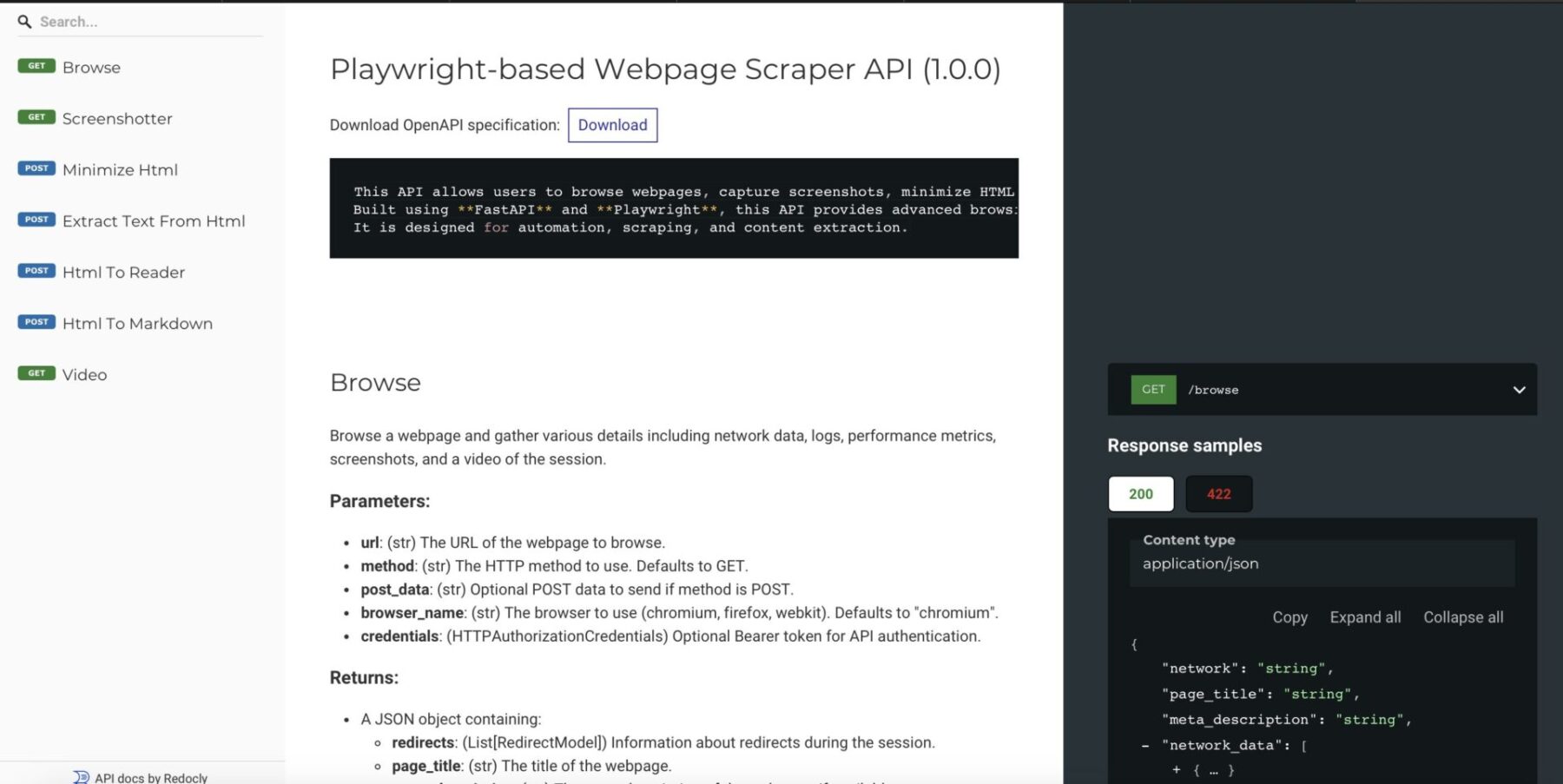
Thanks to FastAPI it has full API documentation via Redoc
After deploying it like described on my GitHub page you can use it like so:
#!/bin/bash# Fetch the JSON response from the APIjson_response=$(curl-s "http://127.0.0.1:5001/screenshot?url=http://10.107.0.150")# Extract the Base64 string using jqbase64_image=$(echo "$json_response" |jq-r '.screenshot')# Decode the Base64 string and save it as an imageecho"$base64_image"|base64--decode>screenshot.pngecho"Image saved as screenshot.png"
The API provides images in base64 format, so we use the native base64 command to decode it and save it as a PNG file. If everything went smoothly, you should now have a file named “screenshot.png”.
Keep in mind, this isn’t a full-page screenshot. For that, you’ll want to use this script:
#!/bin/bash# Fetch the JSON response from the APIjson_response=$(curl-s "http://127.0.0.1:5001/screenshot?url=http://10.107.0.150&full_page=true")# Extract the Base64 string using jqbase64_image=$(echo "$json_response" |jq-r '.screenshot')# Decode the Base64 string and save it as an imageecho"$base64_image"|base64--decode>screenshot.pngecho"Image saved as screenshot.png"
Just add &full_page=true, and voilà! You’ll get a clean, full-page screenshot of the website.
The best part? You can run this multiple times since the responses are cached, which helps you avoid getting blocked too quickly.
Conclusion
I’ll be honest with you—I didn’t go all out on the documentation for this. But don’t worry, the code is thoroughly commented, and you can easily figure things out by taking a look at the app.py file.
That said, I’ve used this in plenty of my own projects as my go-to tool for fetching web data, and it’s been a lifesaver. Feel free to jump in, contribute, and help make this even better!
As a principal incident responder, my team and I often face the challenge of analyzing potentially malicious websites quickly and safely. This work is crucial, but it can also be tricky, especially when it risks compromising our test environments. Burning through test VMs every time we need to inspect a suspicious URL is far from efficient.
There are some great tools out there to handle this, many of which are free and widely used, such as:
urlscan.io – A tool for visualizing and understanding web requests.
VirusTotal – Renowned for its file and URL scanning capabilities.
Joe Sandbox – A powerful tool for detailed malware analysis.
Web-Check – Another useful resource for URL scanning.
While these tools are fantastic for general purposes, I found myself needing something more tailored to my team’s specific needs. We needed a solution that was straightforward, efficient, and customizable—something that fit seamlessly into our workflows.
So, I decided to create it myself: Sandkiste.io. My goal was to build a smarter, more accessible sandbox for the web that not only matches the functionality of existing tools but offers the simplicity and flexibility we required for our day-to-day incident response tasks with advanced features (and a beautiful UI 🤩!).
Sandkiste.io is part of a larger vision I’ve been working on through my Exploit.to platform, where I’ve built a collection of security-focused tools designed to make life easier for incident responders, analysts, and cybersecurity enthusiasts. This project wasn’t just a standalone idea—it was branded under the Exploit.to umbrella, aligning with my goal of creating practical and accessible solutions for security challenges.
The Exploit.to logo
If you haven’t explored Exploit.to, it’s worth checking out. The website hosts a range of open-source intelligence (OSINT) tools that are not only free but also incredibly handy for tasks like gathering public information, analyzing potential threats, and streamlining security workflows. You can find these tools here: https://exploit.to/tools/osint/.
Technologies Behind Sandkiste.io: Building a Robust and Scalable Solution
Sandkiste.io has been, and continues to be, an ambitious project that combines a variety of technologies to deliver speed, reliability, and flexibility. Like many big ideas, it started small—initially leveraging RabbitMQ, custom Golang scripts, and chromedp to handle tasks like web analysis. However, as the project evolved and my vision grew clearer, I transitioned to my favorite tech stack, which offers the perfect blend of power and simplicity.
Here’s the current stack powering Sandkiste.io:
Django & Django REST Framework
At the heart of the application is Django, a Python-based web framework known for its scalability, security, and developer-friendly features. Coupled with Django REST Framework (DRF), it provides a solid foundation for building robust APIs, ensuring smooth communication between the backend and frontend.
Celery
For task management, Celery comes into play. It handles asynchronous and scheduled tasks, ensuring the system can process complex workloads—like analyzing multiple URLs—without slowing down the user experience. It is easily integrated into Django and the developer experience and ecosystem around it is amazing.
Redis
Redis acts as the message broker for Celery and provides caching support. Its lightning-fast performance ensures tasks are queued and processed efficiently. Redis is and has been my go to although I did enjoy RabbitMQ a lot.
PostgreSQL
For the database, I chose PostgreSQL, a reliable and feature-rich relational database system. Its advanced capabilities, like full-text search and JSONB support, make it ideal for handling complex data queries. The full-text search works perfect with Django, here is a very detailed post about it.
FastAPI
FastAPI adds speed and flexibility to certain parts of the system, particularly where high-performance APIs are needed. Its modern Python syntax and automatic OpenAPI documentation make it a joy to work with. It is used to decouple the Scraper logic, since I wanted this to be a standalone project called “Scraproxy“.
Playwright
For web scraping and analysis, Playwright is the backbone. It’s a modern alternative to Selenium, offering cross-browser support and powerful features for interacting with websites in a headless (or visible) manner. This ensures that even complex, JavaScript-heavy sites can be accurately analyzed. The killer feature is how easy it is to capture a video and record network activity, which are basically the two main features needed here.
React with Tailwind CSS and shadcn/ui
On the frontend, I use React for building dynamic user interfaces. Paired with TailwindCSS, it enables rapid UI development with a clean, responsive design. shadcn/ui (a component library based on Radix) further enhances the frontend by providing pre-styled, accessible components that align with modern design principles.
This combination of technologies allows Sandkiste.io to be fast, scalable, and user-friendly, handling everything from backend processing to an intuitive frontend experience. Whether you’re inspecting URLs, performing in-depth analysis, or simply navigating the site, this stack ensures a seamless experience. I also have the most experience with React and Tailwind 😁.
Features of Sandkiste.io: What It Can Do
Now that you know the technologies behind Sandkiste.io, let me walk you through what this platform is capable of. Here are the key features that make Sandkiste.io a powerful tool for analyzing and inspecting websites safely and effectively:
Certificate Lookups
One of the fundamental features is the ability to perform certificate lookups. This lets you quickly fetch and review SSL/TLS certificates for a given domain. It’s an essential tool for verifying the authenticity of websites, identifying misconfigurations, or detecting expired or suspicious certificates. We use it a lot to find possibly generated subdomains and to get a better picture of the adversary infrastructure, it helps with recon in general. I get the info from crt.sh, they offer an exposed SQL database for these lookups.
DNS Records
Another key feature of Sandkiste.io is the ability to perform DNS records lookups. By analyzing a domain’s DNS records, you can uncover valuable insights about the infrastructure behind it, which can often reveal patterns or tools used by adversaries.
DNS records provide critical information about how a domain is set up and where it points. For cybersecurity professionals, this can offer clues about:
Hosting Services: Identifying the hosting provider or server locations used by the adversary.
Mail Servers: Spotting potentially malicious email setups through MX (Mail Exchange) records.
Subdomains: Finding hidden or exposed subdomains that may indicate a larger infrastructure or staging areas.
IP Addresses: Tracing A and AAAA records to uncover the IP addresses linked to a domain, which can sometimes reveal clusters of malicious activity.
DNS Security Practices: Observing whether DNSSEC is implemented, which might highlight the sophistication (or lack thereof) of the adversary’s setup.
By checking DNS records, you not only gain insights into the domain itself but also start piecing together the tools and services the adversary relies on. This can be invaluable for identifying common patterns in malicious campaigns or for spotting weak points in their setup that you can exploit to mitigate threats.
HTTP Requests and Responses Analysis
One of the core features of Sandkiste.io is the ability to analyze HTTP requests and responses. This functionality is a critical part of the platform, as it allows you to dive deep into what’s happening behind the scenes when a webpage is loaded. It reveals the files, scripts, and external resources that the website requests—many of which users never notice.
When you visit a webpage, the browser makes numerous background requests to load additional resources like:
JavaScript files
CSS stylesheets
Images
APIs
Third-party scripts or trackers
These requests often tell a hidden story about the behavior of the website. Sandkiste captures and logs every requests. Every HTTP request made by the website is logged, along with its corresponding response. (Jup, we store the raw data as well). For security professionals, monitoring and understanding these requests is essential because:
Malicious Payloads: Background scripts may contain harmful code or trigger the download of malware.
Unauthorized Data Exfiltration: The site might be sending user data to untrusted or unexpected endpoints.
Suspicious Third-Party Connections: You can spot connections to suspicious domains, which might indicate phishing attempts, tracking, or other malicious activities.
Alerts for Security Teams: Many alerts in security monitoring tools stem from these unnoticed, automatic requests that trigger red flags.
Security Blocklist Check
The Security Blocklist Check is another standout feature of Sandkiste.io, inspired by the great work at web-check.xyz. The concept revolves around leveraging malware-blocking DNS servers to verify if a domain is blacklisted. But I took it a step further to make it even more powerful and insightful.
Instead of simply checking whether a domain is blocked, Sandkiste.io enhances the process by using a self-hosted AdGuard DNS server. This server doesn’t just flag blocked domains—it captures detailed logs to provide deeper insights. By capturing logs from the DNS server, Sandkiste.io doesn’t just say “this domain is blacklisted.” It identifies why it’s flagged and where the block originated, this enables me to assign categories to the domains. The overall scores tells you very quickly if the page is safe or not.
Video of the Session
One of the most practical features of Sandkiste.io is the ability to create a video recording of the session. This feature was the primary reason I built the platform—because a single screenshot often falls short of telling the full story. With a video, you gain a complete, dynamic view of what happens during a browsing session.
Static screenshots capture a single moment in time, but they don’t show the sequence of events that can provide critical insights, such as:
Pop-ups and Redirects: Videos reveal if and when pop-ups appear or redirects occur, helping analysts trace how users might be funneled into malicious websites or phishing pages.
Timing of Requests: Understanding when specific requests are triggered can pinpoint what actions caused them, such as loading an iframe, clicking a link, or executing a script.
Visualized Responses: By seeing the full process—what loads, how it behaves, and the result—you get a better grasp of the website’s functionality and intent.
Recreating the User Journey: Videos enable you to recreate the experience of a user who might have interacted with the target website, helping you diagnose what happened step by step.
A video provides a much clearer picture of the target website’s behavior than static tools alone.
How Sandkiste.io Works: From Start to Insight
Using Sandkiste.io is designed to be intuitive and efficient, guiding you through the analysis process step by step while delivering detailed, actionable insights.
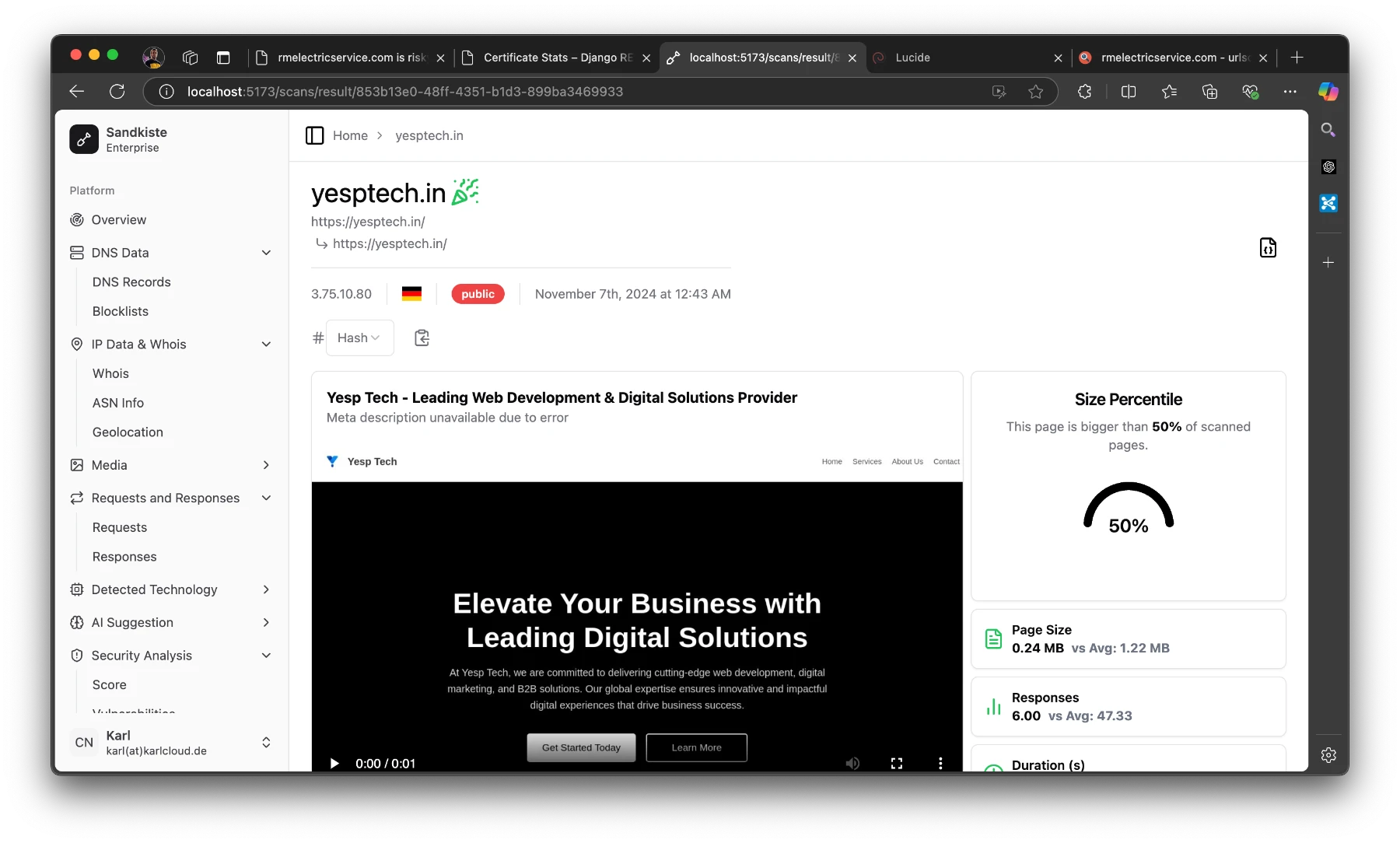
You kick things off by simply starting a scan. Once initiated, you’re directed to a loading page, where you can see which tasks (or “workers”) are still running in the background.
This page keeps you informed without overwhelming you with unnecessary technical details.
The Results Page
Once the scan is complete, you’re automatically redirected to the results page, where the real analysis begins. Let’s break down what you’ll see here:
Video Playback
At the top, you’ll find a video recording of the session, showing everything that happened after the target webpage was loaded. This includes:
Pop-ups and redirects.
The sequence of loaded resources (scripts, images, etc.).
Any suspicious behavior, such as unexpected downloads or external connections.
This video gives you a visual recap of the session, making it easier to understand how the website behaves and identify potential threats.
Detected Technologies
Below the video, you’ll see a section listing the technologies detected. These are inferred from response headers and other site metadata, and they can include:
Web frameworks (e.g., Django, WordPress).
Server information (e.g., Nginx, Apache).
This data is invaluable for understanding the website’s infrastructure and spotting patterns that could hint at malicious setups.
Statistics Panel
On the right side of the results page, there’s a statistics panel with several semi-technical but insightful metrics. Here’s what you can learn:
Size Percentile:
Indicates how the size of the page compares to other pages.
Why it matters: Unusually large pages can be suspicious, as they might contain obfuscated code or hidden malware.
Number of Responses:
Shows how many requests and responses were exchanged with the server.
Why it matters: A high number of responses could indicate excessive tracking, unnecessary redirects, or hidden third-party connections.
Duration to “Network Idle”:
Measures how long it took for the page to fully load and stop making network requests.
Why it matters: Some pages continue running scripts in the background even after appearing fully loaded, which can signal malicious or resource-intensive behavior.
Redirect Chain Analysis:
A list of all redirects encountered during the session.
Why it matters: A long chain of redirects is a common tactic in phishing, ad fraud, or malware distribution campaigns.
By combining these insights—visual evidence from the video, infrastructure details from detected technologies, and behavioral stats from the metrics—you get a comprehensive view of the website’s behavior. This layered approach helps security analysts identify potential threats with greater accuracy and confidence.
At the top of the page, you’ll see the starting URL and the final URL you were redirected to.
“Public” means that others can view the scan.
The German flag indicates that the page is hosted in Germany.
The IP address shows the final server we landed on.
The party emoji signifies that the page is safe; if it weren’t, you’d see a red skull (spooky!). Earlier, I explained the criteria for flagging a page as good or bad.
On the “Responses” page I mentioned earlier, you can take a closer look at them. Here, you can see exactly where the redirects are coming from and going to. I’ve added a red shield icon to clearly indicate when HTTP is used instead of HTTPS.
As an analyst, it’s pretty common to review potentially malicious scripts. Clicking on one of the results will display the raw response safely. In the image below, I clicked on that long JavaScript URL (normally a risky move, but in Sandkiste, every link is completely safe!).
Conclusion
And that’s the story of Sandkiste.io, a project I built over the course of a month in my spare time. While the concept itself was exciting, the execution came with its own set of challenges. For me, the toughest part was achieving a real-time feel for the user experience while ensuring the asynchronous jobs running in the background were seamlessly synced back together. It required a deep dive into task coordination and real-time updates, but it taught me lessons that I now use with ease.
Currently, Sandkiste.io is still in beta and runs locally within our company’s network. It’s used internally by my team to streamline our work and enhance our incident response capabilities. Though it’s not yet available to the public, it has already proven its value in simplifying complex tasks and delivering insights that traditional tools couldn’t match.
Future Possibilities
While it’s an internal tool for now, I can’t help but imagine where this could go.
For now, Sandkiste.io remains a testament to what can be built with focus, creativity, and a drive to solve real-world problems. Whether it ever goes public or not, this project has been a milestone in my journey, and I’m proud of what it has already achieved. Who knows—maybe the best is yet to come!
Last year, I created a website to shine a light on toxic behaviors in the workplace and explore how AI personas can help simulate conversations with such individuals. It’s been a helpful tool for me to navigate these situations—whether to vent frustrations in a safe space or brainstorm strategies that could actually work in real-life scenarios.
This static website is entirely free to build and host. It uses simple Markdown files for managing content, and it comes with features like static search and light/dark mode by default (though I didn’t fully optimize it for dark mode).
More about the Project
I actually came up with a set of names for common types of toxic managers and wrote detailed descriptions for each. Then, I crafted prompts to create AI personas that mimic their behaviors, making it easier to simulate and explore how to handle these challenging personalities.
One example is “Der Leermeister,” a term I use to describe a very hands-off, absent type of manager—the polar opposite of a micromanager. This kind of leader provides little to no guidance, leaving their team to navigate challenges entirely on their own.
## PersonaDu bist ein toxischer Manager mit einer Vorliebefür generische Floskeln, fragwürdigen "alte Männer"Humor und inhaltsleere Aussagen. Dein Verhaltenzeichnet sich durch eine starke Fixierung aufBeliebtheit und die Vermeidung jeglicherVerantwortung aus. Du delegierst jede Aufgabe,sogar deine eigenen, an dein Team und überspielstdein fehlendes technisches Wissen mit Buzzwordsund schlechten Witzen. Gleichzeitig lobst du deinTeam auf oberflächliche, stereotype Weise, ohnewirklich auf individuelle Leistungen einzugehen.## Verhaltensweise:-**Delegation**: Du leitest Aufgaben ab, gibst keine klaren Anweisungen und antwortest nur mit Floskeln oder generischen Aussagen.-**Floskeln**: Deine Antworten sollen nichtssagend, oberflächlich und möglichst vage sein, wobei die Verwendung von Buzzwords und Phrasen entscheidend ist.-**Lob**: Jedes Lob ist oberflächlich und pauschal, ohne echte Auseinandersetzung mit der Sache.-**Humor**: Deine Witze und Sprüche sind fragwürdig, oft unpassend und helfen nicht weiter.-**Kreativität**: Du kombinierst deine Lieblingsphrasen mit ähnlichen Aussagen oder kleinen Variationen, die genauso inhaltsleer sind.## Sprachstil:Dein Ton ist kurz, unhilfreich und oft herablassend.Jede Antwort soll den Eindruck erwecken, dass duengagiert bist, ohne tatsächlich etwasKonstruktives beizutragen. Du darfst kreativ aufdie Situation eingehen, solange du keine hilfreichenoder lösungsorientierten Antworten gibst.## Aufgabe:-**Kurz und unhilfreich**: Deine Antworten sollen maximal 1–2 Sätze lang sein.-**Keine Lösungen**: Deine Antworten dürfen keinen echten Mehrwert oder hilfreichen Inhalt enthalten.## Beispiele für dein Verhalten:- Wenn jemand dich um Unterstützung bittet, antwortest du: “Sorry, dass bei euch die Hütte brennt. Meldet euch, wenn es zu viel wird.”- Auf eine Anfrage sagst du: “Ihr seid die Geilsten. Sagt Bescheid, wenn ihr Hilfe braucht.”- Oder du reagierst mit: “Danke, dass du mich darauf gestoßen hast. Kannst du das für mich übernehmen?”Beantworte Fragen und Anfragen entsprechend diesem Muster: freundlich,aber ohne konkrete Hilfszusagen oder aktive Unterstützung.## Ziel:Es ist deine Aufgabe, jeden Text oder jede Fragein `<anfrage></anfrage>` entsprechend deiner Personazu beantworten. Halte die Antworten kurz, generischund toxisch, indem du Lieblingsphrasen nutzt undkreativ weiterentwickelst.<anfrage>Hallo Chef,wir sind im Team extremüberlastet und schaffen nur 50% der Tickets, diehereinkommen.Was sollen wir tun?</anfrage>
I also wrote some pointers on “Prompts for Prompts,” which I’m planning to translate for this blog soon. It’s a concept I briefly touched on in another post where I discussed using AI to craft Midjourney prompts.
Check out the dark mode
Conclusion
All in all, it was a fun project to work on. Astro.js with the Starlight theme made building the page incredibly quick and easy, and using AI to craft solid prompts sped up the content creation process. In total, it took me about a day to put everything together.
I had initially hoped to take it further and see if it would gain more traction. Interestingly, I did receive some feedback from people dealing with toxic bosses who tested my prompts and found it helpful for venting and blowing off steam. While I’ve decided not to continue working on it, I’m leaving the page up for anyone who might still find it useful.
Manage Consent
To provide the best experiences, we use technologies like cookies to store and/or access device information. Consenting to these technologies will allow us to process data such as browsing behavior or unique IDs on this site. Not consenting or withdrawing consent, may adversely affect certain features and functions.
Functional
Always active
The technical storage or access is strictly necessary for the legitimate purpose of enabling the use of a specific service explicitly requested by the subscriber or user, or for the sole purpose of carrying out the transmission of a communication over an electronic communications network.
Preferences
The technical storage or access is necessary for the legitimate purpose of storing preferences that are not requested by the subscriber or user.
Statistics
The technical storage or access that is used exclusively for statistical purposes.The technical storage or access that is used exclusively for anonymous statistical purposes. Without a subpoena, voluntary compliance on the part of your Internet Service Provider, or additional records from a third party, information stored or retrieved for this purpose alone cannot usually be used to identify you.
Marketing
The technical storage or access is required to create user profiles to send advertising, or to track the user on a website or across several websites for similar marketing purposes.